


The most common advice about an AI coding agent comparison is to start with the leaderboard: find the agent sitting at the top of SWE-bench Verified, check its price per token, and standardize on it. That advice breaks for small teams. A benchmark rank measures a model and a harness against a public set of Python issues. It tells you nothing about how long your reviewer stares at the diff, whether the change matches what a product meeting decided, or how many of the accepted patches were wrong.
So the number worth comparing isn't the solve rate. It's cost per verified merge, meaning the fully loaded time and money to move one change from an agreed requirement through tests, review, and into main.
This comparison sorts agents by where they run, what context they can see, and how much oversight each one demands. Benchmark figures appear with their limits stated plainly, and the closing sections give you a bake-off you can run on your own backlog.
Table of Contents
- AI Coding Agent Comparison at a Glance
- IDE Integrations and Where Each Agent Runs
- Benchmark Scores and What They Actually Measure
- Verification, Risk and Cost Trade-offs
- Reproducibility and Team Collaboration
- How to Run a Product Team Bake-Off
- Which Agent Setup a Seed-Stage Team Should Pilot First
AI Coding Agent Comparison at a Glance
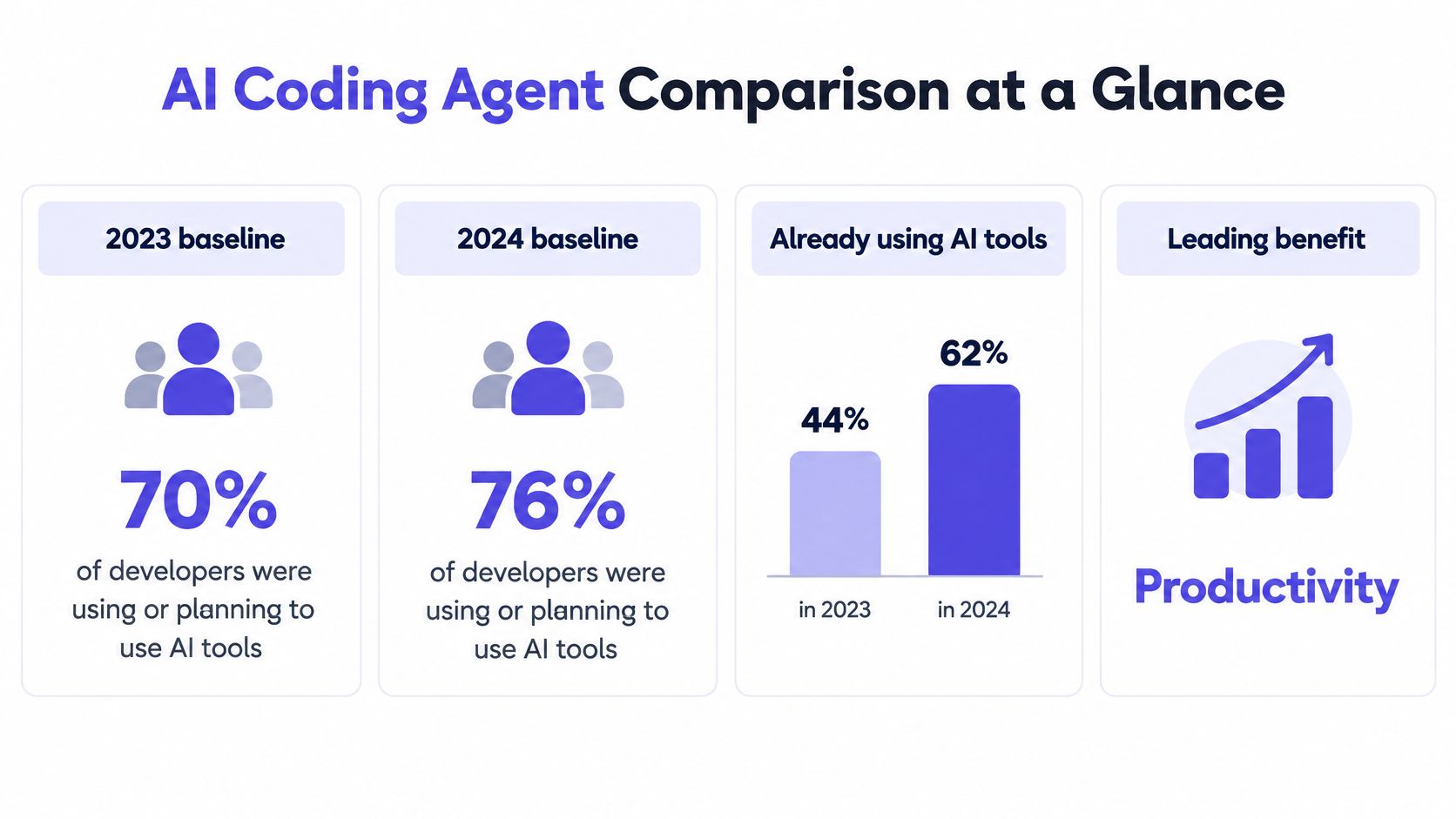
Adoption is settled, which is why it no longer separates tools. The Stack Overflow 2024 Developer Survey found that 76% of developers were using or planning to use AI tools in their development process, up from 70% in 2023, and the share already using them climbed from 44% to 62% year over year. The interesting split sits in the benefits: increased productivity was the leading benefit at 81% of respondents, and 62% said AI tools speed up learning.
Those same developers expect AI to spread across the whole loop rather than sit in the editor. Documentation drew 81%, testing 80%, and writing code 76% in the same survey. Read that ranking twice, because it shows developers expect more help documenting and testing than typing. Any comparison built only on code generation is measuring the smallest of the three areas where the work resides.
Three shapes, three cost structures
Agents differ less by intelligence than by where they sit. An agent inside the editor sees open files and project symbols, so it returns small diffs fast. A terminal agent sees the repository plus the task text, so it returns bigger diffs that take longer to review. A collaborative workspace agent starts from a shared meeting, so it sees the decisions and open questions behind the request.
That difference drives which one a team should pilot, and what the bill looks like.
| Team situation | Agent type | What it sees | Main trade-off | Cost shape |
|---|---|---|---|---|
| Solo developer in one repository | IDE integrated agent | Open files and project symbols | Limited view of product decisions made outside the editor | Per seat subscription |
| Developer handing off long tasks | Terminal agent such as Codex or Gemini | Repository and task text | Larger diffs to review after each run | Usage based billing |
| Product, design and engineering planning together | Collaborative workspace agent such as Stoa | Shared meeting, decisions and plan | The whole team has to work in the shared room | Per meeting hour |
Match the agent to the place where your team decides, then judge it on verified time to merge. A team that argues about scope in meetings and writes code alone will get little from a faster autocomplete. A solo maintainer who never holds a planning call will get little from a meeting-first workspace.
IDE Integrations and Where Each Agent Runs
The environment question has real usage data behind it. An academic study reported in 2024 that 84.2% of respondents used AI coding assistants at least occasionally or regularly, with usage shares of 37.9% for GitHub Copilot, 28.9% for JetBrains AI Assistant, and 17.5% for Visual Studio IntelliCode, according to the published survey in Information and Software Technology. Those are usage shares, not quality scores, and the study reports no figure for Cursor, so no rate is given for it here.
| Tool | Editor or environment | Reported usage (2024 study) |
|---|---|---|
| GitHub Copilot | Editor extension in VS Code and other editors | 37.9% |
| JetBrains AI Assistant | JetBrains IDEs | 28.9% |
| Visual Studio IntelliCode | Visual Studio | 17.5% |
Why the environment changes the answer
The same request produces different patches depending on what the agent could read before it wrote. An editor extension working from open tabs and indexed symbols will miss the migration script in another service. A terminal agent that clones the repository and greps for call sites will find it, and will also touch more files, which shifts cost from typing to review.
Ask four questions before installing anything:
- Which editor does the team already use daily? A tool that lives outside the editor everyone has open gets abandoned in a fortnight.
- Does it read the whole repository or only open files? This single answer predicts how often you'll paste the same context twice.
- Does it run as a terminal command or a background job? Terminal agents suit well-specified work you can leave running; background jobs suit queues of small fixes.
- Can it take a task from a shared plan instead of a typed prompt? If the requirement lives in a meeting, an agent that only accepts text forces someone to retype the decision and lose the reasoning.
The test that settles it takes an afternoon. Open your usual repository, run one identical task in each candidate environment, and compare what the agent read before it wrote a line. You'll learn more from that trace than from any feature matrix.
Benchmark Scores and What They Actually Measure
Start with what the benchmark is. SWE-bench Verified holds 500 human-validated issues from 12 popular Python repositories; the agent receives the pre-fix codebase and the issue description, produces a patch, and passes both fail-to-pass tests (the defect is fixed) and pass-to-pass tests (nothing regresses), as Samaritan Research's analysis of the benchmark sets out. The curation matters: 93 experienced developers selected that subset after 68.3% of the original tasks were removed for invalid harnesses, vague issue descriptions, or environment dependencies.
Then look at what happens when someone checks the patches rather than the tests.
| Benchmark | Scope | Reported result | Caveat |
|---|---|---|---|
| SWE-bench Verified | 500 human-validated issues from 12 Python repositories | Strongest system reached 79% in 2025 | 19.78% of accepted patches were semantically incorrect; the leader fell from 78.80% to 62.20% after strengthening half the instances |
| SWE-bench Pro | 731 tasks in Python, JavaScript, Go and TypeScript | Best reported code-agent score 45.89% | Harder and multilingual, so less tied to the original Python set |
| Team task set from real product conversations | Tasks your team actually ships | No published score exists, you run it yourself | Only result that reflects your intent-to-review time and rework |
What the score hides
The ACM-hosted review of benchmark validity shows both problems at once. Task composition is thin: only 14.2% of Verified tasks were multi-file, and some involved a single file and seven lines of code. Semantic quality is worse than the headline. An adversarial evaluation found 19.78% of accepted patches were semantically incorrect, and after strengthening 50.2% of Verified instances, the leading agent's reported resolve rate dropped from 78.80% to 62.20%.
A multilingual set makes the ceiling visible. On SWE-bench Pro's 731 tasks across Python, JavaScript, Go and TypeScript, the best reported code-agent score was 45.89%.
A headline solve rate without the partition, the harness, the attempt budget and an independent semantic review cannot rank two agents. It ranks two press releases.
Benchmarks also don't measure autocomplete feel, IDE responsiveness, or whether a teammate can follow the change. They measure long-horizon repository navigation, multi-file editing, tool use, and test-driven iteration, which is useful but narrow. When an agent quotes a number, ask for the benchmark partition, the model version, the agent harness, the number of attempts, the test execution budget, and whether success means one accepted patch or independently verified correctness. A vendor that can't produce all six hasn't run a comparison you can use.
Verification, Risk and Cost Trade-offs
Trust in these tools is conditional, and the 2025 data makes the split explicit. In the Stack Overflow 2025 AI survey, 46% of developers actively distrust AI tool accuracy against 33% who trust it, while 87% express concern about accuracy and 81% about security or privacy. The same respondents report gains: about 70% of agent users say agents reduce time on specific tasks, and 69% report higher productivity.

Put those two facts together and the ranking question changes. The fastest agent isn't the one that generates first. It's the one whose output needs the least verification, debugging, and rework before it merges.
Where risk changes the review standard
Split your backlog before you compare anything. A copy fix, a unit test, or a config flag can take a light review and a quick merge. Authentication, payments, data migrations, and infrastructure need a slower path, plus an explicit record of what the agent assumed and which files it touched. Ask whether the agent exposes its assumptions, proposes tests, respects repository policies, and leaves an auditable trail. An agent that skips those steps looks excellent in a demo and exports its cost to your reviewers.
Track five measures rather than one: verified time to merge, defect rate after merge, rollback frequency, security findings, and the share of generated changes a developer can explain out loud. That last one catches the failure nobody logs, where code ships and no one on the team can say why it works.
The three bills you'll actually pay
The cost trap: an agent that looks cheapest per task can be the most expensive per merged change.
| Cost model | How the bill moves | Unit to compare | Example |
|---|---|---|---|
| Per-seat subscription | Predictable monthly bill per person | Cost per verified merge | Divide the monthly seat fee by the verified merges that person shipped |
| Usage-based billing | Rises with heavy agent use and long runs | Cost per verified merge | Divide the month's spend by reviewed merges, so retries and abandoned runs count against the agent |
| Per meeting hour | Follows time spent in a shared room | Cost per verified merge | Stoa at $5 per meeting hour, no seats and no tiers |
Before you sign anything, read how to test AI generated code and build the verification steps into the pilot. A cheap agent that needs a senior engineer to audit every diff is the expensive option.
Reproducibility and Team Collaboration
The speed story hides an awkward result. Even with roughly seven in ten agent users reporting faster tasks, only 17% say agents improve team collaboration, according to the Stack Overflow 2025 developer survey. Individual throughput is rising while shared understanding stays flat.
Why? Decisions live in meetings, chat threads, issue trackers, design files, and pull requests. A generated diff carries the code and drops the reasoning, the unresolved question, and the product intent that produced it. A reviewer then reconstructs context from memory, which is exactly the work the agent was supposed to remove.
Reproducibility is a record, not a promise
The same prompt produces different patches across runs and model versions. For every change that matters, record four things: the prompt as written, the model version, the repository snapshot, and the tool permissions the agent had. Without those, you can't rerun a success, explain a failure, or compare two agents fairly. The practices in managing AI agent context across a project apply here, because context that isn't stored is context that gets re-derived at review time.
This is the gap we built SpecStory around. It doesn't replace the AI tools a team already runs. It wraps them, saves every conversation automatically, and leaves everything working exactly as before, so the record exists without anyone changing their habits.
Traceability is the measure that survives
Define traceability narrowly and it becomes testable: can a reviewer follow one line of code back to the requirement or meeting decision that produced it? Score candidate setups on three things. Time from a meeting decision to an executable plan. The percentage of implementation choices linked to an explicit requirement. How long a new teammate needs before they can explain agent-produced work without asking someone.
Remote and hybrid teams feel this most, since their context is already spread across tools and time zones. A collaborative agent should keep the decision, the open questions, and the plan attached to the code, so product, design, and engineering review the same artifact instead of three interpretations of it.
If every change still needs a meeting to explain it, local throughput never became team delivery.
How to Run a Product Team Bake-Off
A bake-off is the only comparison that answers your question, because it runs on your tasks, your tests, and your reviewers. Do it in seven steps.
- Pick 10 to 20 tasks from real product conversations. Mix low-risk changes with high-impact work such as authentication or a data migration, because an agent that handles only the easy half isn't a fit.
- Freeze the conditions. Same repository snapshot, same tool permissions, same timeout, same token budget. Without this you're comparing machines, not agents.
- Fix the number of attempts per task. Record every run, including the abandoned ones, since retries are where usage-based bills hide.
- Review every accepted patch independently. Passing tests proves the defect is covered, not that the change is correct.
- Time the full path. Record time from clarified intent to reviewed pull request, clarification turns, context retrieval failures, and human rework.
- Compute median latency and cost per verified merge. Medians, not averages, because one runaway session skews the mean.
- Group results by difficulty and by who wrote the prompt. A designer and an engineer often get different results from the same agent, and that gap tells you who the tool serves.
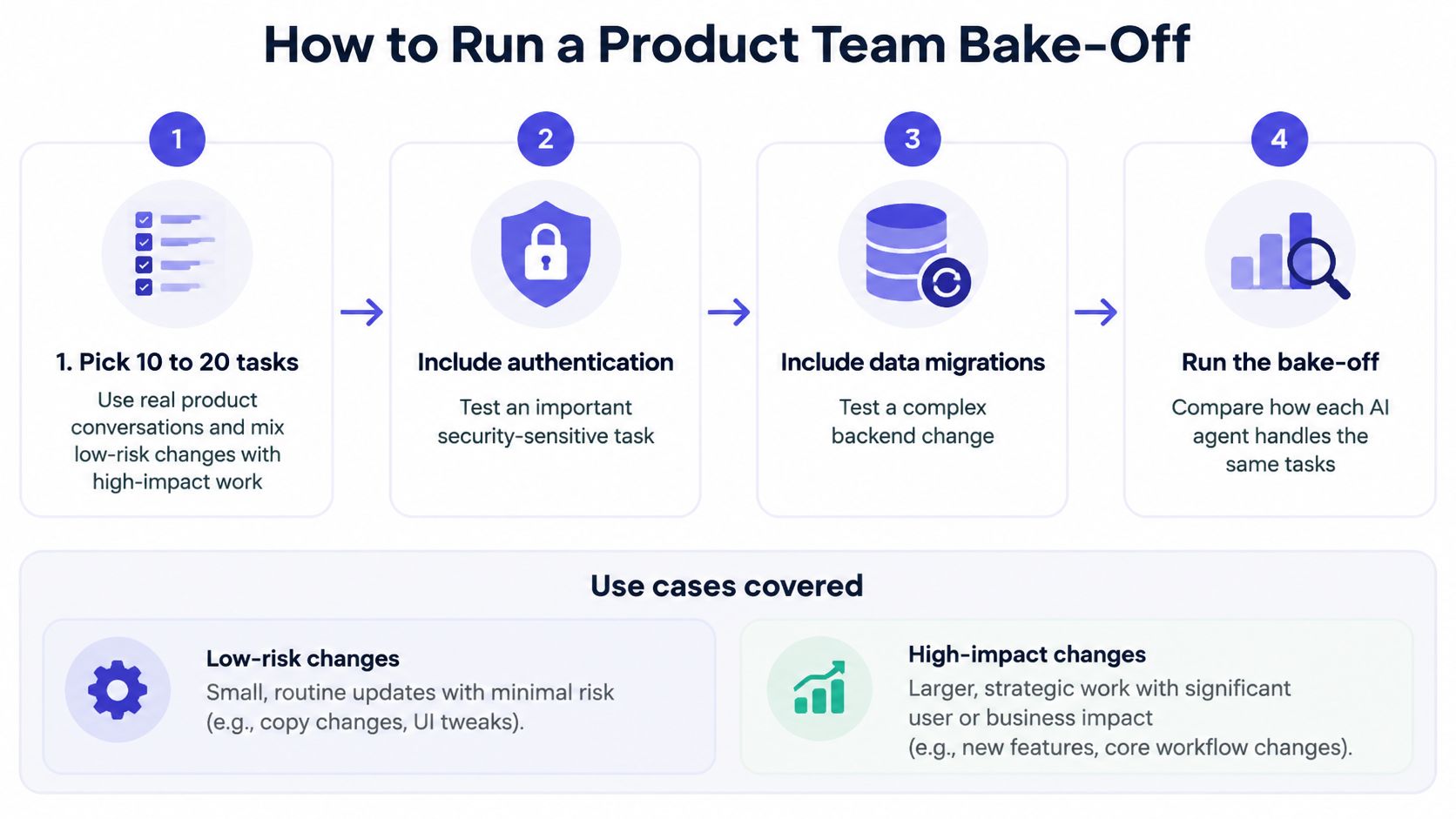
Use cases and the measure that decides them
Four situations cover most small-team work, and each has one deciding measure.
Maintenance bugs in a single repository turn on median latency and regression failures, since the value is a fast, safe patch. Feature spikes turn on how much of the work survives review, because a spike that gets thrown away teaches nothing. Cross-functional features that start in a product meeting turn on time from decision to executable plan, which is where an agent that can't read the decision costs you a re-explanation. Sensitive changes turn on rollback frequency and the share of the diff a reviewer can explain, and here a slower agent that documents its assumptions beats a fast one that doesn't.
The same discipline of building a checklist before you commit applies well beyond code, so keep the habit when you evaluate the tooling around your agents. A short how to choose a data enrichment tool checklist is a useful reminder of how much a few explicit criteria save you.
Validity check: a bake-off counts only if every agent saw identical inputs and every accepted patch got a human review.
Which Agent Setup a Seed-Stage Team Should Pilot First
The recommendation depends on where your team decides, and for most seed-stage teams the answer is two pilots, not one.
A team of a few engineers whose decisions happen in meetings, with members working remotely, should pilot a collaborative workspace agent alongside an IDE agent. The bottleneck in that setup is rarely typing speed. It's the gap between agreeing on something and the first commit. A solo founder or a team doing mostly maintenance in one repository should pilot an IDE agent first, then add a terminal agent only for long, well-specified jobs. Any team touching sensitive code runs the verification checks before rollout, not after the first incident.
Stoa is built for the first case. Its AI listens to the meeting, extracts decisions, drafts specs, flags open questions, and captures notes live without an external bot, and every hour includes video, the in-room agent, Claude Code, live decision capture, and the whole team. If you want to see where agent-assisted review fits day to day, read about pair programming with an AI agent before you set the pilot scope.
The pilot should prove three things and nothing more. One real product meeting turned into an executable plan. The time from that plan to a reviewed pull request. The cost per verified merge, set against your bake-off results. Run one planning meeting with the task list from the bake-off in hand, and compare time to first commit against the baseline the team already has on record.
SpecStory, Inc. builds the record layer this comparison keeps pointing at: every session with Cursor, Claude Code, Codex, Gemini CLI, or Copilot saved as searchable Markdown, with code linked back to the prompt that produced it, so review starts from intent rather than guesswork. If the meeting is your real bottleneck, run the next planning session in Stoa and let the in-room agent capture decisions, draft the spec, and build beside the whole team. Visit SpecStory, Inc. to start with the $50 credit and compare your verified time to merge against the baseline you already have.
Newsletter
Get new posts in your inbox
Bring your team together to build better products. Fresh takes on remote collaboration and AI-driven development.