


A distributed software task can take about 2.5 times as long as comparable work done by a colocated team, with cross-site coordination delays averaging 2.4 days per delay, according to an empirical study of globally distributed development. That gap isn't explained by typing speed. It grows when a team agrees on a feature in a meeting, loses the decision in chat, hands the design to someone who wasn't there, and waits for the first commit to make the plan concrete.
That's the problem collaborative code editing should solve. Shared cursors and synchronized buffers can help people work in the same files, but they don't guarantee that engineers, designers, product managers, and coding agents share the same intent. The practical measure is whether a team can carry a decision into a verified change without making people reconstruct the reasoning along the way.
Table of Contents
- The Day a Product Team Lost to Coordination Debt
- What Collaborative Code Editing Actually Means
- Real-Time vs Asynchronous Collaboration
- Product Team Workflows That Actually Work
- Where Collaborative Agents Like Stoa Fit In
- Common Pitfalls and Misconceptions
- Best Practices and a Monday Morning Checklist
The Day a Product Team Lost to Coordination Debt
A small product team agrees on a feature during a planning call. The designer updates a prototype while the engineering lead explains how the feature should behave when a user cancels. An engineer leaves with an action item, but not a written decision. By the time they open the codebase, the design has changed and the cancellation question is still sitting in chat.
The engineer asks for clarification. The product manager is in another meeting. A second developer starts a related change, unaware that the first engineer is waiting. Someone eventually posts a screenshot and a summary, but nobody is sure whether that summary reflects the final decision. The code itself is straightforward. Getting a clear answer, agreeing on the behavior, and making sure the right person starts the work take longer.
For a seed-stage team, this kind of delay can push a feature out by days without any obvious coding failure. The team may have a shared editor, a repository, and a functioning review process, yet still lack a reliable path from discussion to implementation. The coordination problem sits between those tools.
That's why the distributed-development finding matters: work took approximately 2.5 times as long as comparable colocated work, and cross-site delays averaged 2.4 days in the cited study. The result doesn't mean every remote feature takes that long. It does show how waiting and handoffs can outweigh the time spent writing code.
Often the meeting-to-commit gap is the bottleneck. A collaborative editor helps when it lets teammates change code together, but the team also needs a way to preserve why the change is being made, what's unresolved, and who owns the next step. Without that context, a faster editor can still leave the team waiting on the same decisions.
What Collaborative Code Editing Actually Means
Think of collaborative code editing as a multiplayer document, but with more at stake than seeing another person's cursor. A code change needs to stay synchronized, make contributors' activity visible, retain the reasoning behind edits, and account for work done by both people and agents.
Collaborative editing became familiar through document tools before it became a routine part of software development. A study of real-time editors reported that Google Docs attracted more than 1 million users shortly after its 2007 launch, while the broader Google Drive user base grew from 10 million users in 2012 to 240 million by October 2014. That history shows how shared editing reached mainstream use; source code adds stricter demands around correctness, dependencies, and testing. The study of real-time collaborative editors also found that heavier concurrent use could lead systems to reject connections or show high interaction delays.
A useful evaluation separates four layers:
- File and buffer sync keeps collaborators' working copies aligned. If this layer fails, people can overwrite one another or waste time reconciling which version is current.
- Presence and awareness shows who's in a session and where they're working. Without it, a shared file can feel like a crowded room where nobody knows who has the floor.
- Decision and intent context connects a change to its purpose, constraints, open questions, or design. Sync alone doesn't explain why a line changed or what behavior the team agreed to ship.
- Agent coordination makes it possible to understand what an AI agent is doing, what context it received, and how teammates can review or redirect its work.
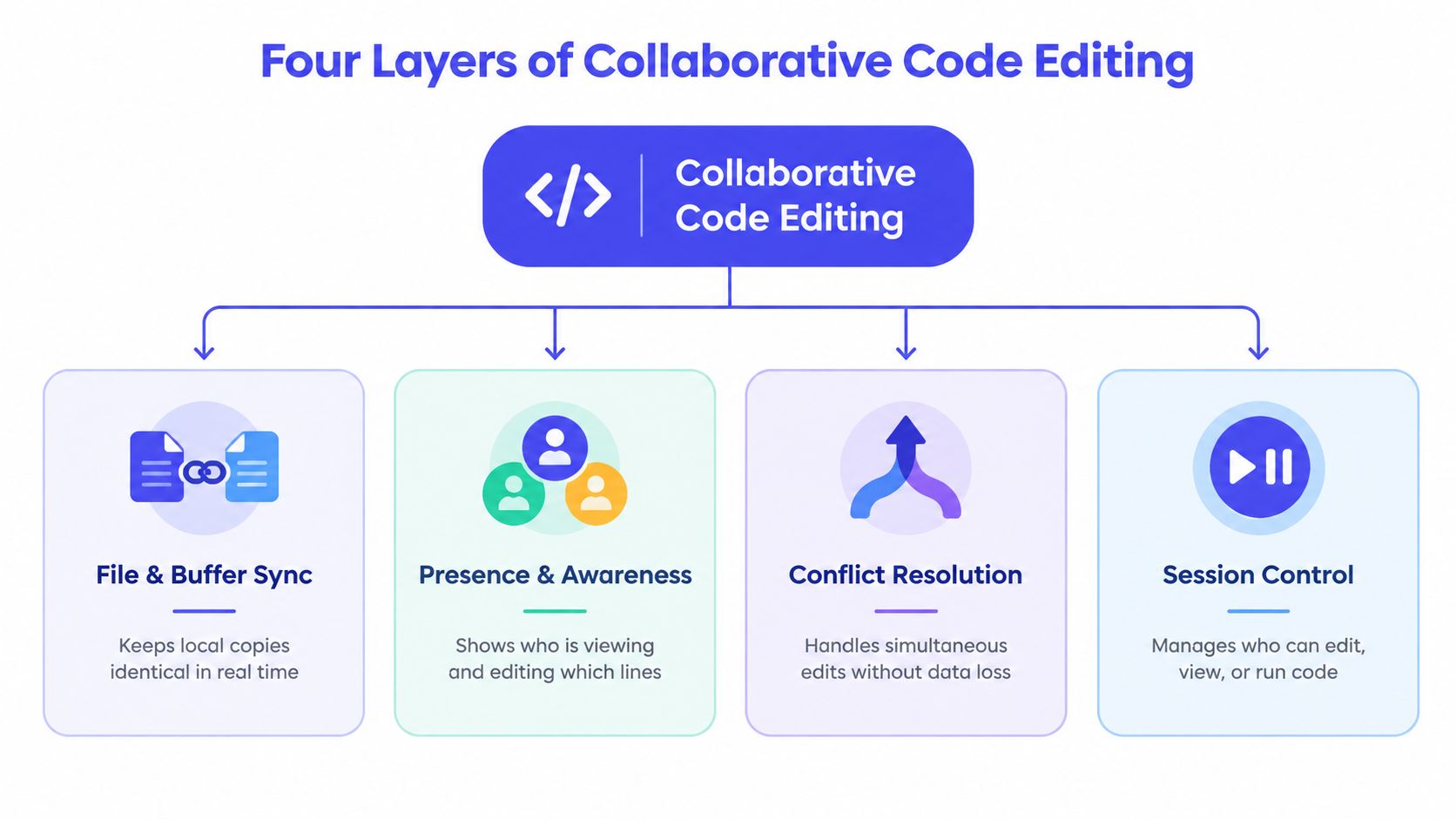
These layers aren't interchangeable. A live editor may handle simultaneous typing while leaving the decision in a meeting recording. An agent may produce code quickly but leave teammates guessing which requirement it followed. Ask what a tool synchronizes, what it makes visible, where it stores intent, and how it handles agent activity.
Version control, code review, and pair programming solve related but different problems. Git records and manages changes over time. Code review provides a process for examining a proposed change before it lands. Pair programming is a way of working together, often in real time. Collaborative code editing can support those practices, but it doesn't replace them. A team still needs clear ownership and review even when collaborators share a live buffer.
Real-Time vs Asynchronous Collaboration
Real-time collaboration reduces the wait between a question and an answer. It's valuable when people need to explore a problem together, test a hypothesis, or agree on a consequential behavior. But a live session has a cost: everyone needs to be available at once, and a poorly scoped meeting can consume time without producing a decision.
Async work does the opposite. Pull requests, recorded walkthroughs, and threaded design comments let teammates contribute on their own schedules, which is especially useful across time zones. The trade-off is latency. A reviewer who can't tell what the author intended may ask for clarification, and the answer may arrive long after the review begins.
| Mode | Best For | Watch Out For | Typical Latency to First Commit |
|---|---|---|---|
| Live pairing | A tricky bug, unfamiliar code, or a design decision that needs discussion | Open-ended sessions with no driver or agreed outcome | Low when the team can decide and implement in the same session |
| Mob session | A cross-cutting change that needs input from several disciplines | Too many participants editing or discussing without clear roles | Low when one person owns the session and a decision is ready |
| Async pull request | Routine changes, bounded refactors, and reviewable implementation work | Unclear rationale, slow feedback, or treating every comment as a blocking debate | Depends on review ownership and teammate availability |
| Recorded walkthrough or threaded design comments | Sharing context with teammates who can't attend live | Notes without an explicit decision or next action | Depends on when the right owner responds |
Choose the mode based on the work, not habit. A routine refactor with a clear owner usually doesn't need a meeting. An architectural choice with significant product consequences often benefits from direct discussion before someone implements an assumption. Exploratory work can begin live, then move to async once the team knows what question it's answering.
The worst default is treating every change as urgent. That turns calendars into a queue and pushes engineers into live sessions that don't need to happen. It also creates pressure to respond instantly to async comments, which defeats the benefit of working asynchronously.
For distributed teams, the key is to make async artifacts useful enough to stand on their own: state the decision, link the relevant design, name the owner, and record unresolved questions. A team choosing tools for this style of work may also find it useful to consider local-first software and how it handles data across devices. It's a practical lens for evaluating whether shared work can remain accessible and usable beyond a single live session.
A balanced sprint reserves synchronous time for high-ambiguity work and uses async collaboration for well-scoped changes. Before a live session ends, capture the decision and the next action. Before an async handoff begins, give the next person enough context to act without scheduling a call.
Product Team Workflows That Actually Work
The simplest way to improve collaboration is to give each kind of work a repeatable path. Small product teams don't need a sprawling process. They need an agreed way to move from uncertainty to a testable change.
A study of more than 1.2 million commits from over 25,000 developers found that developers were less productive when editing code previously written by other contributors, after controlling for code complexity, change type, experience, and project characteristics. In Linux, commits touching only code written by the same developer averaged 5.01 more characters of output per hour than commits involving code previously written by others. The implication isn't to avoid shared ownership. It's to make code history and the reason for a change easy to find. The empirical study of co-editing and developer productivity supports keeping context close to the work.
Pair on a problem, not on every keystroke
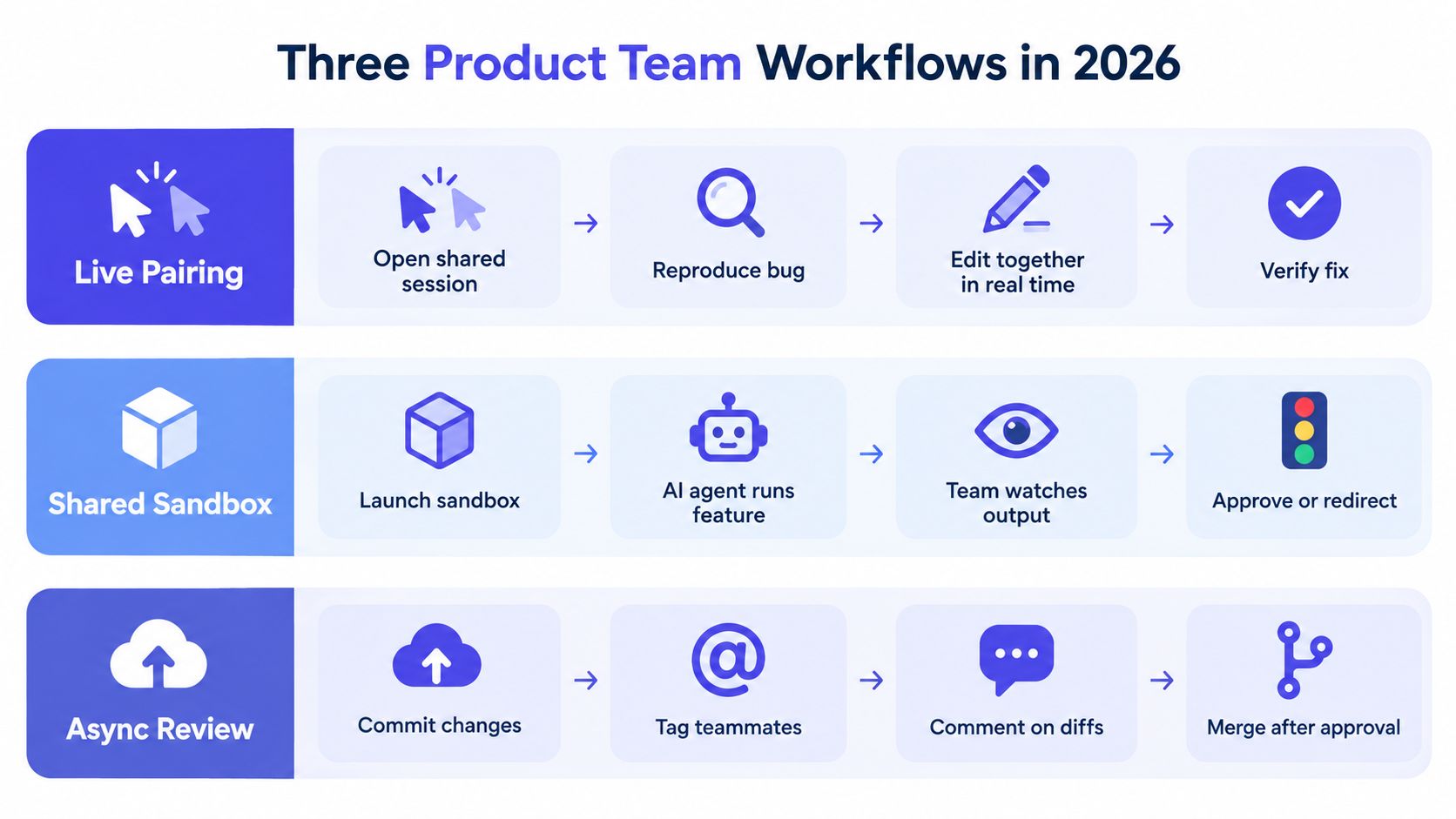
For a difficult bug, the driver and navigator can open a shared session, reproduce the failure, agree on a hypothesis, and test the smallest relevant change. A shared IDE session, voice call, and visible terminal can make the work immediate. The artifact at the end should be more than changed code: capture the cause, the fix, and any regression test.
Designers and product managers can join for the part where expected behavior is unclear, then leave once the team has a concrete implementation path. Without an agent, the pair investigates and edits directly. With an agent, they can ask it to inspect the affected code or draft a test, while the engineers remain responsible for checking the result.
Keep agent work visible in a shared sandbox
When a change is bounded but exploratory, run an AI agent in a sandbox tied to a feature branch. State the task and its constraints, show the team the agent's edits and command output, and pause when it reaches an ambiguous requirement. A product manager can clarify intended behavior; a designer can compare the result with the prototype; an engineer can redirect the implementation.
The output should include a reviewable diff, test results, and a record of decisions the agent needed. If the team can't see what context the agent used, it can't reliably judge whether the result follows the plan.
Turn the requirement into the first commit
For a well-defined feature, start with a short written requirement that names user behavior, constraints, and open questions. Have the engineer confirm the scope, then create the first commit against that written intent. The product manager owns the requirement, the designer supplies relevant interaction details, and the engineer owns implementation and tests.
When a team needs a practical process for assigning review responsibilities and handling feedback, a practical guide to review workflows can help make that handoff explicit. To strengthen the product-to-engineering handoff, teams can also use this guide to collaborating effectively across design and development.
Where Collaborative Agents Like Stoa Fit In
An AI agent can write code, but it can't make a team's intent coherent by itself. If requirements live in a meeting, design decisions live in a prototype, and implementation work lives in an editor, the agent may receive only part of the story. The team then spends its time correcting a plausible answer to the wrong question.
The 2025 Stack Overflow Developer Survey offers a useful caution: 84% of respondents said they were using or planning to use AI development tools, yet only 17% of AI-agent users said those tools improved team collaboration, the lowest-rated impact by a wide margin, according to the survey discussion in the Journal of Software Engineering Research and Development. Adoption and teamwork aren't the same outcome. A tool can help an individual produce code while leaving the group with more review, unclear decisions, and extra coordination.
A useful agent-augmented workflow begins before anyone opens the editor. In a shared room, teammates discuss the feature, record decisions, and mark unanswered questions. An agent can turn that discussion into a draft PRD. The team reviews the draft, corrects assumptions, and carries the agreed requirements into a shared sandbox where the agent can write and run code. The engineer then decides what belongs in the first commit.
For a product team using Stoa, the workflow is built around shared rooms, artifacts, and collaborative agents. It's designed to capture live conversation as executable context, produce Markdown PRDs, and run agent work in shared sandboxes, with outputs traceable to the conversation. Context can follow teammates into tools such as Cursor and Figma; unresolved questions, voice memos, and shared localhost sessions can support feedback without asking everyone to reconstruct the meeting from scattered messages.
Local-first sync also matters if a team wants its decisions and artifacts available as plain files through a CLI rather than locked inside one workspace. That doesn't eliminate the need to verify agent output, agree on code ownership, or review the change. It can reduce the time spent copying decisions between tools, while leaving the team responsible for judging the implementation.
For teams deciding how to adopt agents into delivery, this guidance on nearshore AI delivery provides another perspective on connecting AI tools with an engineering workflow. The useful test is operational: can a teammate understand what the agent was asked to do, what it produced, and which human approved the result?
A walkthrough can help teams assess how a shared workspace supports that flow. Watch for whether conversation, requirements, code output, and review remain connected, rather than whether an agent can produce an impressive demo.
Common Pitfalls and Misconceptions
Shared cursors are a visibility feature, not proof that a team has shared understanding. A remote pair-programming study found no meaningful loss in defect detection from working remotely: participants found 27 errors using NetMeeting, compared with 24 in the colocated condition. The result supports a practical point: remote work can preserve review quality when people can see and discuss the same code state. It doesn't mean every remote setup works equally well. The distributed pair-programming study makes awareness and interaction design central to the outcome.

Five failure modes come up repeatedly:
- Treating shared editing as ownership. Two engineers edit the same area, each assuming the other will handle the tests. Name one owner for the change, even when several people contribute.
- Letting an agent generate code without a traceable decision. The agent implements a behavior that nobody agreed to. Link the requirement or decision to the task and ask the agent to identify assumptions before it proceeds.
- Using async tools without accounting for time-zone gaps. A question sits unanswered because no one knows who should respond. Assign an owner and write down the next action so the work can continue without an immediate reply.
- Skipping review because the team discussed the change live. A conversation doesn't replace inspection of the final diff. Keep tests and review in the workflow, especially when the implementation changed after the session.
- Locking useful context inside one vendor. A decision that can only be found in a proprietary workspace may be hard for teammates to reuse elsewhere. Prefer workflows that preserve decisions in accessible artifacts, and check how you'll export or retain them.
A shared session can make a discussion feel complete even when important work remains. Before people leave, name the code owner, the open questions, the expected test, and where the decision will be recorded. That small closing habit is more useful than adding another chat pane.
Agent-generated changes need the same discipline as human-authored ones. Teams looking for a concrete way to validate them can use a guide to testing AI-generated code as a starting point, then adapt the checks to their codebase and risk. Collaborative editing works when the team keeps responsibility visible, not when it assumes the tool will supply it.
Best Practices and a Monday Morning Checklist
Set a default mode for each kind of work, then let the owner choose a different one when the task needs it. A live session should end with a decision or a clear next action. An async handoff should include enough context for the next person to proceed without a meeting.
Use this checklist to put the approach into practice:
| Practice | Why It Matters | First Step This Week |
|---|---|---|
| Choose a collaboration mode by task | Keeps routine work from becoming a meeting | Write down which work merits live pairing and which should stay async |
| Connect commits to decisions | Helps reviewers understand why a change exists | Add a requirement, decision, or open-question reference to the task |
| Assign an owner for every change | Prevents shared work from becoming nobody's work | Name one person responsible for the next step and review |
| Evaluate the four collaboration layers | Reveals what your tools support and what they leave uncovered | Check sync, awareness, intent context, and agent coordination in one real workflow |
Operating principle: Make the decision easy to find before asking someone to make the change.
Start with one workflow, such as a tricky bug or a feature requirement, and follow it from conversation to first commit. Notice where the team pauses to search for context, wait for an answer, or repeat a decision, then fix that handoff before adding more tooling.
SpecStory, Inc. offers Stoa, a multiplayer AI workspace where product teams capture conversations, turn decisions into shared artifacts, and work with collaborative agents in sandboxes. If your team wants to connect intent to code without relying on scattered meeting notes and chat, visit SpecStory, Inc. to explore the workflow.
Newsletter
Get new posts in your inbox
Bring your team together to build better products. Fresh takes on remote collaboration and AI-driven development.