


Your team leaves a planning meeting with a clear priority, an agreed owner, and a short list of open questions. By the next standup, the priority is buried in Slack, the rationale sits in a Notion page, the prototype is in Figma, and the engineer who owns the next step remembers only part of the conversation. An AI agent can summarize that meeting, but a summary alone won't preserve the working context your team needs to ship.
An AI agent workspace addresses the larger problem. It gives people, agents, tools, decisions, and artifacts a shared place to operate, so the team can coordinate work instead of repeatedly reconstructing what happened. The category matters because enterprise adoption is already substantial. In a May 2025 survey of 300 senior executives, 79% said AI agents were already being adopted in their companies, while 88% planned to increase AI-related budgets because of agentic AI, and 66% of adopters reported measurable productivity gains (PwC's AI agent survey).
Table of Contents
- Why Your Team Keeps Losing the Thread After Meetings
- What an AI Agent Workspace Actually Is
- The Core Concepts and Technical Workflow
- Must-Have Features and Integrations
- Product Team Use Cases Worth Building Around
- Evaluation Checklist for Choosing a Workspace
- Migration, Rollout, and What to Do Next
Why Your Team Keeps Losing the Thread After Meetings
The meeting itself usually isn't the problem. A product manager, designer, and engineer can leave the room aligned because they share the same immediate context. They heard the customer concern, looked at the same design, discussed the tradeoff, and agreed that one person would investigate the edge case.
The decay starts afterward. One person writes a partial note, another posts a decision in Slack, and a third creates a ticket without including the reasoning behind it. The team's context becomes distributed across tools and memories. By the time someone asks an AI agent to help, the agent often receives only a fragment of the original intent.
That produces familiar symptoms:
- Duplicate asks: Two people ask an agent to research the same issue because neither can see the other's work.
- Lost decisions: A ticket contains the conclusion but not the constraints or alternatives that shaped it.
- Repeated work: An agent drafts a document or code change that a teammate already completed in another tool.
- Unclear ownership: A system can generate an action item without showing who approved it or what should happen next.
- Broken handoffs: A designer's rationale, a PM's priority, and an engineer's implementation notes remain disconnected.
This is coordination decay, not individual sloppiness. Every handoff creates an opportunity for meaning to disappear. Adding another chatbot doesn't solve that gap because the chatbot still starts with incomplete information.
Practical rule: Treat every meeting decision as a piece of operational state, not as disposable conversation.
AI note takers can help capture the initial record. Teams comparing leading AI note takers for leadership should look beyond transcription and ask whether decisions, owners, unresolved questions, and source context remain usable after the meeting ends. The broader discipline is knowledge preservation, which connects meeting output to future work rather than treating notes as an archive (knowledge preservation for product teams).
The missing surface isn't another place to chat. It's a shared coordination space where humans and AI agents can see the same approved context, claim work, show progress, and leave an inspectable trail. That shift changes the evaluation question from “How capable is this agent?” to “Can our team coordinate several agents and people without losing intent?”
What an AI Agent Workspace Actually Is
Think of an AI agent workspace as a project room. People sit around the same table, specialized agents handle different jobs, tools are within reach, and the walls display the current plan, decisions, dependencies, and open questions. A chatbot is more like a conversation at the doorway. It may be useful, but it doesn't automatically share the room's history or know what everyone else has agreed to do.
An AI agent workspace is an environment where multiple people and agents plan, execute, and review work against persistent shared context. The defining feature isn't that an agent can call a tool. The defining feature is that the workspace records what happened, routes the next task, and makes the handoff visible.
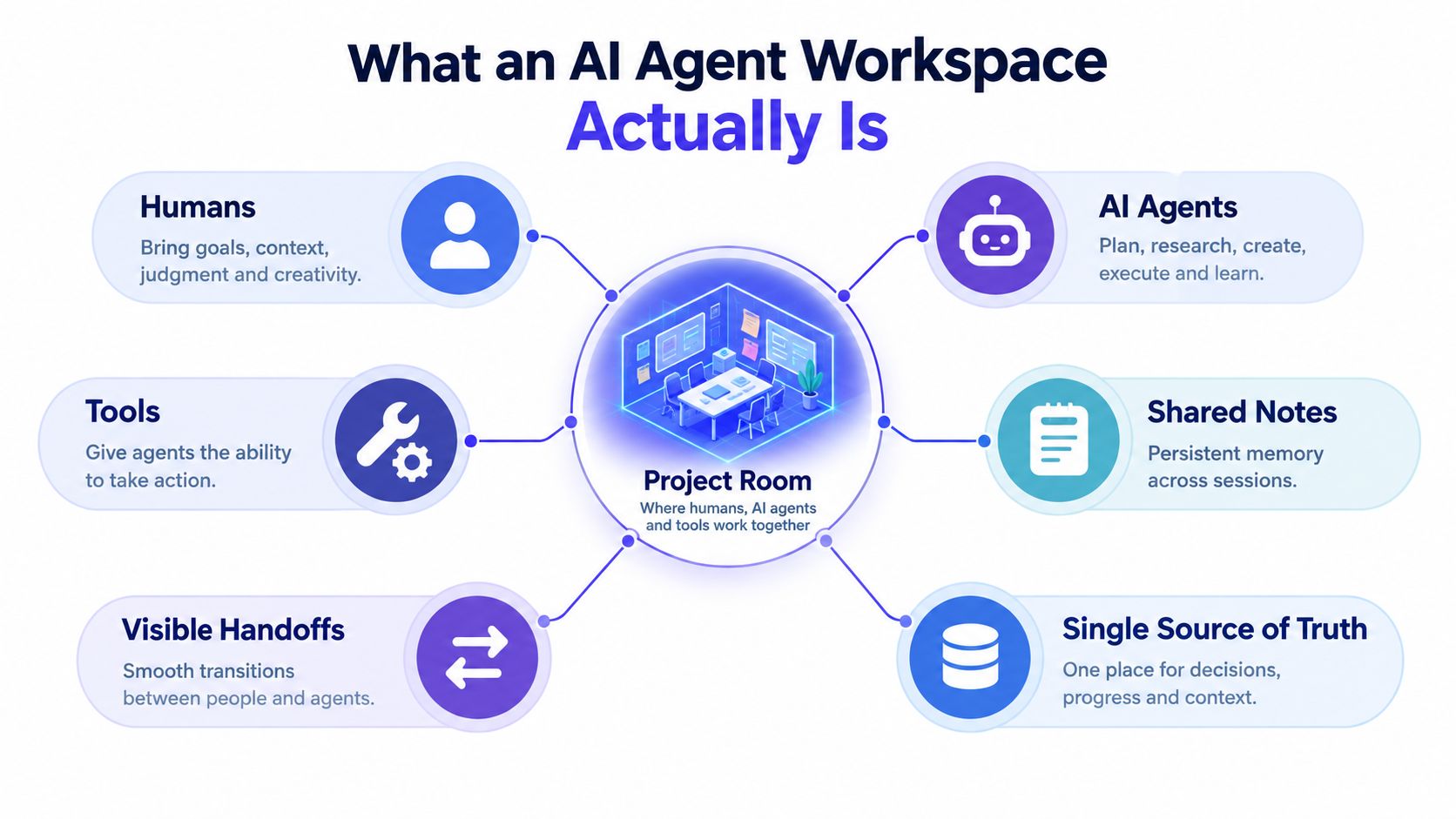
Three ideas define the category
Persistent shared context gives the team a durable memory layer. It can contain meeting transcripts, structured decisions, Markdown PRDs, design references, code changes, test results, and unresolved questions. The important detail is structure. A raw transcript is difficult to retrieve and easy to misinterpret, while a decision record can be linked directly to an artifact and an owner.
Coordinated multi-agent execution means agents have distinct responsibilities and can hand work to one another. A research agent might identify customer themes, a planning agent might turn those themes into acceptance criteria, and a coding agent might implement a reviewed change. The workspace should show which agent acted, what context it used, what it produced, and where the next human decision is required.
Human-in-the-loop governance keeps people responsible for consequential actions. A human may approve a roadmap change, merge code, send an external message, or accept an interpretation of ambiguous feedback. Good governance doesn't make agents passive. It gives them room to prepare work while clearly marking the boundary where a person must decide.
This coordination layer distinguishes the workspace from neighboring products:
- An agent framework helps developers build agent behavior and tool calls.
- An IDE copilot assists primarily inside a coding environment.
- An RPA platform automates defined procedures across applications.
- An AI agent workspace connects people, agents, tools, state, review, and handoffs around ongoing work.
The technical implementation usually combines retrieval, task planning, tool routing, permissions, event logging, and a persistent file or database layer. A useful overview of the broader idea of a shared workspace for collaborative work helps clarify why the workspace itself matters, not just the intelligence of the individual agent.
The Core Concepts and Technical Workflow
A vendor demo can make an agent workspace look like one elegant chat window. Underneath, a credible system has several distinct layers. Map each product you evaluate to the following framework.
-
Context store: This holds short-term working context, long-term memory, shared artifacts, decisions, and execution state. The store should distinguish a current task from the broader project record, so an agent doesn't have to load everything into every prompt.
-
Planning layer: An orchestrator interprets intent, breaks work into tasks, chooses the right agent or tool, and determines when to pause for approval. It should represent dependencies explicitly. “Draft a PRD” may require research, synthesis, review, and revision rather than one opaque call.
-
Execution layer: Agents call APIs, retrieve files, query systems, run tests, and write artifacts. Tool routing should limit each agent to the capabilities it needs. Code execution belongs in a controlled sandbox, not in an unrestricted shared machine.
-
Governance layer: Permissions, audit trails, approval gates, identity, and rollback controls make activity accountable. The team should be able to answer who initiated a run, which agent acted, what data it accessed, and which person approved the result.
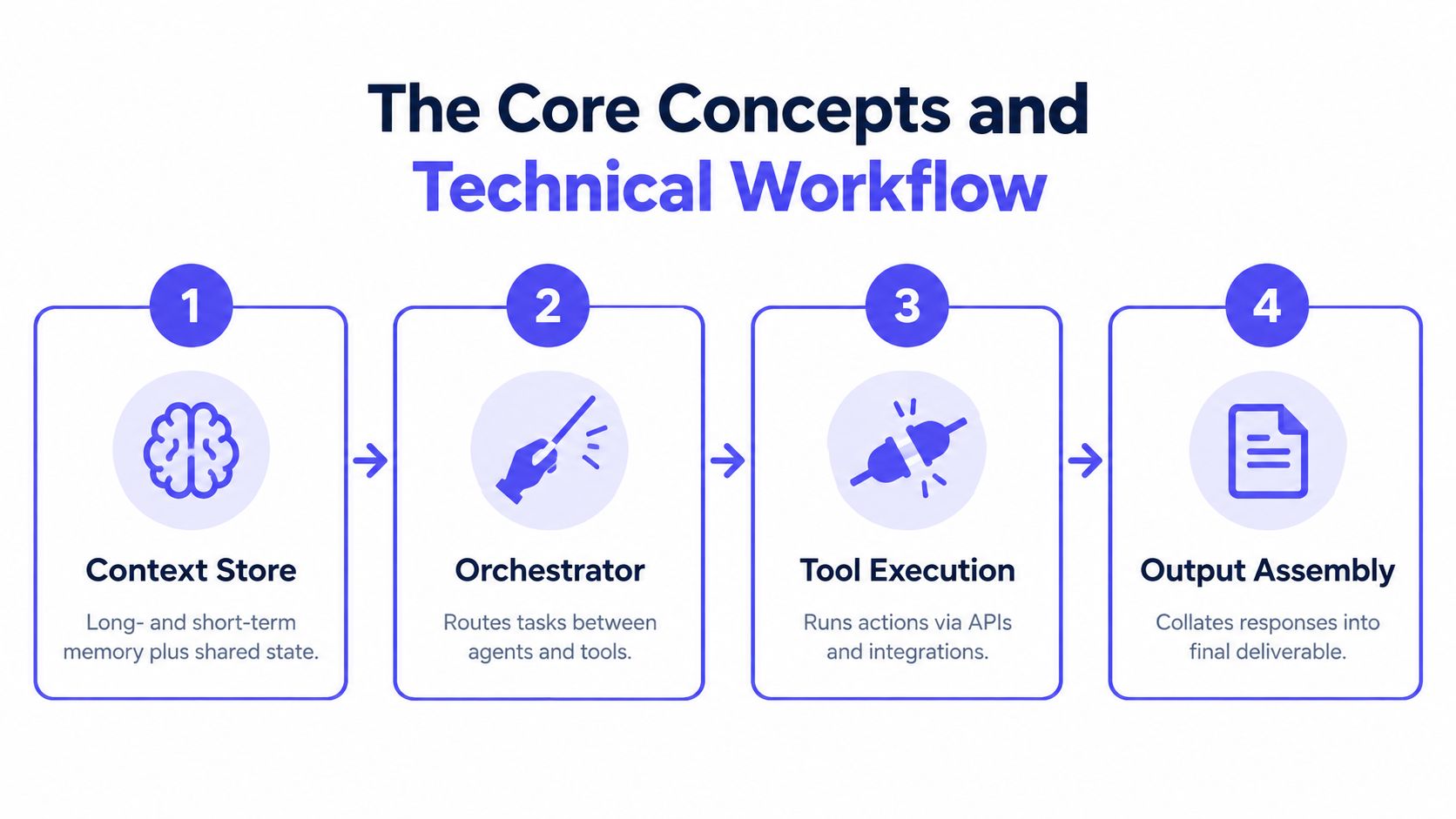
What happens during a run
A request enters the workspace, such as “prepare the next release brief from customer feedback and the current backlog.” The planner decomposes it, retrieves relevant project memory, assigns research and synthesis tasks, and sends approved context to the appropriate agents. Each agent calls its permitted tools, writes results back to shared state, and records its assumptions.
The workspace then assembles the outputs into a reviewable deliverable. A human can inspect source material, correct a mistaken interpretation, answer an open question, or reject a proposed action before the system continues. This is the point where agent-to-agent handoff becomes useful. The next agent receives a deliberate package of context instead of an accidental dump of chat history.
Long-running workspaces perform better when they use a smaller active context window with durable memory rather than attempting to keep everything in context. A 2026 technical review reported that hybrid retrieval combining dense, sparse, and structured search outperformed dense-only retrieval across all task lengths, and that partitioning memory by task lineage reduced cross-task contamination by 47% (technical review of context and memory). For product teams, the practical lesson is straightforward: write meetings, decisions, and artifacts into a structured memory layer.
A visual walkthrough can make the sequence easier to follow:
The coordination lens ties the layers together. The context store prevents memory loss, the planner prevents duplicated effort, execution tools let agents act, and governance makes human responsibility visible. A deeper look at AI agent integration patterns is useful when you start mapping these layers to your existing systems.
Must-Have Features and Integrations
A small product team doesn't need every possible agent feature. It needs a workspace that makes responsibility, context, and intervention clear during ordinary work.
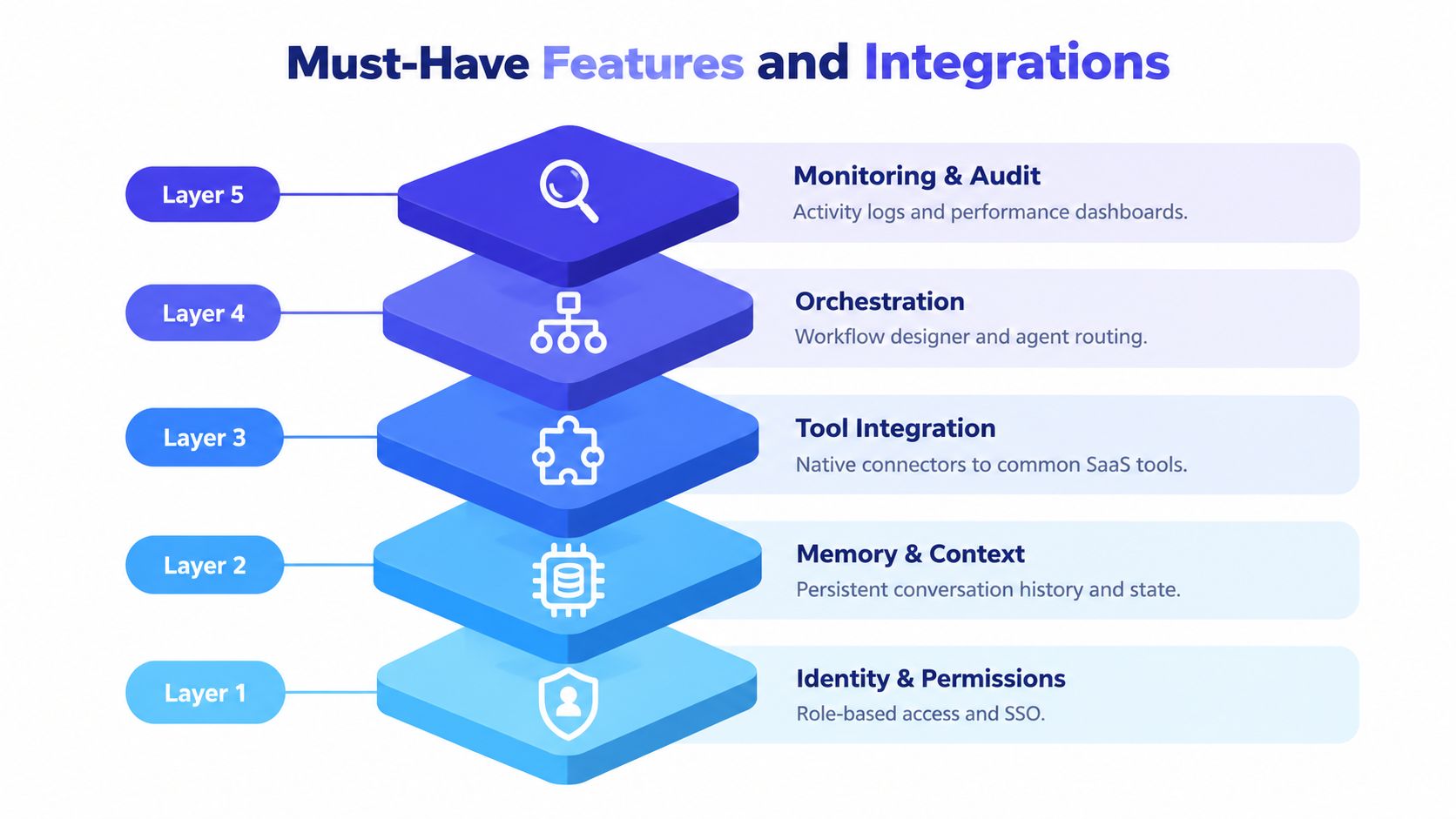
Identity and permissions come first
Start by asking whose authority an agent is using. A mature workspace supports role-based access, single sign-on, scoped credentials, short-lived tokens, and separate permissions for reading, drafting, and changing systems. An agent that can read a backlog shouldn't automatically be able to close tickets or merge code.
For example, a triage agent might classify incoming issues and suggest labels, while a human approves status changes. The audit record should connect the agent run to the sponsoring user and preserve the input, tool calls, output, and approval.
Memory must preserve more than chat
A useful memory layer stores project decisions, source documents, prior runs, artifacts, and unresolved questions. It should support search by project, task, file, and lineage. A scrollable conversation history is not enough if the agent can't identify which decision replaced an earlier one.
The difference appears during a release review. A weak system summarizes the latest thread. A stronger system retrieves the decision, links the relevant design and ticket, shows the agent's previous analysis, and flags the issue that remains unresolved.
Orchestration should expose handoffs
Look for a workflow designer or event system that can trigger agents from a meeting, ticket, commit, or approval. The interface should show task status, dependencies, retries, and the exact point where work moved from one agent to another.
A product manager may start a customer-feedback workflow. A research agent clusters themes, a planning agent drafts requirements, and a review agent checks for conflicts with the roadmap. The PM should be able to stop the chain after research, edit the interpretation, and restart planning with corrected context.
Integrations connect the room to work
Native or well-governed connectors matter because teams already work across Jira, Linear, GitHub, Slack, Notion, Figma, customer relationship management systems, and data warehouses. Evaluate whether an integration preserves links and permissions, not just whether it can import text.
An agent that copies a ticket into its own database may create another silo. An agent that links the ticket to the decision, source conversation, code change, and approval creates a traceable work graph.
Observability shows whether coordination works
Dashboards should expose activity logs, run outcomes, failure reasons, tool usage, approvals, and rollback paths. Cost visibility can help, but product teams should also inspect whether agents are repeating tasks, escalating too often, or producing artifacts that humans can't verify.
The most mature workspace isn't the one with the flashiest demo. It's the one that lets a lead diagnose a failed handoff without asking three teammates to reconstruct the sequence from memory.
Product Team Use Cases Worth Building Around
The strongest use cases are recurring workflows where context accumulates over time. A one-off prompt can demonstrate intelligence, but an ongoing workspace demonstrates whether the team can coordinate.
A product manager starts with customer interview transcripts. A research agent clusters themes and identifies supporting passages, while a planning agent drafts a PRD from those themes. The PM reviews the interpretation, removes an outlier, and approves the requirements. The workspace then connects the source passages, the decision, the PRD, and the related Slack discussion, so the engineer doesn't have to trust an unattributed summary.
An engineer can apply the same pattern to issue triage. A triage agent reads a shared backlog, proposes a category, attaches reproduction steps, and checks for related reports. Straightforward issues move into a review queue, while ambiguous cases go to a human with the agent's reasoning and evidence attached. The agent isn't replacing engineering judgment. It's preparing a consistent handoff that an engineer can accept, correct, or reject.
A designer might run competitor research against a defined set of sources and compare the results with the team's earlier critique notes. The workspace preserves the prior discussion, so the agent can distinguish a new pattern from an observation the team already rejected. The designer reviews the findings beside the original rationale instead of opening disconnected tabs and repeating old debates.
The useful unit of automation isn't the prompt. It's the reviewed handoff.
These workflows also change staffing choices. A team may combine agents with human support, including Latin American virtual assistants for research preparation, data cleanup, or coordination tasks that still need human judgment. The workspace should make that collaboration explicit, whether the contributor is a teammate, contractor, assistant, or software agent.
Compare each use case by asking four questions:
- What persists: Can the workspace remember the project's decisions and artifacts between runs?
- What changes: Can a person intervene before an external system or shared artifact changes?
- What connects: Are sources, outputs, owners, and approvals linked?
- What remains unclear: Does the system surface uncertainty instead of hiding it inside a polished result?
If the answer to the first three is weak, a clever agent won't rescue the workflow. The value comes from continuity and review.
Evaluation Checklist for Choosing a Workspace
Use the checklist below during vendor demonstrations. Ask the vendor to show each capability in a real workflow, not just in a product tour.
| Capability Area | What Good Looks Like | Red Flag to Avoid |
|---|---|---|
| Governance | Scoped identities, per-run audit logs, approval gates, and revocable credentials | SSO exists, but agents share broad permissions and actions can't be reconstructed |
| Context management | Persistent project memory, structured decisions, artifact links, and lineage-aware retrieval | A long chat history is presented as the entire memory system |
| Agent orchestration | Visible task routing, agent-to-agent handoffs, retries, dependencies, and pause points | A single opaque workflow hides which agent did what |
| Integrations | Permission-aware connections to systems such as Jira, Linear, GitHub, Slack, Notion, and Figma | Data is copied into a disconnected silo with stale records |
| Observability | Activity history, tool-call records, failure states, approvals, and rollback controls | The dashboard shows only successful outputs |
| Total cost of ownership | Clear usage model, exportable data, manageable administration, and practical recovery procedures | Pricing looks simple, but migration, monitoring, and maintenance remain undefined |
Score coordination before polish
Give governance and context management greater weight than interface polish. A beautiful workspace that loses decisions will create more cleanup. A less polished system with strong lineage, permissions, and review may support a more durable operating model.
Run a sample task from meeting input to final artifact. Check whether the system can answer:
- Which context did the agent retrieve?
- Which person approved the plan?
- Which tools did each agent access?
- What changed after human review?
- Can the team export or inspect the underlying state?
Rollout should follow the evaluation. Start with one recurring workflow and run it beside existing tools. Then add adjacent artifacts after the team trusts the records. Only after that should you connect write-enabled integrations and reduce older tools to reference surfaces.
A workspace that scores well on coordination and auditability will usually outlast one that merely produces impressive single-agent outputs. The test is whether the system makes the next person faster without making the past harder to understand.
Migration, Rollout, and What to Do Next
Adoption works better as a controlled pilot than as a big-bang replacement. Pick a workflow that happens regularly, has visible inputs and outputs, and causes enough coordination pain to reveal whether the workspace helps.
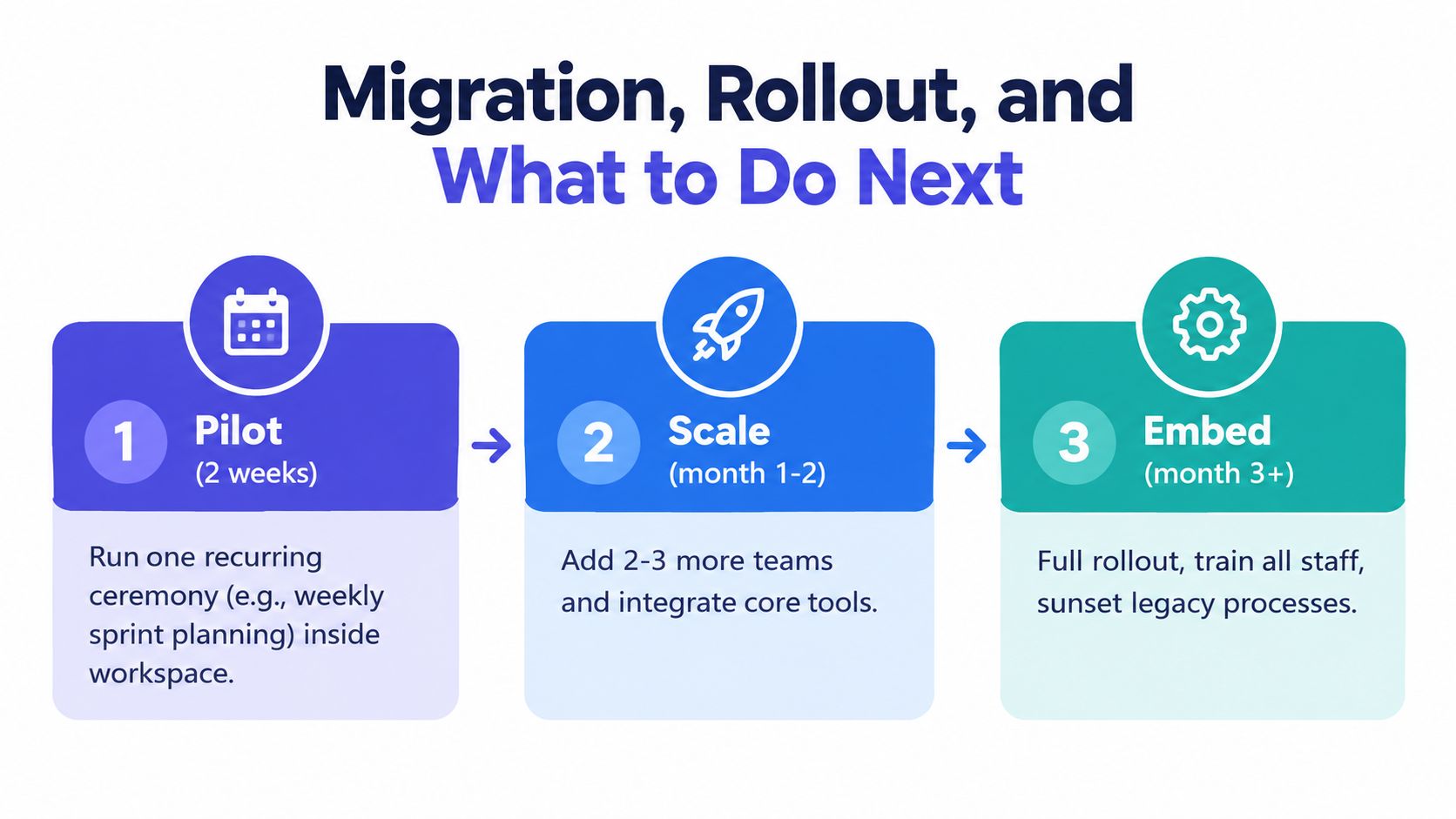
Phase one should stay narrow
Use the workspace for one recurring ceremony, such as weekly sprint planning, while keeping your existing project tools active. Ask the system to capture decisions, owners, dependencies, and unresolved questions. Have a person review the record before it becomes the team's working plan.
This gives the team a controlled comparison. You can see whether people refer back to the workspace, whether agents retrieve the right context, and whether the meeting produces fewer disconnected follow-up tasks.
Expand only after trust appears
Add adjacent workflows such as roadmap updates, customer-feedback triage, or release preparation once the team trusts the summaries and handoffs. Keep write permissions limited at first. Let agents draft changes and prepare actions while humans approve updates to shared systems.
Assign one workspace owner. That person doesn't need to perform every task, but should maintain conventions for naming decisions, recording ownership, approving integrations, and handling failed runs.
Measure the coordination outcome
Choose two signals before rollout. For example, track hours saved per planning cycle and the share of decisions traceable to an agent thread. These measures connect directly to the problem. They show whether the team spends less time reconstructing context and more time making progress.
Review the pilot after thirty days. Keep the workflow if the records are trusted, handoffs are clear, and people can find prior decisions without asking around. Change or stop it if the workspace produces attractive artifacts but leaves ownership, evidence, or approval unclear.
For teams building a multiplayer workflow, Stoa from SpecStory, Inc. offers shared rooms where conversations, decisions, designs, and open questions become executable context, with collaborative agents that can draft Markdown PRDs and run code in shared sandboxes while keeping outputs traceable to the conversation. Visit SpecStory, Inc. to see how that model could fit your team's path from meeting agreement to reviewed work.
Older
GUI vs Command Line Productivity Guide for Teams
Newer
Context Engineering for AI Agents: A Practical Guide
Newsletter
Get new posts in your inbox
Bring your team together to build better products. Fresh takes on remote collaboration and AI-driven development.