


The most popular advice for AI agents is to give them a larger context window and let them “remember” everything. That approach confuses storage capacity with useful working memory. In production, the difficult problem isn't getting more tokens in front of a model. It's deciding which tokens deserve attention, which state belongs in a durable system, and which information must be removed before it starts distorting the next decision.
Context engineering for AI agents treats context as a budgeted, governed operating surface. System instructions, retrieved knowledge, tool definitions, conversation history, memory, permissions, and runtime state all compete for a finite attention budget. The teams that ship reliable agents don't accumulate context indefinitely. They curate, compress, isolate, audit, and refresh it.
Table of Contents
- Why Bigger Context Windows Make Agents Worse
- What Context Engineering Actually Means
- The Five Core Techniques You Will Combine
- Production Rules for Managing Context Budgets
- A Day in the Life of a Long-Running Agent
- Pitfalls That Quietly Break Agent Reliability
- Keeping Context Traceable Across Team Tools
- Your First Five Steps This Week
Why Bigger Context Windows Make Agents Worse
A million-token window doesn't give an agent a million tokens of equally useful reasoning capacity. As the active context grows, irrelevant observations, repeated tool results, stale instructions, and contradictory state make it harder for the model to identify what matters. The model may still accept the request, but its practical behavior can become less predictable.
The production bottleneck is usually tool output and prior tool calls, not the original user message. A verbose API response can crowd out the system prompt. A long trace can bury the user's deadline. A later run can inherit old permissions or obsolete assumptions, creating what looks like reasoning failure but is really a state-management failure. The context window overview is useful background, but a larger window isn't a substitute for an allocation policy.
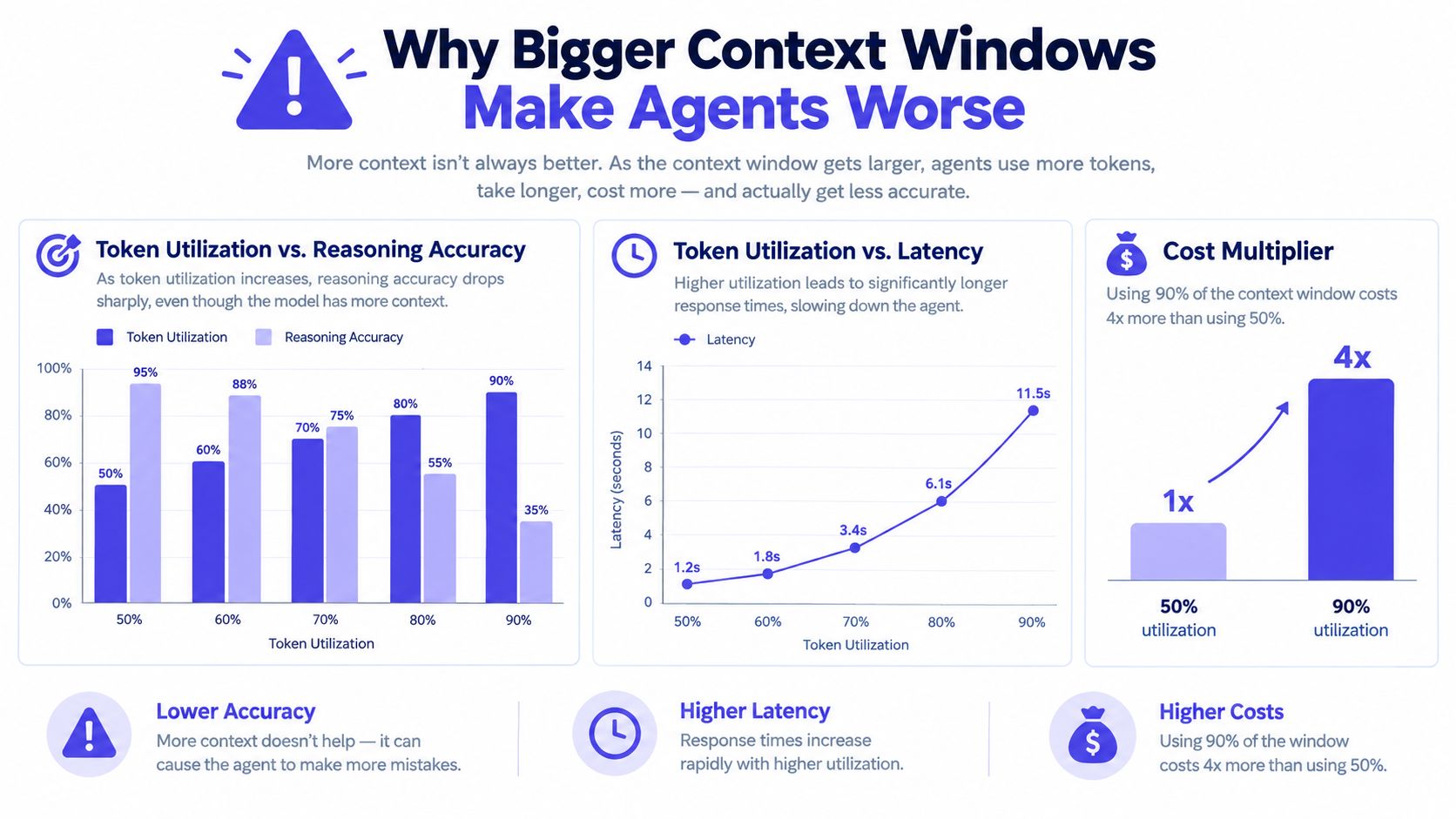
A 2026 paper on efficient context engineering makes the trade-off concrete. A no-user-model baseline completed 8.0% of items, while retaining the full context raised completion to 71.0%, but required 1,480,996 tokens and 14.56 hours. Pruning to the last five tool calls reached 79.0% with 535,274 tokens and 5.39 hours, while adding summarization reached 91.6% with 553,374 tokens and 5.79 hours. Those results are reported in the efficient context engineering paper.
Practical rule: Treat the context window like a capacity-constrained runtime, not a warehouse.
A useful mental model has five buckets:
- Instructions: Policies, role boundaries, output contracts, and approval requirements.
- Retrieval: Documents and records selected for the current question.
- Working memory: Current goals, decisions, constraints, and unresolved items.
- Tool I/O: Schemas, requests, responses, errors, and observations.
- External state: Durable records, files, tickets, databases, and event logs.
Each bucket needs a different retention policy. Instructions require version control, retrieval requires freshness checks, working memory requires deliberate updates, tool I/O requires truncation, and external state requires ownership and auditability.
What Context Engineering Actually Means
Context engineering is the discipline of curating the exact token set an agent receives at inference time. That set can include system instructions, developer policies, retrieved documents, tool schemas, previous turns, tool outputs, memory, and runtime state. Anthropic's framing, summarized in a 2026 survey-style paper, emphasizes optimizing token utility rather than merely writing a better prompt. The paper defines context engineering as a controllable operating surface for agent reliability in the context engineering survey.
Consider a customer-support agent handling a return request. The user's message says they want to return a device, but the agent also needs the applicable return policy, the order record, the purchase date, the item's condition, the available refund method, and the authority required to issue an exception.
Those inputs fall into distinct categories:
Instructions
The system policy might require the agent to verify identity, avoid promising a refund before checking eligibility, and request human approval for exceptions. These instructions should remain stable and visible, not compete with transient chat history.
Retrieval
The return-policy document and order record are retrieved for this request. The agent doesn't need the entire help center. It needs the relevant policy version and the customer's current transaction details.
Working memory
The agent can maintain a compact task object containing the return reason, verified order, eligibility result, customer deadline, and unresolved approval. This is more useful than replaying every conversational turn.
Tool I/O
The order lookup, eligibility check, and refund-preview calls produce machine data. The agent needs the result and meaningful errors, not duplicated payloads or every intermediate debugging field.
External state
The ticket, approval record, refund status, and audit log must survive the conversation. They shouldn't live only in the model's context, because another agent or human may need them later.
Prompt engineering improves how instructions are phrased. Context engineering decides what enters the model, what stays outside it, how state changes, and who can verify the result. That distinction matters because a beautifully written prompt can't repair stale retrieval, an unbounded tool response, or a missing approval record.
The Five Core Techniques You Will Combine
These techniques solve different failure modes, so stacking them blindly creates more complexity than reliability. A customer-support agent might use all five, but each layer should have a clear job.
| Technique | What It Solves | Where It Breaks | Production Cost/Risk |
|---|---|---|---|
| Prompt structuring | Reduces instruction ambiguity and output drift | Conflicting instructions still create confusion | Low implementation cost, but policy mistakes can be high risk |
| Retrieval-augmented generation | Supplies relevant policy and customer records | Stale, poorly ranked, or overly broad results mislead the agent | Indexing, freshness, and access-control overhead |
| Context window management | Prevents history and tool output from crowding out critical state | Aggressive pruning can remove rationale or constraints | Requires token instrumentation and summarization logic |
| State tracking | Preserves decisions, commitments, and pending actions | Bad schemas turn state into another noisy transcript | Durable storage and migration responsibility |
| Grounding with tools or APIs | Lets the agent verify live status and take controlled actions | Too many tools increase selection errors and context churn | Credential, timeout, approval, and rollback risk |
Start with the lowest-risk layer that addresses the observed failure. If the agent misunderstands the return policy, improve instruction structure and retrieval. If it forgets a decision after several calls, add structured state. If it acts on stale order data, require a live API check. If tool definitions overwhelm the model, curate the registry before adding another retrieval layer.
For teams evaluating platforms rather than assembling every component themselves, a practical guide to choose agentic AI for your business can help frame the trade-off between managed orchestration and an in-house harness. The decision should still follow the workflow's risk profile. A support agent issuing refunds needs stronger approval and audit controls than an internal agent drafting a response.
A reliable inference sequence might look like this:
- Load the stable policy and output contract.
- Retrieve the relevant customer and policy records.
- Load the compact working-memory object.
- Expose only the tools needed for verification or action.
- Write decisions and outcomes back to durable state.
The model sees enough to act, but not every artifact produced along the way.
Production Rules for Managing Context Budgets
A context budget needs allocation rules, reserve capacity, and hard failure behavior. Without those controls, every successful tool call becomes an argument for keeping more history, until the next call pushes the run into an unpredictable state.
One practical target is to keep active context below 60% of the available window, reserving capacity for tool results, recovery, retries, and the model's response. This is a production rule of thumb, not a universal benchmark. Recent practitioner guidance recommends explicit budgeting and describes a layered cascade that can handle pressure before an LLM summary is necessary, as discussed in this guide to long-running agent context.
Allocate by durability
Keep the layers separate:
- System layer: Stable instructions, permissions, safety rules, and output schemas.
- Working layer: Current task facts, decisions, constraints, and pending actions.
- Episodic layer: A compact trace of meaningful events and prior attempts.
- External layer: Full logs, documents, files, records, and reversible artifacts.
When the window fills, remove information in an order that protects future decisions. Compact verbose tool traces first. Remove repeated search results next. Replace raw diffs with file references and summaries. Preserve decisions, commitments, unresolved errors, user constraints, and the latest authoritative tool result.
Compression should be reversible whenever possible. If the agent can fetch a file again, store its path and checksum instead of keeping the entire file in every turn.
Summarization is appropriate when the next step needs the trajectory but not its full wording. Use a structured summary with fields such as objective, decisions, evidence, failed attempts, constraints, pending actions, and confidence. Forget information when it has no future decision value. Offload information to a vector store when it may be useful later but isn't needed for the current step. Use a scratchpad or task record for exact intermediate values that shouldn't be exposed as conversational prose.
Before every model call, run a pre-flight check. Measure the assembled context, verify required instruction blocks are present, confirm the active tool registry, and apply deterministic cutoffs before the provider rejects the request. The agent workflow reference offers useful context for thinking about these controls as part of the workflow rather than as an afterthought.
A good budget policy is boring by design. It should behave the same way during a calm test run and a noisy incident.
A Day in the Life of a Long-Running Agent
At 09:00, an operations agent detects an outage. It receives the alert, selected logs, recent user reports, service ownership, and the incident runbook. It records the initial hypothesis and the user's stated deadline in working memory. Raw log streams stay in the observability system, while the context holds only relevant excerpts and references.
At 11:30, the agent escalates to a human. Before pausing, it creates a handoff packet containing the incident summary, evidence, decisions already made, failed checks, required approvals, and pending actions. The packet is written to the incident record, and the full trace remains available for audit rather than being replayed automatically.
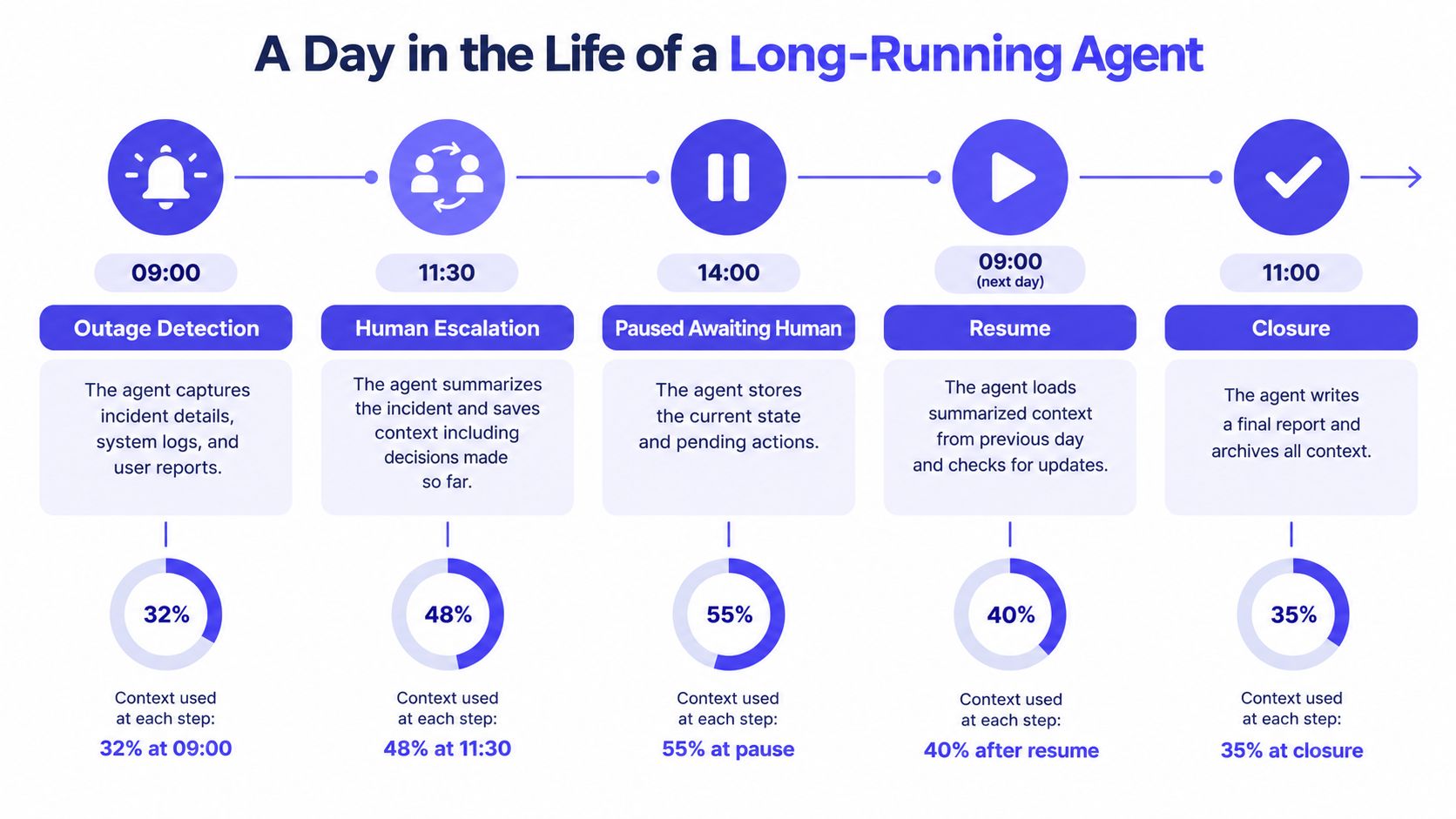
At 14:00, the agent is paused while the human investigates. Its live context can be discarded because the durable state contains the pending action and the approval status. When the agent resumes the next morning, it loads the handoff packet and fresh telemetry. It doesn't reread every tool call from the prior day, so yesterday's speculation doesn't compete with today's evidence.
Where discipline matters
Suppose the summary retains the technical hypothesis but drops the customer's deadline. The resumed agent may produce a technically correct update that arrives too late. If compression changes “deployment requires approval” into “deployment is ready,” the failure is more serious. The fix is to keep deadlines, permissions, and commitments as typed fields that summarization can't rewrite.
At closure, the agent writes the final report, links the evidence, records the human decisions, and archives the trace. The model's context is temporary. The incident record is the source of truth.
Pitfalls That Quietly Break Agent Reliability
Demos often hide the failures that appear after a long run, a human handoff, or a permissions change. Most of these failures aren't mysterious model behavior. They're consequences of losing, mixing, or trusting the wrong context.
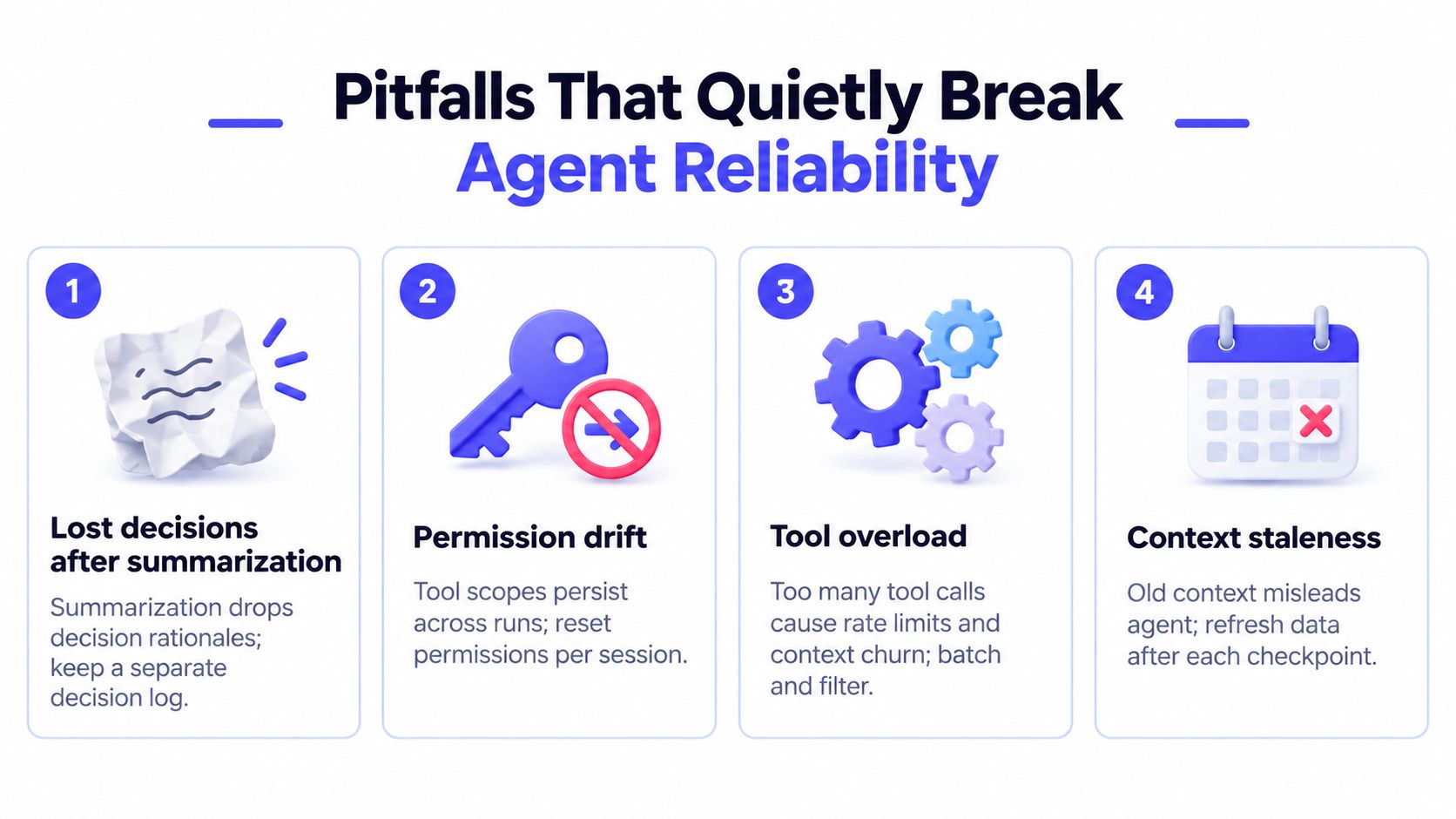
- Lost decisions after summarization: A summary may preserve the conclusion but omit why the team chose it. Keep a separate decision log with the decision, rationale, owner, timestamp, and superseded alternatives.
- Permission drift: A session can inherit tool access that no longer matches the user's authority or the current workflow. Issue scoped credentials per run, re-check authorization before sensitive actions, and make approval state explicit.
- Tool overload: Exposing every API makes selection harder and increases irrelevant schema tokens. Use a curated registry, group related operations behind stable interfaces, and provide a safe fallback when no tool fits.
- Stale grounding: A retrieved document can be accurate in general but wrong for the current operational state. Attach freshness metadata, prefer live reads for mutable records, and refresh retrieval after meaningful checkpoints.
- Silent truncation: A middleware layer may drop the oldest messages, the latest user constraint, or the final tool result without raising an error. Make truncation explicit, log what was removed, and preserve the current user turn, active instructions, decisions, and latest authoritative observation.
A context bug often presents as a reasoning bug. Debug the assembled prompt, tool registry, memory writes, and truncation events before replacing the model.
Test these failures directly. Create a run that produces long tool output, force a human handoff, change a permission, update a source record, and resume from compressed state. If the agent can't explain what it saw and why it acted, the system isn't ready for unattended execution.
Keeping Context Traceable Across Team Tools
An agent's context has to survive more than model calls. Product teams move decisions through Slack threads, Linear tickets, Notion pages, runbooks, repositories, and incident rooms. If each tool keeps a slightly different version of the truth, the next agent inherits ambiguity instead of context.
Assign each category a home:
| Context Category | Primary Tool | Owner |
|---|---|---|
| Decisions and rationale | Project ticket or decision record | Decision maker |
| Raw inputs and tool outputs | Agent execution log | Platform owner |
| Constraints and operating rules | Versioned runbook | Service owner |
| Open questions and approvals | Shared project workspace | Product or engineering lead |
| Final artifacts | Repository or document system | Artifact owner |
The agent should write references between these systems, not copy every artifact into its prompt. A ticket can contain the decision and a link to the execution trace. The runbook can define the constraint and its version. The agent can then retrieve the specific record needed for the next action.
Governance is part of context design
Someone must own stale context. Someone must approve changes to system instructions. Someone must review whether a tool's scope still matches the workflow. Put prompt and schema changes through the same pull-request process as application code, with a visible diff and tests for authorization, missing fields, truncation, and handoff recovery.
A lightweight version convention is enough to start. Store the context schema version, instruction version, retrieval timestamps, tool versions, and state revision with every run. A teammate returning later should be able to reconstruct what the agent saw without rerunning a mutable API call.
Teams adopting shared AI workspaces should evaluate whether the workspace preserves decisions, artifacts, and open questions as durable objects. The AI agent workspace guide provides relevant framing for that collaboration problem. The key principle is simple: context should behave like a governed schema, not an accidental chat transcript.
Your First Five Steps This Week
You don't need a complete memory platform to improve an agent. Ship small controls that make context visible, bounded, and recoverable.
- Instrument token usage per turn. Export input, output, tool, and retrieved-token counts to your existing observability stack. The smallest acceptable artifact is a dashboard or log query that shows context growth for one workflow.
- Version system instructions. Move prompts and policies into configuration reviewed through pull requests. The minimum artifact is a repository file with a diff that reviewers can inspect.
- Define an input and output schema. Name required fields for goals, constraints, decisions, tool results, approvals, and final status. Add tests that reject missing or ambiguous state.
- Checkpoint one long-running workflow. Before the agent pauses or reaches a hard context threshold, write a structured handoff packet. Test resumption from the packet without replaying the full trace.
- Assign a context owner. Write a one-page runbook covering stale retrieval, instruction overrides, permission changes, truncation behavior, and rollback. The owner should have authority to change the schema and require fixes.
Review the results at the next sprint meeting. Look for missing decisions, oversized tool responses, stale records, and unexplained truncation. Those findings will tell you whether the next investment belongs in retrieval, memory, tool design, governance, or observability.
SpecStory, Inc. offers tools that preserve prompts and decisions from AI coding-agent sessions, sync conversations across projects, and make prior context searchable for reuse. Visit SpecStory, Inc. to see how its Stoa workspace can help your team carry decisions, open questions, and artifacts from shared conversations into agent-assisted product work.
Older
AI Agent Workspace Guide for Product Teams
Newer
How to Write a PRD That Ships Faster for Startups
Newsletter
Get new posts in your inbox
Bring your team together to build better products. Fresh takes on remote collaboration and AI-driven development.