


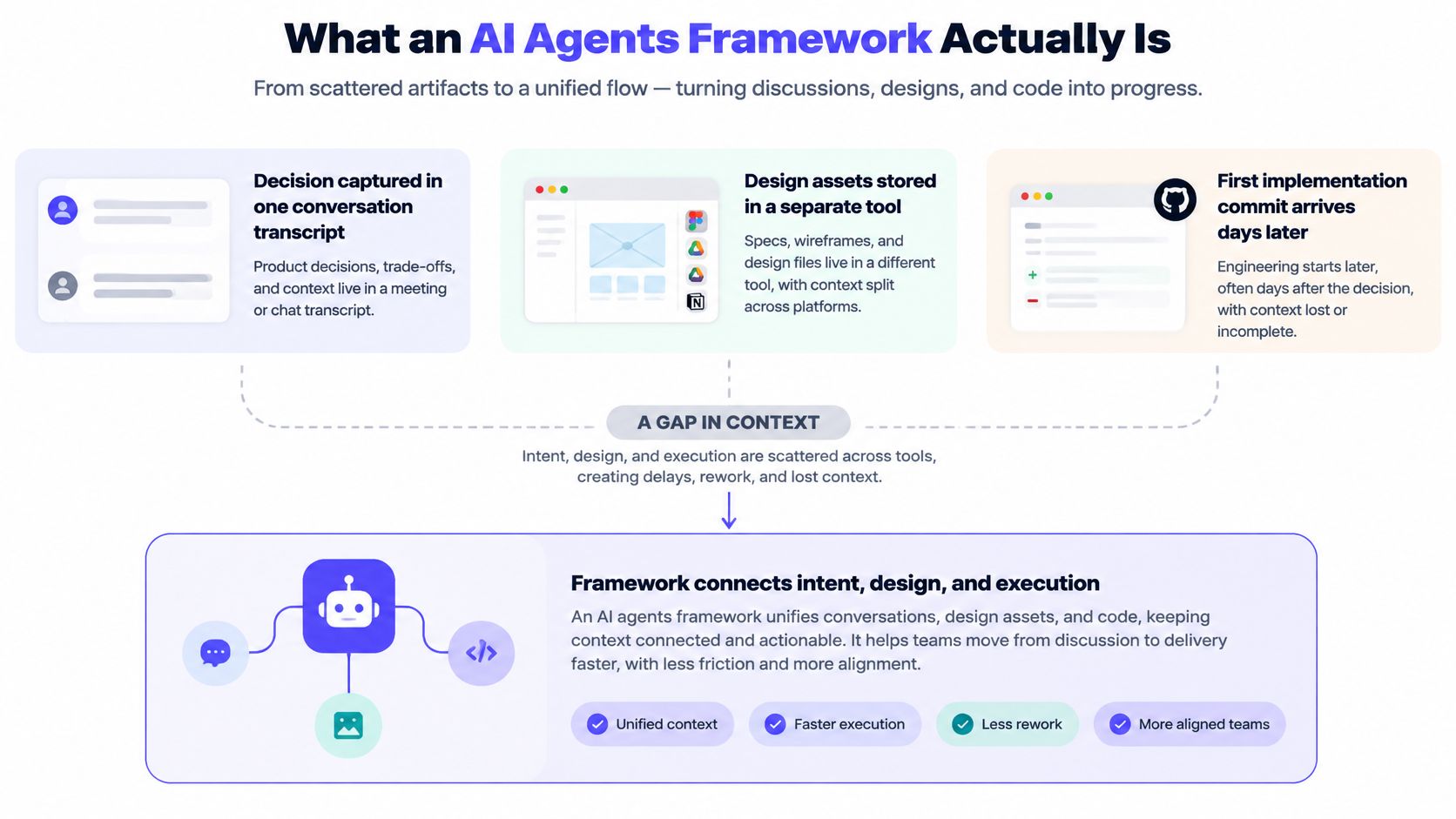
A PRD review ends with agreement, but the decision is buried in a meeting transcript, the design sits in a separate tool, and the first implementation commit arrives days later without a clear link to either. Someone on the team has to reconstruct what was decided, which details are still open, and what the engineer should build. That coordination gap is where an AI agents framework can help, if it reliably connects team intent to useful, reviewable work.
The hard part isn't getting a model to produce a plausible answer. It's coordinating context, tools, permissions, and verification so the result can be trusted and traced. For a small product team, the practical test is whether that setup shortens the journey from a decision in a meeting to a safe, reviewable first commit, without creating a new system that's harder to maintain than the workflow it replaces.
Table of Contents
- What an AI Agents Framework Actually Is
- The Five Components Every Framework Shares
- Architecture Patterns for Multi-Agent Workflows
- Collaborative Agent Workflows in Practice
- Developer APIs and Integration Points
- Reliability and Safety Beyond the Demo
- Build, Adopt, or Skip the Framework
- Adoption Checklist for Seed-Stage Product Teams
What an AI Agents Framework Actually Is
In a typical product workflow, one teammate shares the meeting transcript, another finds the latest design, and an engineer asks which version of the requirement is authoritative. A model can summarize the transcript or suggest code, but that doesn't automatically make it an agent. It still needs a way to retrieve relevant context, choose an action, use a tool, inspect the result, and continue or stop appropriately.
An AI agents framework is the coordination layer that makes those steps repeatable. It can route a task to the right tool, carry state between actions, keep an execution trace, and return a structured artifact such as a PRD draft or code diff. It doesn't decide whether the product requirement is strategically right, guarantee that the underlying model will reason well, or replace the team's business logic. People still need to define the goal, review consequential decisions, and own what ships.
A foundational pattern for this kind of system appeared in ReAct, published in 2022. It combines reasoning with actions and observations in a loop, giving an agent a way to interact with tools and use the results to decide what to do next. That history matters because it highlights what a framework orchestrates: not just a model response, but a sequence of actions, observations, and decisions (the ReAct approach and its role in agent design).
The useful question for a product team isn't, “Can this framework make an agent?” It's, “Can it connect the decision we made to an artifact we can inspect, test, and revise?” If the team still has to manually rebuild context and can't tell what tools the agent used, the framework hasn't closed the gap.
The Five Components Every Framework Shares
Think of an agent framework as a kitchen line. The food is the task, and a successful service depends on more than having a talented cook. Someone has to assign work, pass along the right information, provide usable equipment, and check what leaves the kitchen.
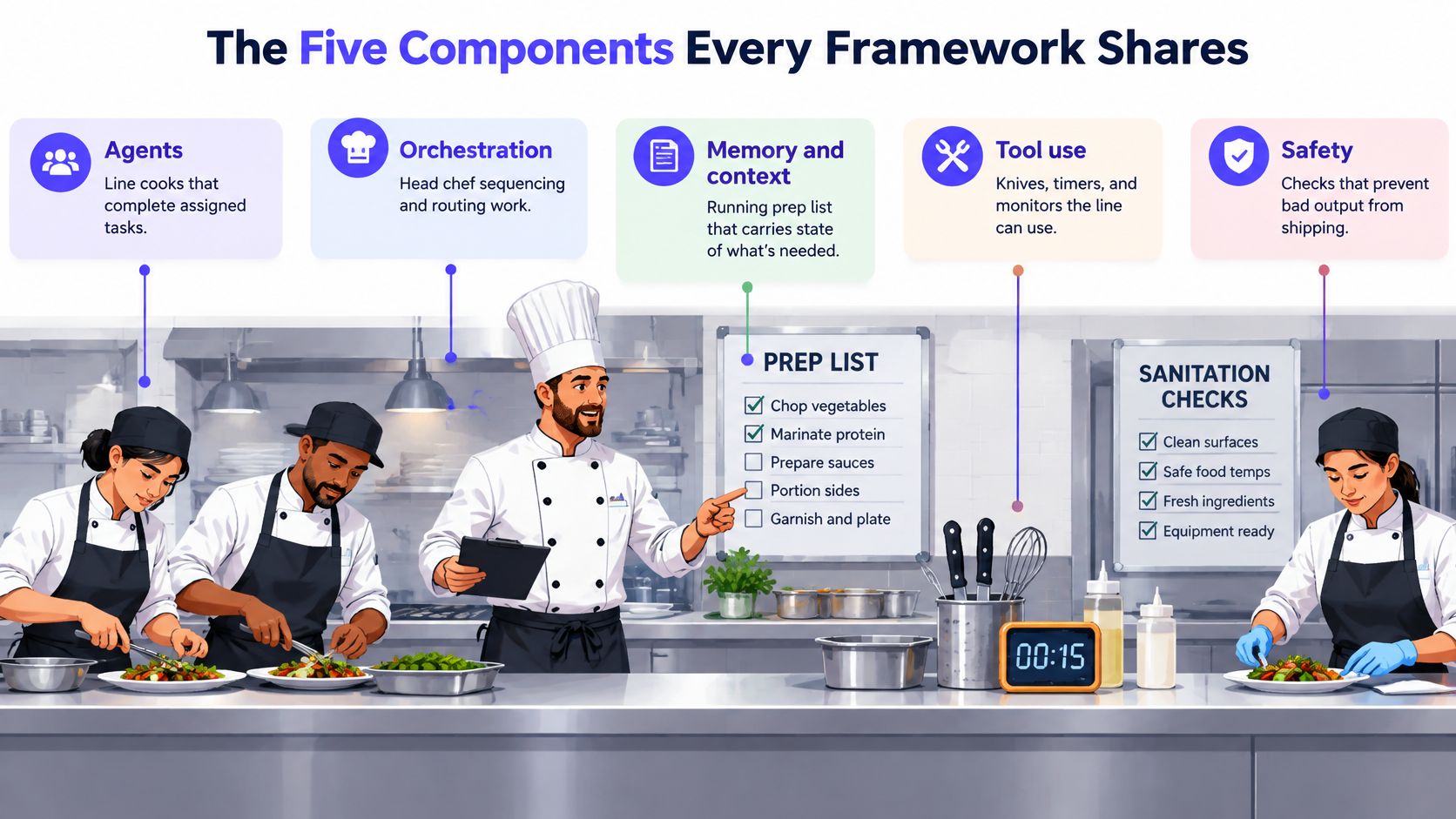
Agents are the line cooks: they handle assigned tasks, such as extracting requirements or proposing a code change. The design question is whether one agent should own the whole job or whether tasks need separate specialists. More specialists can help divide work, but they also create more handoffs to debug.
Orchestration is the head chef directing the flow. It decides what happens first, what can happen in parallel, when one result should go to another agent, and when the process should stop. Teams often underestimate this component because it also determines where retries happen and how work is attributed across agents. A loop without a clear stopping condition can waste time and produce repeated, low-value tool calls.
Memory and context are the running prep list. They preserve decisions, intermediate results, and the details an agent needs when work moves between steps. A team must choose what to retain, what to retrieve on demand, and what to discard. Poor context handling can leave an agent repeating questions or acting on outdated requirements. For more on the practical choices involved, see this guide to context engineering for AI agents.
Tool use is the equipment on the counter: a repository, a search function, a design file, or a test runner. The framework needs to define what each tool accepts and returns, and what the agent may do with it. A tool that returns ambiguous results can send the agent confidently down the wrong path.
Safety is the set of checks that prevents bad output from leaving the kitchen. That can mean limiting which files an agent can change, requiring approval before an action, or validating an output before it's accepted. A framework can expose these controls, but the team must decide what requires a human.
| Component | Design question | Common failure mode |
|---|---|---|
| Agents | Who owns each task? | Agents overlap or leave work undone |
| Orchestration | What happens next, and when does the run stop? | Runaway loops or broken handoffs |
| Memory and context | What information persists between steps? | Lost or stale context |
| Tool use | What can the agent call, and how is the result validated? | Invalid or unintended actions |
| Safety | What requires limits, validation, or human approval? | Permission leaks or unchecked output |
These pieces are interdependent. When something goes wrong, look for the broken handoff or missing control, not just a bad model response.
Architecture Patterns for Multi-Agent Workflows
Teams usually encounter three ways to organize an agent workflow. The simplest is a single agent with a tool belt. It can retrieve a requirement, inspect a design, and draft a specification in one loop. That's a sensible starting point when the task has a clear owner and the agent can use a small set of tools. It becomes awkward when the job requires several independent workstreams or when one agent's growing instructions make it hard to isolate errors.
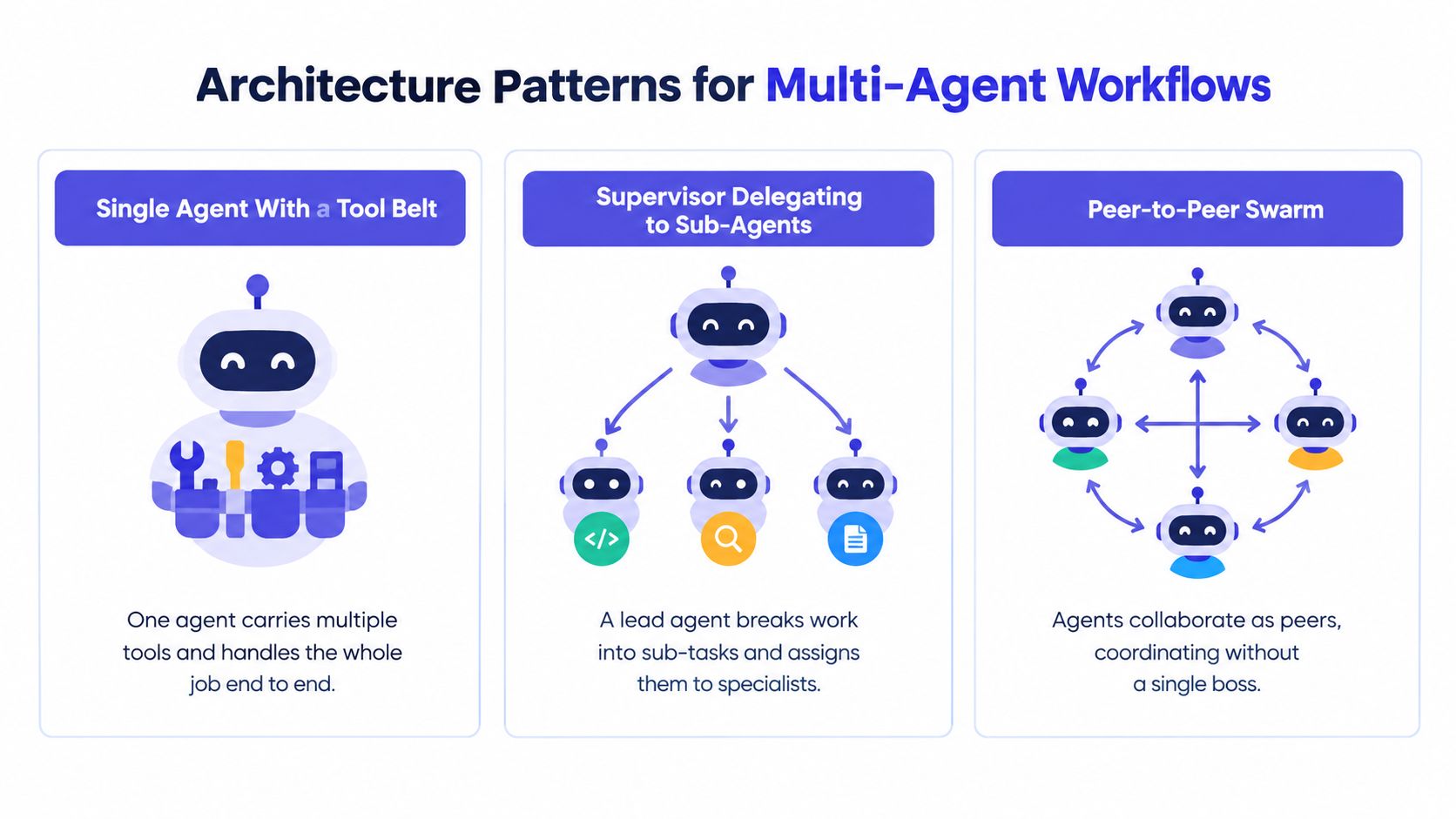
A supervisor with sub-agents adds a lead agent that divides a task and routes pieces to specialists. For example, one agent might gather customer context while another checks a proposed feature against existing product behavior. This arrangement can be useful when tasks have distinct inputs and outputs. It breaks down when the supervisor can't reliably reconcile conflicting results, or when each handoff adds more work than the specialization saves.
A peer-to-peer swarm lets agents pass work among themselves without a single central lead. That may suit an open-ended task where agents need to explore different directions. For a small team trying to turn one meeting decision into an implementation, though, it can make it harder to know who changed what, which agent owns the next action, and when the job is complete.
The historical rise of reason-act-observe designs, including the public interest illustrated by AutoGPT, helped bring iterative tool use into developer conversations. The lesson for teams isn't that every workflow needs multiple agents. It's that an agent system needs observable control flow, whether the work runs through one loop or several specialists. Teams considering how context and causality should carry through agent actions may find this guide to agent memory and causality useful.
The most expensive mistake is reaching for a swarm before proving that a single agent with a well-defined tool belt can do the work. More agents mean more context boundaries, handoffs, and opportunities for inconsistent decisions. Choose the simplest pattern that makes ownership and completion clear.
Collaborative Agent Workflows in Practice
A PRD workflow starts with the conversation, not with a blank document. An agent extracts the team's decisions and unresolved questions from the meeting transcript. A second step retrieves relevant design and customer context, then an orchestration layer combines those inputs into a structured Markdown draft. Each open question should point back to the part of the discussion that raised it, so the team can distinguish an actual decision from an assumption the agent filled in.
That's where the framework's components become visible. Memory carries the decision and its supporting context; tool use retrieves the design or customer material; orchestration decides which work happens first and how the results are assembled. A reviewer can correct the draft while the conversation is still fresh instead of reconstructing the rationale after implementation has started.
A code workflow should make the transition from specification to change equally inspectable. The agent receives an approved requirement, edits in a shared sandbox, runs relevant tests, and returns a diff with the test results. The framework should preserve the link between the originating decision and the proposed change. If a test fails, the engineer needs to see what the agent ran and what it changed, not just a summary claiming the task is complete.
These examples use similar building blocks but expose different risks. A PRD agent can make an assumption that misstates intent. A code agent can make a change that compiles but doesn't satisfy the requirement. In both cases, the team needs reviewable artifacts and a clear record of how they were produced.
Collaborative agents earn their keep when they reduce the effort of moving between discussion and execution, not when they merely add more generated text. Every useful output should remain traceable to the conversation that requested it.
Developer APIs and Integration Points
A framework's developer API is part of the product the team adopts. Tool definitions determine what an agent can call and what information each call requires. Whether the framework uses function declarations, JSON Schema, or a protocol such as MCP, the team needs a stable contract: clear inputs, predictable outputs, and validation when the tool returns something unexpected.
Output handling matters just as much. Structured outputs can make a PRD or action request easier to validate than free-form prose. But a schema alone doesn't guarantee useful content. Teams still need validators, sensible retry limits, and a plan for cases where the model returns incomplete or invalid data.
Streaming and partial results affect how the workflow feels to users. A product may benefit from showing an agent's progress while it works, but partial output should be clearly distinguished from a completed artifact. Hooks and callbacks can provide places to log actions, run evaluations, or pause for approval before a consequential tool call.
Software-agent benchmarks also reinforce why scaffolding matters: in August 2024, GPT-4o resolved 33.2% of SWE-bench Verified tasks, while the open-source Agentless scaffold roughly doubled its earlier 16% score, as described in OpenAI's introduction to SWE-bench Verified. That's a reminder to evaluate the complete workflow, including repository navigation, tools, edits, and verification, rather than judging the model's code suggestions in isolation.
API questions to settle before adoption
- Tool contracts: Can the team version tool schemas without breaking existing workflows?
- Context limits: Can logs and tool outputs be managed without overwhelming the model's useful context?
- Streaming: Can users tell which results are provisional and which are final?
- Intervention: Can the team pause execution for review before a sensitive action?
- Observability: Can engineers trace a failure across the model, tools, and external services?
A framework may offer integrations yet still leave the team stitching together its own observability. Before choosing one, check how its integration surface fits the systems you already run and the ones you'll need to connect, using a practical AI agent integration guide. If the API makes it difficult to record tool calls or enforce review, those gaps become production work.
Reliability and Safety Beyond the Demo
A successful first run is not evidence that a workflow is dependable. Pass@1 can flatter an agent because it says little about whether the agent will behave consistently when task details, available context, or tool responses change. ReliabilityBench reports that an agent's 96.9% pass@1 under unchanged conditions fell to 88.1% under a task perturbation, a decline of 8.8 percentage points (ReliabilityBench's evaluation of agent consistency and robustness).
That difference matters when a team moves from demo tasks to real work. A meeting decision may be expressed differently by two people, a design reference may be updated, or a tool may return incomplete information. If the framework can't preserve state and expose what happened, the team may see an answer that looks polished but can't be reproduced or safely acted on.
Security testing makes the same point from another angle. In large-scale testing, participants submitted 1.8 million prompt-injection attacks against 22 frontier agents across 44 scenarios, and more than 60,000 attacks elicited policy violations, including unauthorized data access and illicit financial actions (the UK AI Security Institute's prompt-injection findings). A popular framework or capable model doesn't, by itself, make an agent safe.
Practical rule: Treat framework selection as a security and governance decision, not a feature-matrix exercise.
A serious setup needs explicit controls: deterministic state tracking where possible, schema-validated tool calls, bounded retries, checkpointed artifacts, permission boundaries, and audit logs. The team should test repeated runs and changes to the context and tool responses, not only the happy path. For code-writing agents, a code execution sandbox also helps keep experiments separate from the systems and files the agent shouldn't be able to change.
Build, Adopt, or Skip the Framework
Adopting a framework isn't automatically better than writing a small loop yourself. Frameworks appear in about 18% of organizations running LLM applications, up from 9% a year earlier, according to Splunk's discussion of agent frameworks. That increase shows growing use, not universal fit. Teams may choose not to adopt one because they want simpler debugging, fewer dependencies, or more control over how context and actions are handled.
A small team can make the decision by testing three things.
Portability: Identify which artifacts remain usable if the framework is replaced. Prompts, tool schemas, test cases, execution traces, and generated files shouldn't become inaccessible just because the orchestration layer changes. If the framework owns all state in a proprietary format, the team inherits an exit cost.
Observability: Check whether an engineer can follow a failure from the conversation through the agent's decisions and tool calls to the resulting artifact. A clean demo doesn't answer how easily the team can debug a stale context, failed action, or unexpected retry.
Total operating cost: Account for the work created by the system, not just the model call. Multiple agents can add duplicated context, extra tool calls, longer execution, retries, and more coordination for humans to review.
A minimal custom loop can beat an off-the-shelf framework when the workflow is narrow, there's one clear agent, the tool set is small, and the team can implement the needed logging, validation, and handoff contract without taking on unnecessary orchestration. It's a poor choice when the team would have to rebuild durable state, approval controls, and reliable recovery on its own.
The best choice is the one that cuts the time between a team agreeing on what to build and reviewing a first commit. If a framework adds ceremony without making that transition safer or easier to trace, it hasn't earned its place.
Adoption Checklist for Seed-Stage Product Teams
A 2026 synthesis of McKinsey data reports that 23% of organizations had scaled an agentic AI system in at least one business function. It also reports that 40% of organizations with more than $1 billion in annual revenue were scaling agents, compared with 22% of smaller organizations (the adoption synthesis and its survey context). For a seed-stage team, adoption isn't the milestone. A dependable workflow that people use is.
Before wiring an agent into product work, answer these questions:
- Where do decisions live today? Pick a real workflow and identify the transcript, design, and requirements the agent would need.
- What could a wrong tool call do? Decide which actions are safe to run automatically and which need a human approval step.
- Can you trace the output? Make sure a teammate can follow a generated document or code change back to the conversation and context that produced it.
- How do you test failure? Define how you'll check invalid outputs, failed tools, changed context, and attempts to exceed the agent's permissions.
- What's the exit cost? Confirm that your useful artifacts and test cases remain accessible if the framework is abandoned or replaced.
Run a small, real workflow before expanding the system. Review the output with the people who will use it, inspect the trace when something goes wrong, and keep the process only if it reduces coordination without hiding risk.
An AI agents framework earns its place when it makes the path from intent to artifact shorter, safer, and easier to walk back.
SpecStory, Inc. builds Stoa, a multiplayer AI workspace where product teams capture meeting decisions and turn them into traceable PRDs and code changes in shared sandboxes. If your team is trying to connect conversations to agent execution without losing the context behind a decision, visit SpecStory, Inc. to see how Stoa approaches that workflow.
Newsletter
Get new posts in your inbox
Bring your team together to build better products. Fresh takes on remote collaboration and AI-driven development.