


A project can look settled right up until the team starts building. The brief is polished, the kickoff is over, and then a designer hears “make it feel more premium” while an engineer is working from a different interpretation of the goal. Nobody can say who gets the final call, what's out of scope, or how the team will judge whether the result works.
A useful design project brief template doesn't try to predict every conversation. It makes the important decisions visible, names who owns them, and keeps unresolved questions in view as the work changes.
Table of Contents
- Why Most Design Briefs Create Rework Before They Create Alignment
- The Template, Section by Section, With Fill-In Prompts
- A Completed Example for a Real Onboarding Redesign
- Adapting the Template by Project Scope
- Running the Brief as a Living Artifact After Kickoff
- Where Real Briefs Break and How to Fix Them
Why Most Design Briefs Create Rework Before They Create Alignment
A brief can describe a project in detail and still leave the team without a shared basis for decisions. Background explains the situation; alignment depends on a defined outcome, agreed boundaries, and a named decision-maker for trade-offs. Treat the brief as a working alignment artifact, not a one-time intake form.
Research on sampled design briefs found that project background appeared in 100% of documents, while business objectives appeared in 47%, research data in 1%, and project scope in 6% (Design Society analysis of design briefs). The gap matters in practice: a team may understand the context but still lack the evidence and authority needed to choose a direction.
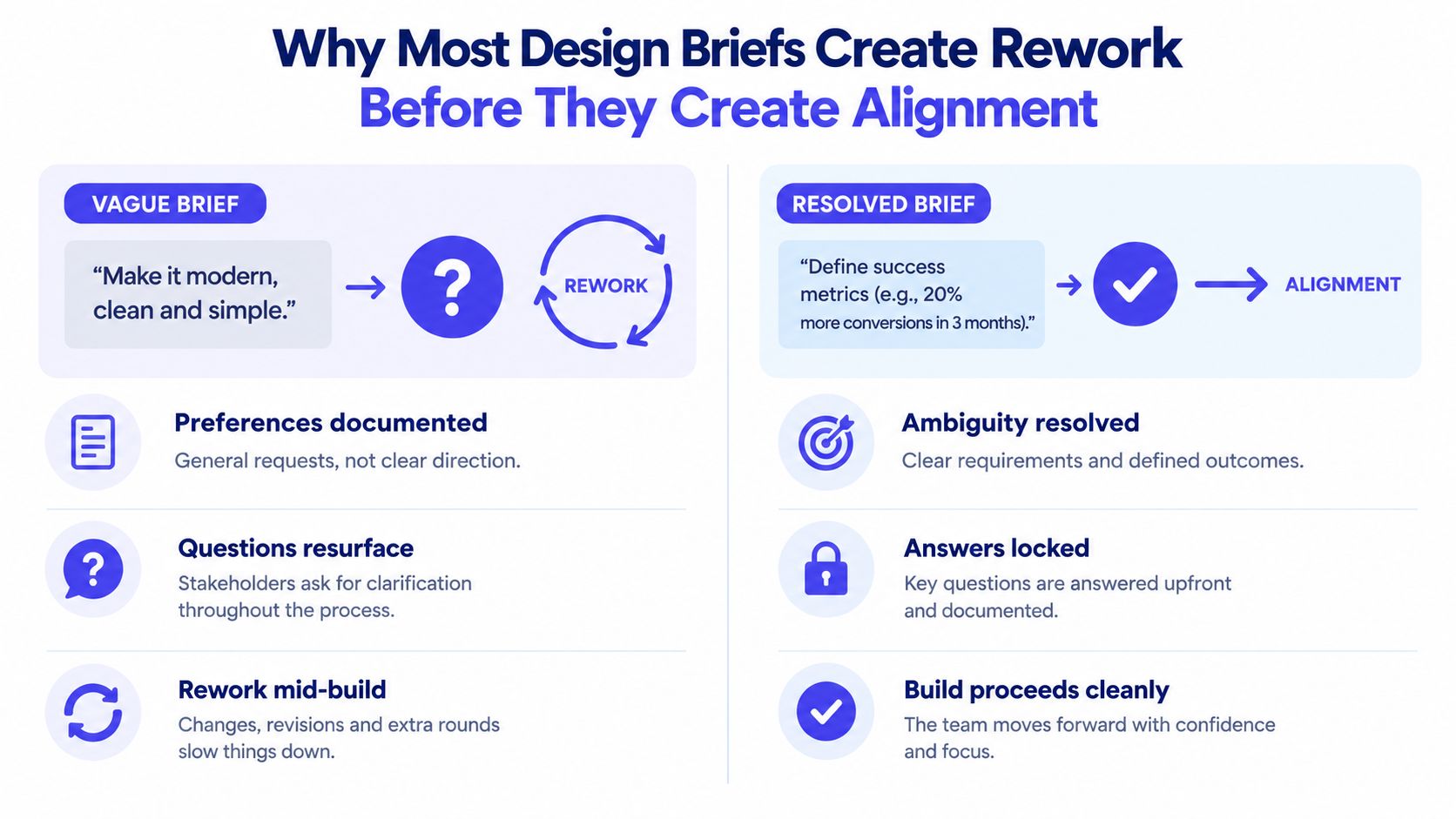
Say a project aims to “modernize the onboarding experience.” Without a user problem or success criteria, a stakeholder may expect a visual refresh, the product lead may want fewer interruptions, and engineering may assume the current flow must remain intact. Those interpretations can survive kickoff and collide during design review or implementation. Define what success looks like and who decides when those expectations conflict.
| What typical briefs cover | Decision it must support |
|---|---|
| Project background | Why does this work matter now, and what evidence supports the need? |
| Audience | Which users or stakeholders are affected, and whose needs take priority? |
| Objectives | What observable outcome will count as success, and who confirms it? |
| Deliverables | What will the team hand over, and who accepts each item? |
| Scope | What's included, what's excluded, and who can authorize a change? |
A useful brief doesn't need to become an exhaustive intake form. Make it decision-forward: record the intended outcome, boundaries, decision owner, and unresolved questions. Keep it current as decisions change, so the team can distinguish settled choices from assumptions still under discussion. A concise document can support alignment when it makes those responsibilities clear. For practical guidance on reducing friction across delivery, see this client site delivery workflow advice.
The Template, Section by Section, With Fill-In Prompts
Use a short summary first, then add enough detail to make decisions testable. That layered approach keeps the brief scannable without confusing brevity with completeness (Design Society research on design briefs).
Copy these prompts into a working document. The project owner can draft them with the team, but each field needs a named owner and a clear test for completion.
Project snapshot and problem
Project snapshot: Name the project, owner, sponsor, current version, and intended review point. The project owner maintains it. Done when: anyone opening the document can identify who coordinates the work and who approves it.
Problem and opportunity: Describe the user or business problem, what's known, and why it matters now. Keep the proposed solution out of the problem statement. The product or business lead owns the framing, with research partners validating evidence. Done when: the team agrees on the problem even if it hasn't agreed on the design.
Audience and stakeholders: Identify the users affected and the stakeholders who contribute, review, or decide. The product lead owns the audience definition; each functional lead confirms relevant stakeholders. Done when: the team knows whose needs it is prioritizing and who must be consulted.
For groundwork on distinguishing user needs from assumptions, use this guide to assessing customer needs.
Outcomes, boundaries, and delivery
Objectives and success criteria: State the intended outcome and how the team will observe it. Name the metric or evaluation method, its owner, and who accepts the result. Done when: two people can independently tell whether the objective has been met.
Scope, constraints, and deliverables: List what's in and out, then record relevant budget, schedule, platform, accessibility, legal, and technical constraints. For each deliverable, name its owner and acceptance authority. Done when: a new request can be compared with an explicit boundary, not an unstated expectation.
Milestones and dependencies: Record the checkpoints and external inputs that affect progress. The project manager maintains sequencing; functional owners confirm dependencies. Done when: each critical dependency has an owner responsible for surfacing a delay.
Decisions and unresolved items
Decision rights: Name who recommends, who provides input, and who makes the final call for each important decision. Done when: the team can resolve a disagreement without guessing who has authority.
Open questions, assumptions, and review cadence: Separate known facts from assumptions, list unresolved questions with owners, and set when the team will revisit them. The project owner coordinates the review; subject-matter owners update their items. Done when: every open item has a next action or an explicit reason it remains open.
A Completed Example for a Real Onboarding Redesign
A SaaS team wants to redesign its first-run onboarding because new users aren't reaching the point where they can use the product independently. The brief shouldn't start by prescribing a checklist, a tour, or a redesigned dashboard. It should first align the team on the user problem, outcome, constraints, and decision authority.

The worked example below uses fictional details to show how the template can be completed without pretending that a preferred interface is already the answer. The methodology is solution-neutral: define context, problem, audience, measurable objectives, constraints, decision rights, and open questions before drawing the interface (PMI requirements-management guidance).
| Field | Filled value | Owner |
|---|---|---|
| Project snapshot | First-run onboarding redesign for new workspace administrators | Product lead |
| Problem | New administrators often leave setup unsure what to do next; the team needs to validate where they get stuck | Research lead |
| Audience | New administrators setting up a workspace, with support staff as a secondary stakeholder | Product lead |
| Objective | Help new administrators reach the first meaningful product task; define the success measure after reviewing available product evidence | Product lead and analytics |
| Scope | Review the first-run experience, prototype changes, and specify the agreed flow; broader account setup remains outside this effort | Design lead |
| Constraints | Preserve existing account and permission rules; engineering confirms implementation limits before design approval | Engineering lead |
| Deliverables | Validated problem summary, prototype, acceptance criteria, and implementation handoff | Design lead |
| Decision rights | Product lead resolves product trade-offs; engineering lead confirms feasibility; named sponsor approves material scope changes | Sponsor |
| Open questions | Which setup step creates the most confusion, and what event can represent meaningful progress? | Research and analytics |
| Review cadence | Revisit decisions and open questions in the project's regular review | Project owner |
The trade-off is deliberate: the team can explore interaction patterns, but it can't redefine account permissions as part of this project. Analytics owns the measurement plan, while the product lead decides whether proposed changes still address the agreed problem. Before moving into detailed screens, the team can use wireframe best practices to keep early layouts focused on flow and information hierarchy rather than visual polish.
A design review can test whether a proposed direction serves the agreed user need and product goal. The brief should remain the reference for that conversation, not a substitute for the prototype or acceptance criteria.
Adapting the Template by Project Scope
One template shouldn't force every project into the same amount of process. A contained feature experiment needs crisp boundaries and a clear learning goal. A broad product-surface redesign needs deeper dependencies and acceptance criteria. A brand engagement has different decision materials, such as positioning, identity principles, and applications.
Keep the same decision spine, then adjust the depth. Don't delete ownership or open questions just because a project is small. Do avoid requiring a feature team to complete brand-level stakeholder mapping when it won't help anyone make a decision.
| Template field | Feature | Product surface | Brand |
|---|---|---|---|
| Problem and audience | Keep concise and specific to the affected task | Expand to include user groups and connected journeys | Frame around audience perception and business need |
| Objectives and evaluation | Focus on the experiment outcome and learning | Define outcomes across the surface and its key journeys | Set criteria for evaluating identity and applications |
| Scope and constraints | Keep a tight in/out list and key technical limits | Detail platform, accessibility, technical, and operational constraints | Emphasize brand rules, channels, and production needs |
| Deliverables and acceptance | List the feature, tests, and approval owner | Break down the surface, shared components, and acceptance points | Include identity assets, guidance, and application examples |
| Dependencies | Note only dependencies that could block the work | Make cross-team and system dependencies visible | Include review, content, and production dependencies |
| Decision rights and questions | Name a decision-maker and surface unknowns | Clarify decisions across product, design, and engineering | Identify brand approver and resolve competing stakeholder views |
For a feature, skip background that doesn't change the decision and link to supporting detail instead. For a product surface, keep shared constraints and dependencies visible because local design choices can affect connected experiences. For a brand project, give the decision-maker clear criteria for reviewing the work so feedback doesn't collapse into subjective preference.
Success means the brief is proportionate: the team can see what it must decide without wading through fields that don't apply. If a section has no decision to support, shorten it or mark it not applicable. If a project spans multiple teams or has unresolved approvals, retain the detail even when the document grows.
Running the Brief as a Living Artifact After Kickoff
A brief can be accurate at kickoff and misleading later. A stakeholder changes a priority, a dependency slips, or a prototype reveals that an assumption was wrong. If the team changes the plan without recording the decision, the document stops helping people align.
Many templates explain how to fill in a brief but give less attention to keeping it current (Canva's design brief guidance). Treat maintenance as part of delivery, not as administrative cleanup.
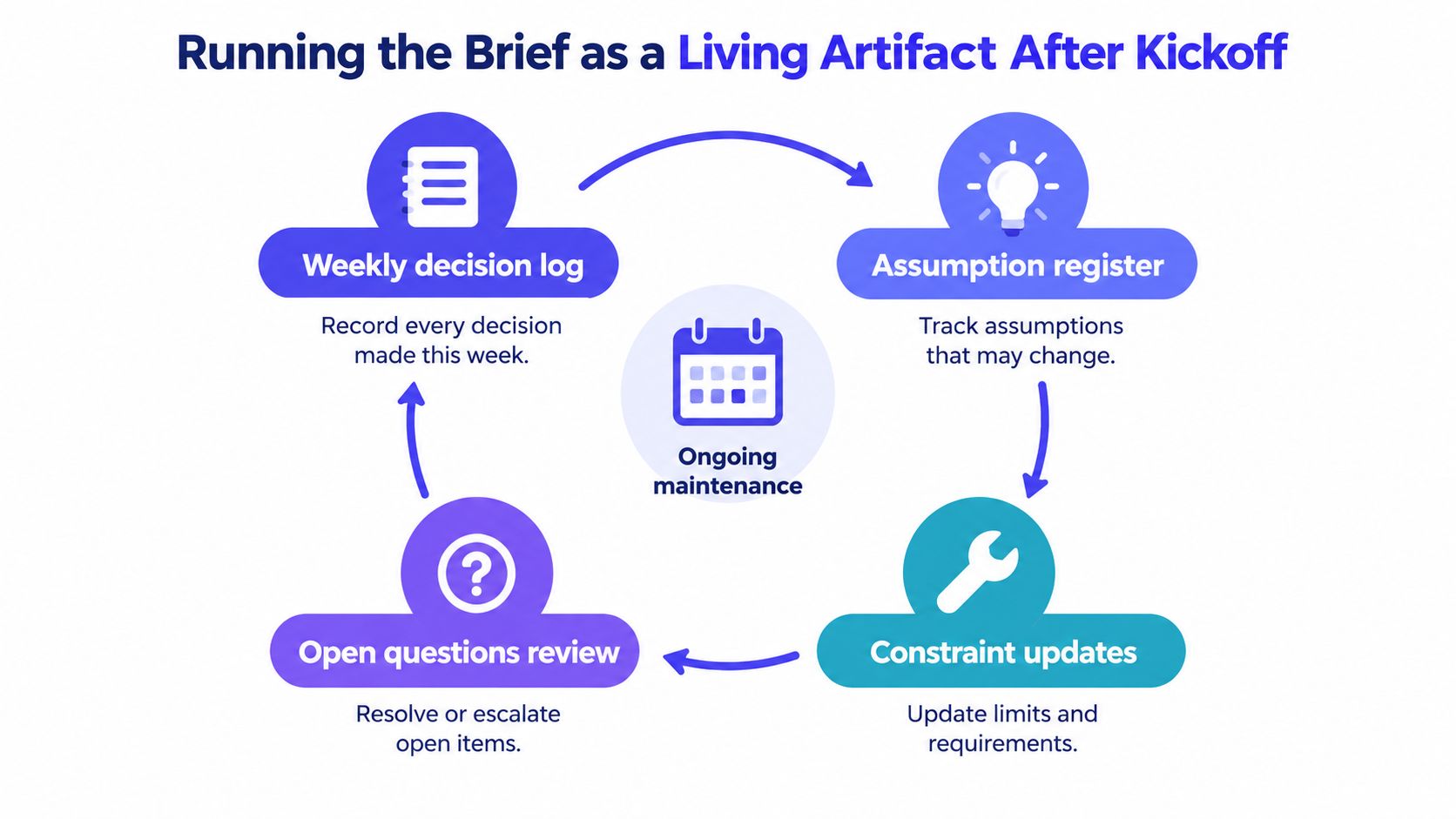
A lightweight maintenance loop
Record decisions as they happen. The project owner keeps a decision log alongside the brief. Each entry captures the decision, the person who made it, the reason, and any effect on scope, success criteria, or deliverables. A brief update shouldn't erase the history of why the team changed direction.
Revisit assumptions. Give each assumption an owner and a status: untested, confirmed, or no longer valid. Recheck assumptions when the team reviews research, prototypes, or dependencies. A claim that was safe to use during planning may need revision once implementation exposes a technical limit.
Resurface open questions. Review unresolved items in the team's regular standup or project review. The owner reports whether the question is answered, blocked, or escalated, and names the next action. Don't leave an open question buried in meeting notes where only its original author can find it.
Update constraints and change decisions visibly. When a deadline, platform limit, approval, or requirement changes, record what moved and who authorized the change. Then check whether the objectives, scope, and acceptance criteria still fit together. If the new information alters the project's purpose, take the revised brief back to the relevant decision-maker instead of editing it without notification.
Working rule: Keep the brief short enough to revisit, then link it to the artifacts that show the work. Prototypes, design reviews, and acceptance tests should connect back to the decisions and criteria they depend on.
A living brief isn't a transcript of every discussion. It's a concise record of the current agreement, its owners, and the uncertainty that still matters. Teams working through conversation-heavy reviews can also learn from this explanation of living documents.
Where Real Briefs Break and How to Fix Them
A setup wizard can reach design review before anyone agrees on the user problem it should solve. That is a decision gap, not a missing field. The review question is whether the team knows what to do when reasonable people disagree, and who has authority to choose.
Research on sampled briefs found that common parameters were often missing, and business objectives were frequently absent even when several parameters were included. More fields alone do not make a document ready for decisions. Check for gaps that could send the team in conflicting directions, then agree on what success looks like and who decides.
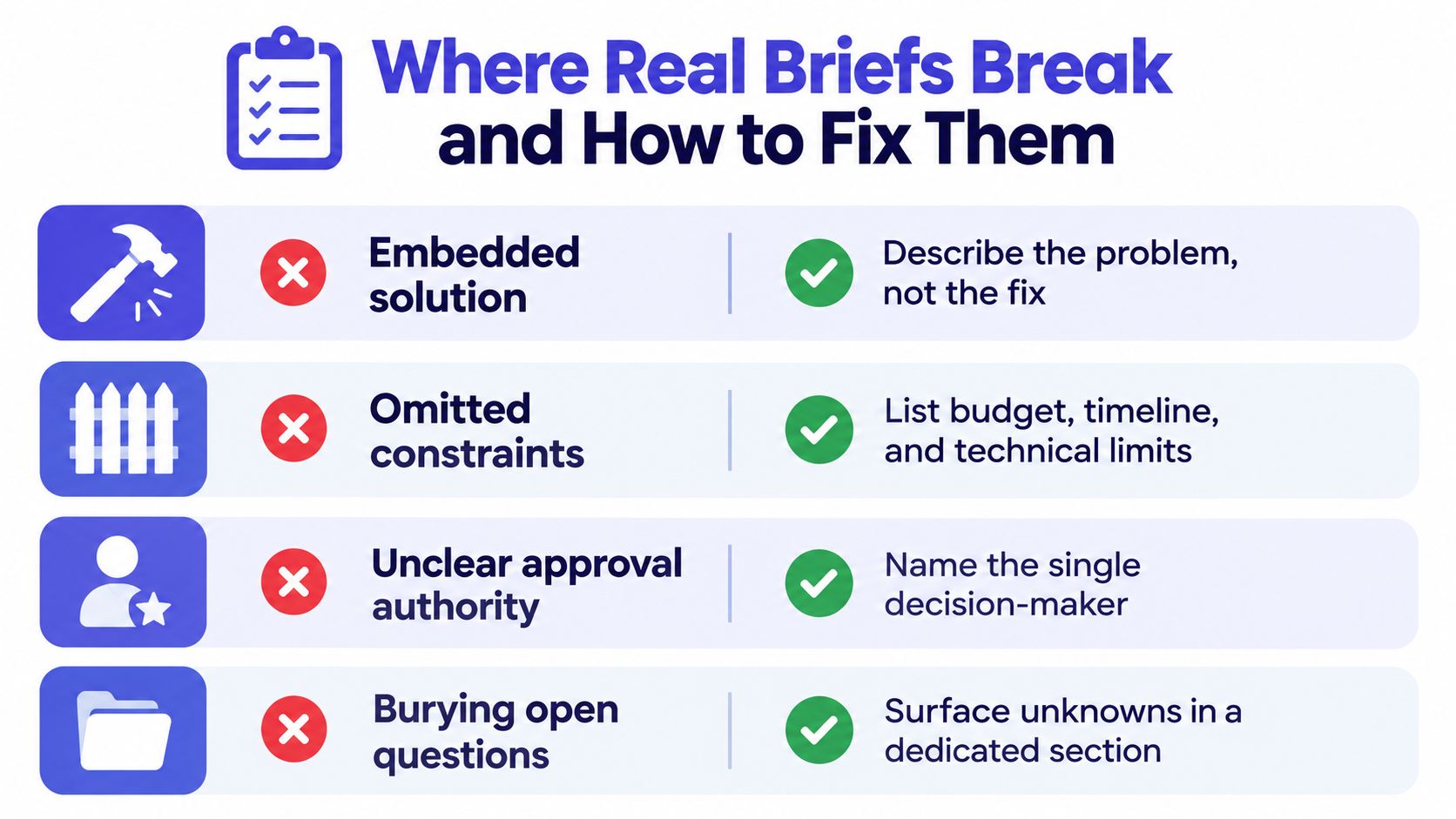
Four failure modes to catch
The solution is embedded in the problem. A setup wizard is specified, but the user difficulty behind it remains unclear. Ask whether the team could choose a different solution and still meet the objective. State the user or business problem, leave implementation options open, and name who approves the direction. Success means the chosen solution addresses the agreed problem.
Constraints are missing. Work starts without clarity on platform, accessibility, legal, technical, or timing limits. Ask which constraints could rule out a preferred direction. Have the relevant functional owners state those limits before treating a concept as approved. The decision-maker should confirm whether the concept is feasible.
Approval authority is vague. Several stakeholders comment, but nobody can resolve conflicting feedback. Name the person who makes the final call for each deliverable that could change direction or scope. Success is a clear approval path, not unanimous agreement.
Open questions are hidden. The document reads as settled while assumptions remain untested. Separate what the team knows from what it assumes, then assign each unresolved question an owner and next action. The named decision-maker should resolve questions that affect scope, direction, or success criteria.
Before sharing, check that the objective has an observable success criterion, scope boundaries are clear, each important deliverable has an approver, and unresolved questions are visible. Then connect the artifact to the design-to-development handoff, so the team carrying the work forward can see the decisions behind it.
SpecStory, Inc. builds Stoa, a shared workspace where product teams can capture conversations, decisions, designs, and open questions as working context. Teams that need to turn alignment discussions into traceable project artifacts can visit SpecStory, Inc. to explore how Stoa supports that workflow.
Newsletter
Get new posts in your inbox
Bring your team together to build better products. Fresh takes on remote collaboration and AI-driven development.