


You've got a feature that sounds simple. The team agrees it's important, design has started sketching screens, and an engineer asks one innocent question: “What should happen if the user does something unexpected?” Suddenly, the decision is buried in Slack, the mockup and ticket disagree, and the sprint is moving without a shared definition of done.
That's the situation a good product requirements document, or PRD, prevents. A startup PRD doesn't need to become a bureaucratic gate or a frozen contract. It needs to preserve the problem, decisions, constraints, and verification rules well enough that humans and AI coding agents can build from the same context.
Table of Contents
- Why Most PRDs Fail Small Teams Before Coding Starts
- The Essential Structure Every Effective PRD Needs
- Drafting Your PRD Without Getting Stuck in Endless Edits
- Writing Goals Metrics and Acceptance Criteria That Engineers Can Verify
- Keeping Your PRD Alive With Versioning Collaboration and AI Agents
- Your Next PRD From Template to First Commit
Why Most PRDs Fail Small Teams Before Coding Starts
A feature can look small until implementation exposes the missing decisions. “Add team analytics,” “improve onboarding,” and “let users export their data” sound clear only because each person supplies a different meaning. Product assumes one workflow, design sketches another, and engineering meets a third interpretation after work has started.
The sprint then turns into a sequence of avoidable questions: Which users have access? What does an empty state show? Is export synchronous? What result qualifies as success? Each answer can force changes to designs, tickets, data models, or code already in progress. Underestimating scope is a common startup failure pattern, as discussed in how hard is it to make an app.
Practical rule: If two capable teammates can read a requirement and implement different behaviors, the requirement isn't ready.
A PRD became common alongside structured software engineering in the 1980s and 1990s, when waterfall methods favored detailed requirements written before coding. Early documents could be “hundreds of pages” long and functioned as contracts between product and engineering teams, as described in this history of the product requirements document. That format suited work built around exhaustive upfront specification, traceability, and formal sign-off.
Seed-stage teams need a smaller operating agreement. It should preserve why the work matters, who it serves, what will be built, what won't be built, and how the team will verify it. Written clearly, the same artifact gives a designer, engineer, and AI coding agent enough context to make consistent decisions without turning every open question into a meeting.
The cost of skipping shared context
Without a PRD, intent gets reconstructed from scattered artifacts. An engineer searches old messages, a designer checks a forgotten comment, and the founder becomes the database for unresolved decisions. This “Slack archaeology” slows delivery, hides trade-offs, and makes context disappear when someone changes focus.
Ambiguity is the actual cost, not the number of pages. One expert source attributes 40–60% of defects to ambiguity, while another reports that 68% of engineering teams receive incomplete or ambiguous requirements in its cited findings, summarized in this practical PRD workflow. Those figures support a focused response: make decisions, constraints, edge cases, and verification rules explicit.
A lightweight PRD earns its place when work crosses roles, changes user behavior, introduces edge cases, or carries meaningful technical risk. A tiny copy change may need only a ticket. A new workflow needs a decision trail that remains useful after the first commit, including when an AI agent reads it months later.
The Essential Structure Every Effective PRD Needs
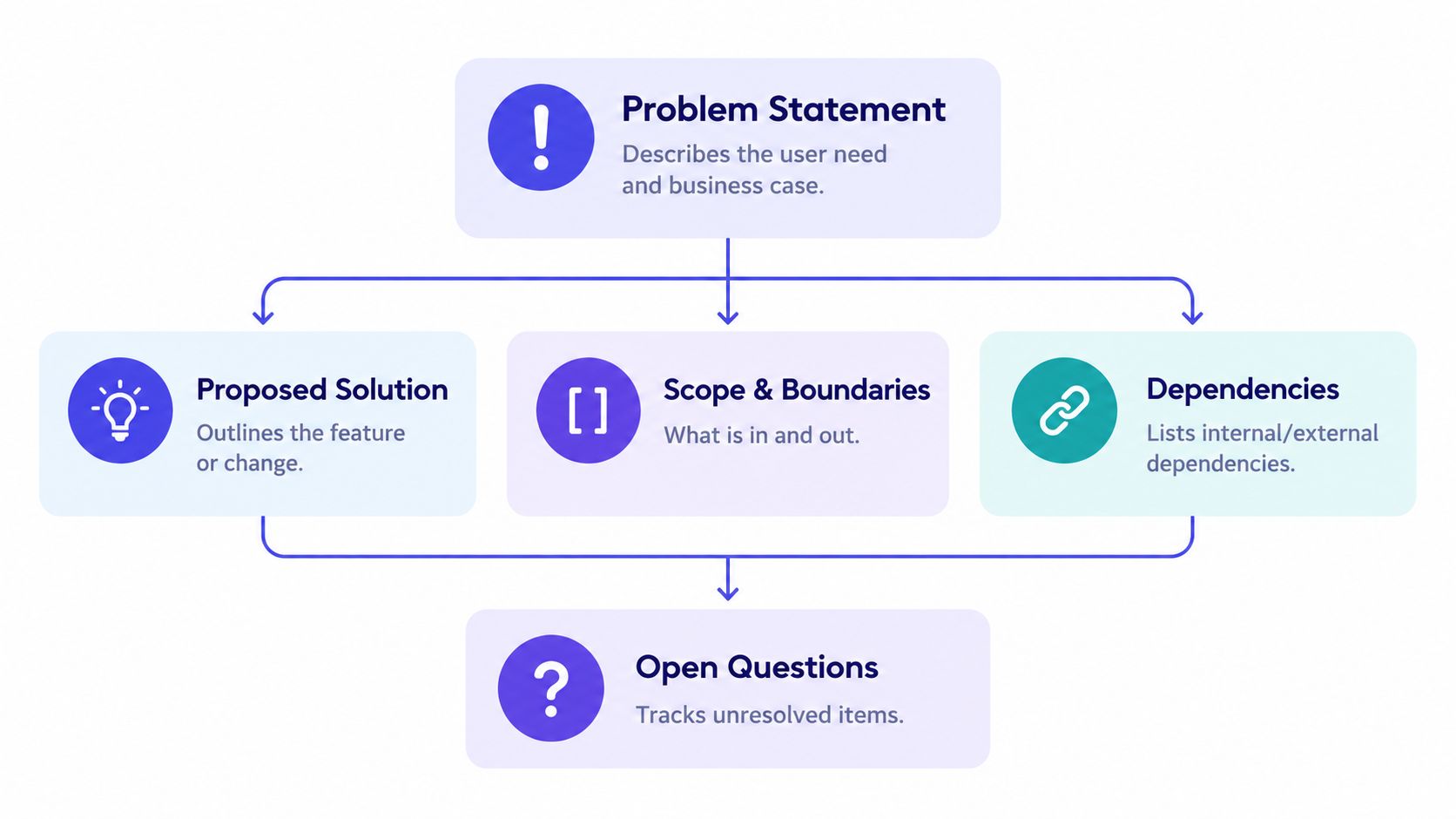
A startup-friendly PRD is a decision container, not a feature inventory. Each block should answer a question that otherwise creates meetings, rework, or inconsistent implementation.
Start with the problem
Write the user problem in a few direct sentences. Name the affected user, the situation, the friction, and the consequence. “Users need better reporting” is a theme, not a problem. “Workspace admins can't identify which invitations remain unused, so they manually inspect records before following up” gives design and engineering something concrete to investigate.
Add why now if timing affects prioritization. It might be a customer commitment, a product dependency, a change in operating conditions, or evidence that the current workflow no longer supports the team's direction.
Define outcomes and boundaries
State the goals as outcomes rather than shipped objects. “Help admins understand invitation status” is stronger than “Build an invitation dashboard.” Then add non-goals. A short list of exclusions protects the team when someone proposes adjacent work during implementation.
A useful scope block distinguishes:
- In scope: The user journeys and behavior this release must support.
- Out of scope: Related requests intentionally deferred.
- Constraints: Technical, legal, design, operational, or timing limits.
- Dependencies: Services, teams, data, permissions, or decisions required before release.
For a reusable reference, this product requirement document template can help you organize those blocks without turning the document into a formal enterprise specification.
Describe users, flows, and requirements
Identify the primary user and the job they're trying to complete. Include a simple user flow or low-fidelity sketch when screens, states, or transitions matter. Keep pixel-level design in the design tool, but link it from the PRD so the requirement and the visual execution stay connected.
Functional requirements describe behavior. Non-functional requirements describe qualities such as performance, security, accessibility, reliability, observability, and recovery. Both matter. “The user can export filtered records” is incomplete if the PRD says nothing about permissions, failure handling, or what the user sees while the export is prepared.
Make success and uncertainty visible
Success metrics should show whether the change solved the original problem. Release criteria should identify what must be true before launch. Risks and open questions belong in the document, not in someone's memory.
A good PRD also records ownership and change history. You don't need ceremony for every edit, but you do need to know which decision is current, who made it, and what remains unresolved. Agile changed expectations around PRDs in the early 2000s, when teams rejected large static documents as too slow to maintain. The practical lesson from that shift is not “stop documenting.” It's “keep the document concise, collaborative, and current,” as this account of PRD evolution in Agile practice explains.
Drafting Your PRD Without Getting Stuck in Endless Edits
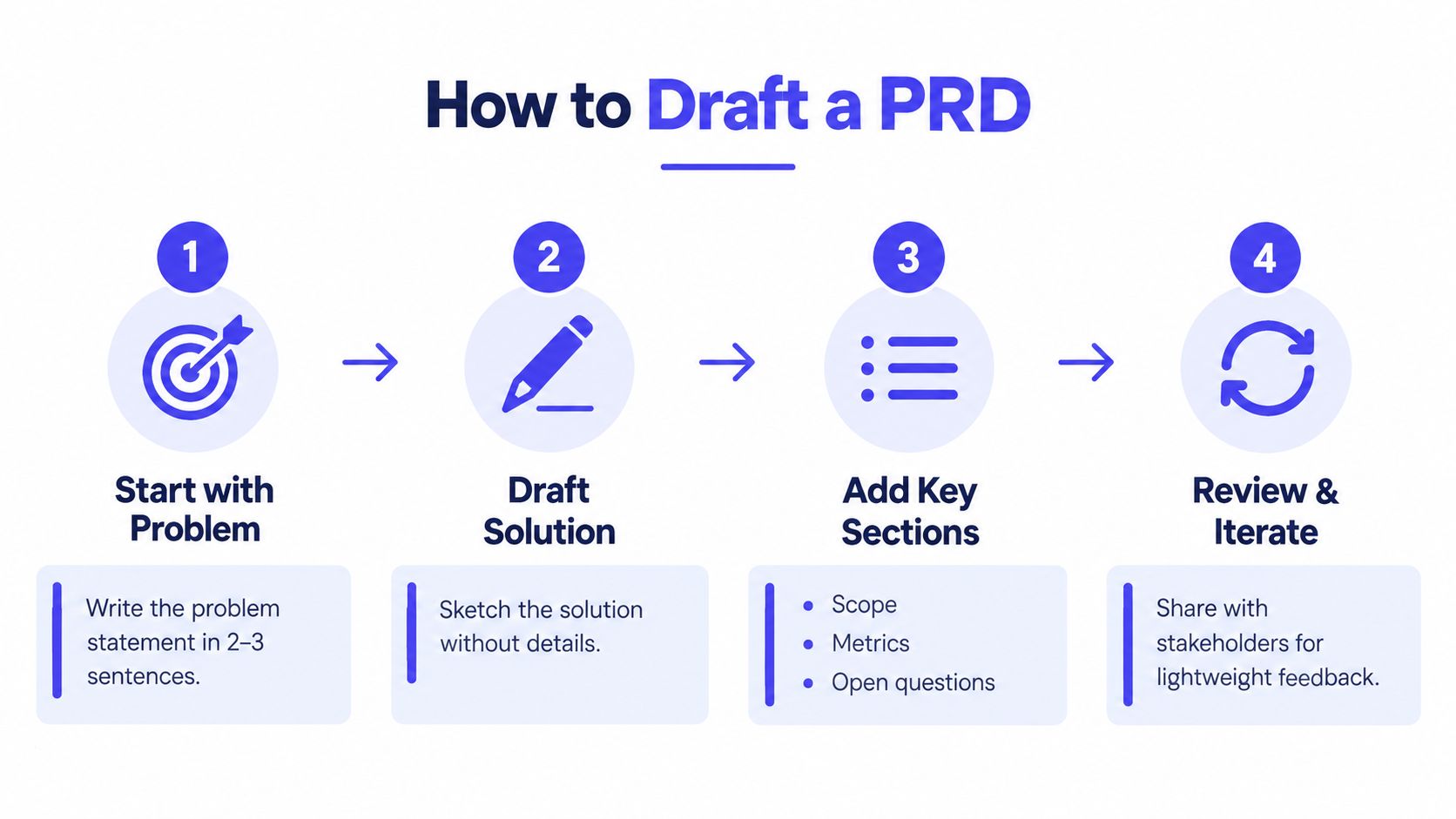
A founder opens a PRD to answer one question, then finds a page of polished assumptions. Engineering cannot tell which behavior is required, design cannot see which states matter, and an AI agent would have no reliable way to test the intended outcome. Start with a thin draft that exposes the central decision before refining the prose.
Put the first version together quickly
Write the problem, target user, proposed direction, initial scope, and unanswered questions. Use bullets. Label assumptions clearly instead of presenting them as facts. This gives the team something concrete to challenge and gives both people and AI tools a smaller, more testable context.
A practical sequence is a lightweight first draft, conversations with roughly three users during discovery, three measurable outcomes, and a review with engineering and design before detailed requirements. Treat this as a working recommendation, not a ritual. The order matters because it tests the problem before the team spends time specifying a solution.
Use those conversations to examine language and workflow, not to collect a wish list. Ask what the user does today, where the process breaks, what they have already tried, and what a successful result would look like. Update the problem statement with the evidence, and record any assumption that remains uncertain.
Review decisions with the right people
Share the thin draft with engineering and design while changes are still cheap. Engineering should challenge assumptions, dependencies, data availability, failure modes, and operational needs. Design should challenge the user journey, states, content, accessibility, and any proposed solution that adds unnecessary complexity.
Give the review a narrow job. Ask:
- Problem: Does this describe a real user need clearly?
- Scope: Can the team identify what must wait?
- Behavior: Are the main and failure paths understandable?
- Verification: Could a person or AI agent test the requirement without asking the author what it means?
- Risk: Which assumption could invalidate the plan?
Record answers as decisions, not as a meeting transcript. For example, write, “The first release supports workspace admins only because member-level permissions require separate policy work.” Add the decision owner and date when the choice may be revisited. A short rationale lets a new teammate, future agent, or reviewer trace why the requirement looks the way it does.
Expand only where ambiguity remains
After review, add detail selectively. Expand requirements that affect implementation, testing, design states, or launch readiness. Leave low-risk choices to the people closest to the work, rather than turning the PRD into a specification for every detail.
A remote team can keep the process lightweight with one shared Markdown file, linked designs, a short review call, and a decision log. Comments should become a resolved decision, an assigned question, or a rejected suggestion. Unprocessed comments are hidden project state, and hidden state makes both collaboration and automated verification less reliable.
A useful PRD is reviewable before it is complete. If nobody can challenge it until every paragraph is polished, feedback has become too expensive.
Writing Goals Metrics and Acceptance Criteria That Engineers Can Verify
A requirement becomes useful when someone can determine whether the product satisfies it without interpreting the author's intent. That standard applies to engineers, designers, QA, support, and AI agents.
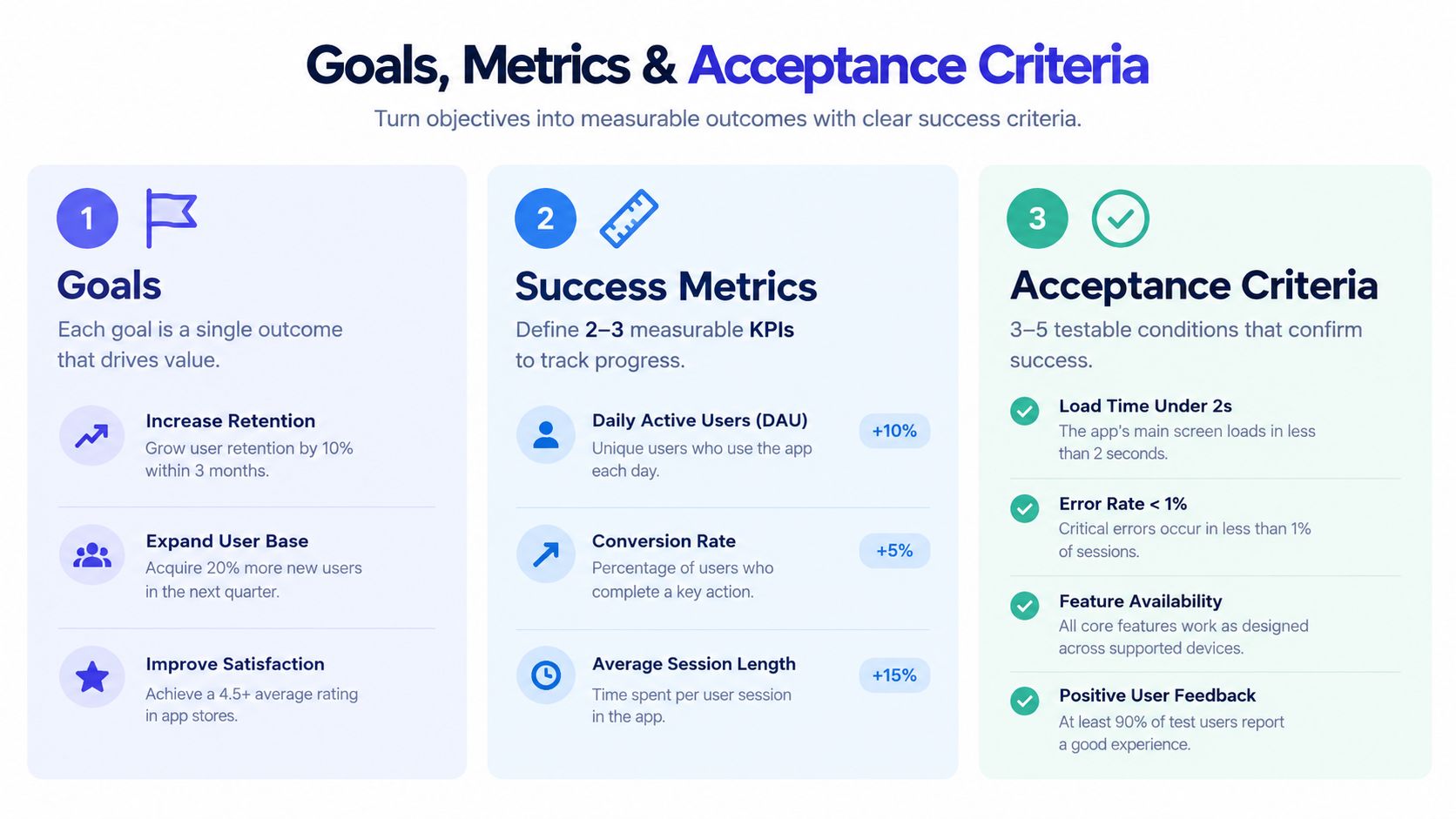
The sequence matters. Start with the problem, define the desired outcome, choose a measurable signal, and translate the behavior into acceptance criteria. Expert guidance on writing good product requirements recommends criteria specific enough for a non-developer to verify, including thresholds such as p95 latency rather than adjectives like “fast.”
Separate goals from outputs
A goal describes the change you want in the user or business outcome. An output describes what the team will ship. “Launch saved filters” is an output. “Help analysts return to a recurring view without rebuilding filter choices” is a goal.
Metrics then connect the goal to observable behavior. Choose signals that the team can instrument and interpret. A metric should include the event, the relevant population or context, and the direction of improvement. If the team can't explain how it will collect the signal, the metric isn't ready.
Avoid metrics that reward activity without confirming value. A feature can be shipped, clicked, or opened while leaving the original problem untouched.
Write acceptance criteria as pass or fail conditions
Vague:
- The export should be fast.
- The dashboard should be easy to use.
- Users should receive helpful errors.
Verifiable:
- When an authorized admin selects a valid date range and chooses Export, the system creates an export request and shows its current status.
- When the request completes, the user can download the resulting file from the export status view.
- When the date range is invalid, the system prevents submission and explains which value needs correction.
- When the export fails, the user sees a retry action and the failure is recorded for monitoring.
- The p95 response target for creating the request is defined explicitly rather than described as “fast.”
These criteria describe state, action, result, and exception behavior. They don't prescribe the implementation, so engineering retains room to choose the right architecture.
Test the requirement before implementation
Read each criterion as if you're a non-developer validating the release. Can that person identify the starting state, perform the action, observe the result, and recognize failure? If not, add the missing condition.
You can also use a Given, When, Then format:
Given an authorized admin has selected a valid range, when they submit an export, then the system creates one request and displays its status.
For a deeper explanation of how these conditions define completion, see this acceptance criteria definition. The same discipline helps AI coding agents. An agent can act on explicit inputs, outputs, edge cases, and verification commands. It can't reliably act on “make the experience intuitive” without human interpretation.
Before approving the PRD, check that every requirement has an observable result, every important failure path is named, permissions are explicit, non-functional expectations are recorded, and success metrics map back to the problem. That checklist catches more ambiguity than another round of stylistic editing.
Keeping Your PRD Alive With Versioning Collaboration and AI Agents
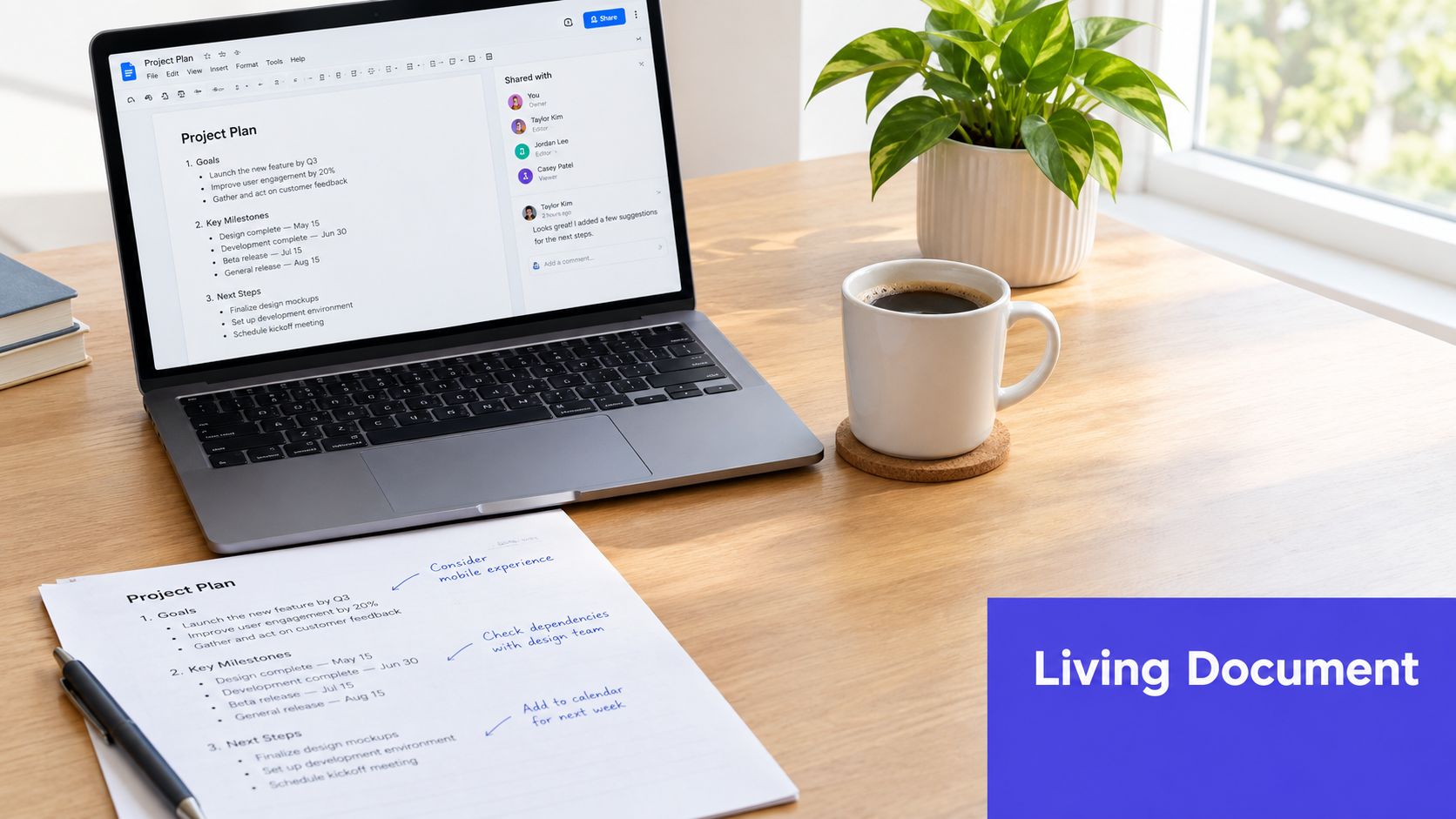
The first approved draft is not the end of the PRD. It's the first stable version of a working agreement. During implementation, technical discoveries, user feedback, and design decisions will change the plan. If those changes stay in meetings or chat, the document stops representing reality.
Track decisions instead of rewriting history
Keep the original problem and intended outcome stable unless new evidence changes them. Update scope, requirements, risks, and open questions as the team learns.
A small decision log can use four fields:
- Decision: What the team agreed to do.
- Reason: The constraint, evidence, or trade-off behind it.
- Owner: Who made or approved the decision.
- Status: Current, superseded, or unresolved.
This prevents a common failure mode: someone changes a requirement, then another teammate follows an older version from a ticket or design file. Link implementation tasks and tests back to requirement identifiers where practical. Traceability doesn't require a heavyweight platform. It requires stable references and a clear current state.
Write for human and agent readers
AI coding agents need requirements that are more explicit than ordinary conversational notes. Current independent guidance emphasizes testable acceptance criteria, enumerated edge cases, and verification conditions that an agent can check itself. One 2026 guide reports benchmark PRDs containing 31 acceptance criteria across 5 user stories and 14 edge cases, which illustrates how much machine-consumable detail many PRDs still omit, as described in this guide to PRDs for AI coding agents.
That doesn't mean adding every imaginable scenario. Enumerate the cases that change behavior or risk: empty data, duplicate submission, expired permissions, interrupted network requests, partial completion, invalid input, and recovery after failure. Give each case an expected result and a way to verify it.
Use AI during review as a critic, not as the product owner. Ask it to identify vague adjectives, contradictory requirements, missing states, unowned decisions, and acceptance criteria without observable outcomes. Then let a human decide which findings matter.
Keep context portable
A living PRD works best when it sits near the work and remains readable outside one tool. Markdown, linked designs, committed decision logs, and references from issues or pull requests make context easier to carry across editors and coding environments.
The living document approach is useful here because it treats updates, unresolved questions, and post-launch observations as part of the artifact rather than as administrative cleanup. The document should help the next person understand not only what changed, but why.
Your Next PRD From Template to First Commit
Choose the smallest meaningful feature that currently causes confusion. Don't start with the company roadmap or a speculative platform rewrite. Pick the workflow where product, design, and engineering are already interpreting the request differently.
A one-page PRD is usually enough when the user journey is narrow, dependencies are limited, and the team understands the surrounding product. Use a fuller specification when the feature affects permissions, data migration, external services, operational support, multiple user roles, or significant failure behavior.
Run this pre-commit check
- State the problem: Identify the user, situation, friction, and consequence.
- Name the outcome: Define what should improve and how you'll observe it.
- Set boundaries: Record what's in scope, out of scope, constrained, or dependent.
- Map behavior: Include the primary flow, important states, and failure paths.
- Make it testable: Write acceptance criteria with explicit inputs and expected results.
- Log uncertainty: Assign open questions and record decisions as they change.
- Connect the work: Link requirements to designs, tasks, tests, and the eventual pull request.
Once code starts, keep the PRD close to review. A pull request should point back to the requirements it implements, while the PRD should note decisions discovered during implementation. If your team is new to that workflow, this guide to GitHub pull requests explains the role of review in connecting proposed code to shared context.
The right PRD doesn't eliminate uncertainty. It makes uncertainty visible, assigns it to someone, and gives the team a reliable place to update the agreement. That's how a small team moves from a fuzzy request to a first commit without sacrificing speed.
SpecStory, Inc. offers Stoa, a multiplayer AI workspace where product teams capture conversations, decisions, designs, open questions, and Markdown PRDs in real time. Visit SpecStory, Inc. to see how a living, traceable plan can follow your team from discussion into shared sandboxes and the first commit.
Older
Context Engineering for AI Agents: A Practical Guide
Newer
AI Agent for Coding: What It Is and How Teams Use It
Newsletter
Get new posts in your inbox
Bring your team together to build better products. Fresh takes on remote collaboration and AI-driven development.