


The demo is nearly over when someone asks why the primary button sits there. The designer thought users would review their choices before submitting; the engineer understood the ticket as immediate submission. Now you're reopening a finished feature, changing the flow, and explaining why the release needs to move.
If you're deciding how to reduce rework, start with the information people lacked when they began, not with a demand to work more carefully. Preventable rebuilding and deliberate learning aren't the same thing. Your job is to identify which happened, trace the trigger, and change the earliest habit that could have prevented the unnecessary work.
Table of Contents
- Rework Causes and the First Fix for Each
- How to Surface Hidden Gaps During Discovery
- How to Make Decisions Stick
- How to Hand Off Work Without Losing Context
- Feedback Loops That Catch Errors Early
- Measuring Rework Without Counting Good Iteration as Failure
- Run Your First Rework Audit This Week
Rework Causes and the First Fix for Each
A misplaced button can expose a disagreement about the entire workflow. Moving it is easy; rebuilding validation, navigation, and tests around a newly agreed sequence isn't. The expensive part is correcting all the work people completed under different assumptions.
In its 2002 study, the U.S. National Institute of Standards and Technology, working with the Research Triangle Institute, found that more than half of software defects weren't discovered until downstream stages, when corrections could affect code, integrations, documentation, testing, or released systems. That's a historical finding, not a forecast for your startup, but it explains why the first fix belongs before dependent work begins.
Use this diagnostic table to identify the missing input rather than blaming whoever reopened the ticket.
| Cause | Early symptom | First fix |
|---|---|---|
| Unclear requirements | Tickets reopened after the first demo | Write acceptance criteria before work starts |
| Missing decisions | The same question asked across different channels | Log each decision with an owner and a date |
| Incomplete handoff | Engineer rebuilds context from scratch | Circulate the brief at least 48 hours before kickoff |
| Late testing | Defects found only after integration | Test a prototype or first slice before dependent work begins |
| Untracked open questions | Work blocked waiting for an answer nobody owns | Assign an owner and a deadline to every open question |
| AI-generated output without context | Plausible code that misses constraints | Attach constraints, examples, and rationale to the task |
Requirements produce rework when people interpret success differently. Acceptance examples make those interpretations visible before implementation.
Missing decisions invite people to repeat a settled debate. A dated record preserves who chose what and why.
Incomplete handoffs force receivers to invent the missing reasoning. Advance circulation gives them room to challenge it before committing.
Late testing lets dependent work accumulate around an error. Testing an early slice limits what needs changing.
Unowned questions encourage guesses or silent delays. An accountable owner makes the uncertainty actionable.
Context-poor AI tasks invite technically plausible but unsuitable implementations. Explicit constraints give reviewers something concrete to verify.
Inspect your recent reopened tickets and start with the cause that appears most often. Don't introduce a heavier process for a problem your team doesn't have.
How to Surface Hidden Gaps During Discovery
Rework can begin with a sentence everyone accepts but understands differently: let customers manage their subscriptions. Product imagines pausing, design imagines cancellation, and engineering starts with payment-method updates.
A useful requirements-gathering process turns broad agreement into examples people can dispute. You don't need a complete specification before learning anything, but you do need enough shared understanding to choose a sensible experiment.
Use this discovery flow to make the assumptions visible.
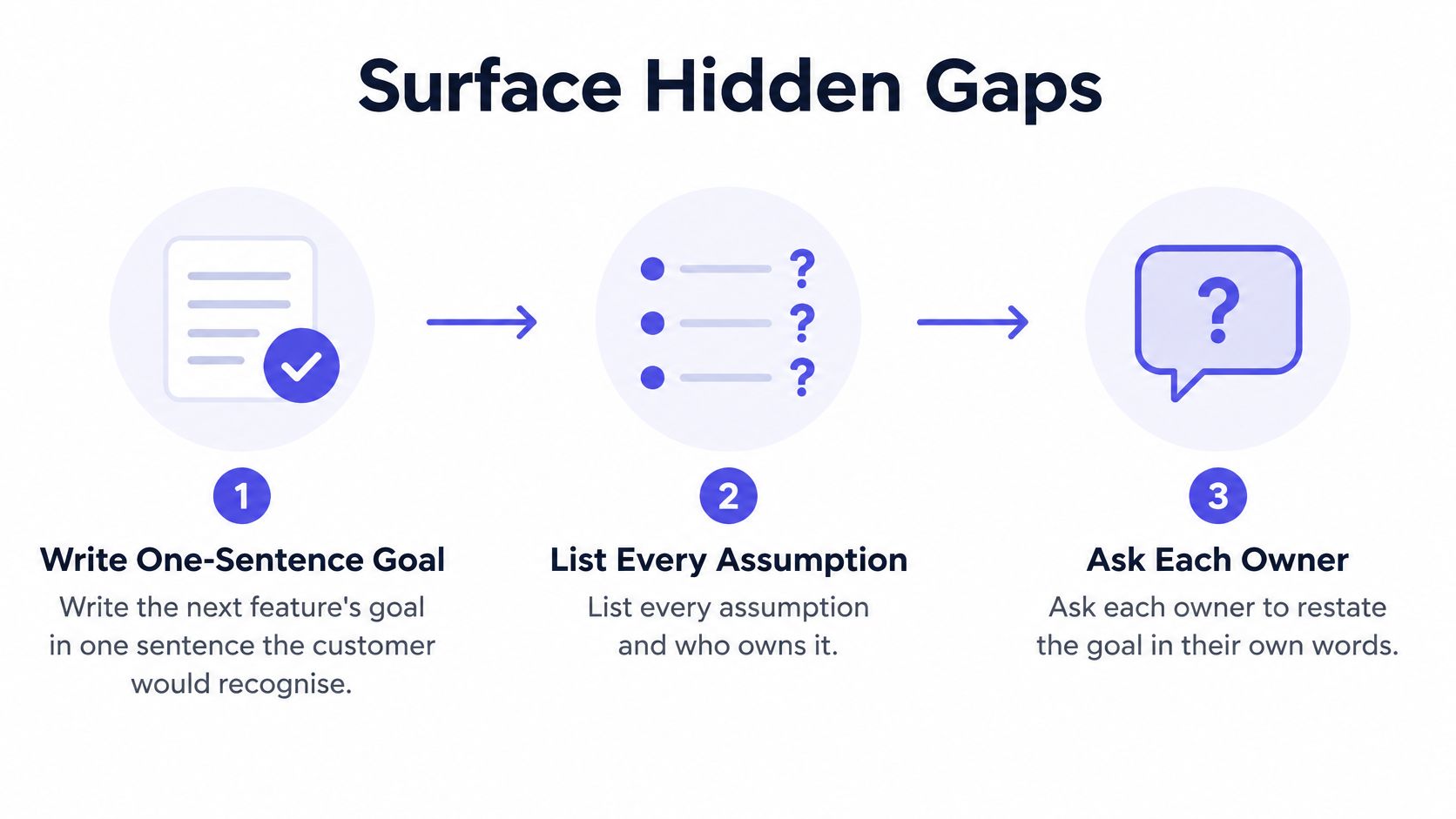
Turn intent into testable examples
-
Write the customer's goal. Describe the outcome in a sentence the customer would recognise, such as pausing a subscription without contacting support. Don't substitute an implementation instruction, such as adding a settings button, for the underlying need.
-
List the assumptions. Identify who can act, which account states qualify, what data is required, and what happens when a request fails. The common slip is describing only the successful path and leaving permissions, billing boundaries, and recovery behaviour implicit.
-
Work through an example. Choose a specific account state, an input, and the expected result, including what the customer sees afterward. Examples can feel slower than writing another paragraph, but they force people to resolve words such as immediate, active, and eligible.
-
Ask engineering and design to restate it. Have each explain the sequence independently rather than agreeing with the presenter. When one person describes a confirmation screen and another describes an immediate state change, you've found a gap worth resolving.
-
Assign unanswered questions. Record the question, the person responsible for resolving it, and the date the answer is needed. Don't label an unresolved billing rule an edge case and let someone code around it.
Discovery exit test: People can explain the same behaviour independently, and nobody has to guess who will resolve the remaining uncertainty.
You don't need every future possibility settled. You need agreement on the examples you're about to build, explicit boundaries around the experiment, and named owners for uncertainties that could change the implementation. Keep low-risk questions open when appropriate, but don't begin dependent work on an assumption that could invalidate the whole approach.
How to Make Decisions Stick
Say a team chooses Redis for session storage. Later, a developer proposes Postgres, and everyone starts reconstructing the original discussion from chat messages. Without the rejected alternatives and the conditions behind the choice, the team can't distinguish a useful challenge from a repeated debate.
A decision log should make the reasoning visible, not merely announce the outcome.
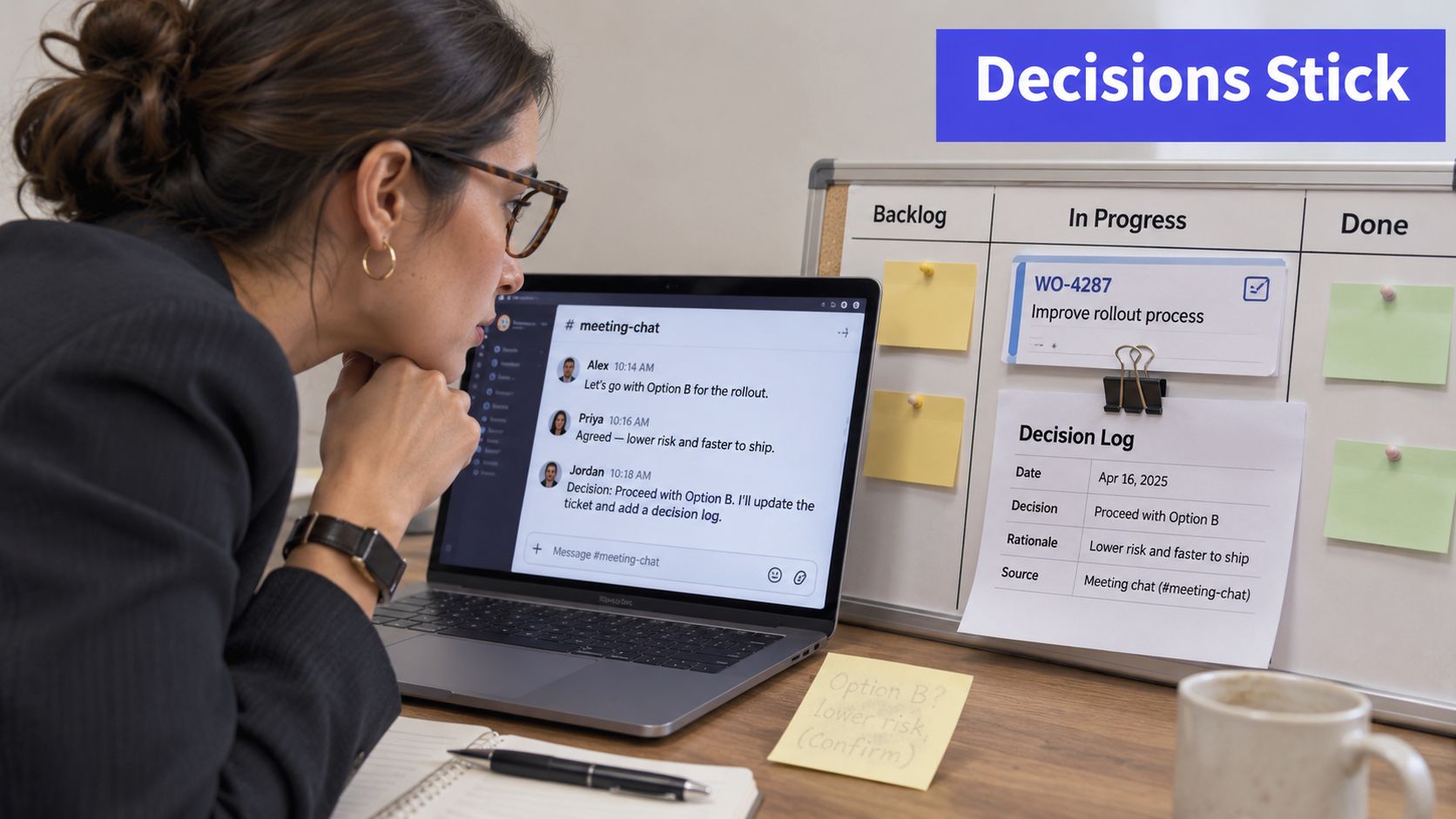
Keep a decision log next to the work item. Capture the fields that let someone assess the choice without needing the original participants:
- Decision: The specific choice and the work it applies to.
- Reason: The evidence, constraints, and trade-offs that justified it.
- Alternatives rejected: What else you considered and why it wasn't suitable.
- Owner: The person accountable for resolving challenges and maintaining the record.
- Revisit date: When the team will reassess whether the assumptions still hold.
Close the meeting with an outcome
Our Feature Kickoff guidance recommends timeboxing the meeting to 60–90 minutes and scheduling a follow-up if major questions remain unresolved. Before the meeting ends, every open question should have an owner and a deadline. An unresolved question is an acceptable outcome; an implied agreement nobody can explain isn't.
Write the decision while the participants can correct it. Ask the owner to confirm the trade-off explicitly, especially when the team is accepting operational complexity, reduced flexibility, or a temporary limitation.
Use this video alongside the written record when discussing how your team handles decisions.
In the storage scenario, the log might show that Postgres was considered but rejected because of the expected access pattern and expiry requirements. The developer can then challenge those assumptions directly instead of rerunning an architectural debate from memory.
Don't treat the record as permission to defend a poor choice indefinitely. A changed requirement, new operational evidence, or an invalidated assumption can justify revisiting it.
Reopen a decision because the evidence changed, not merely because a different person prefers another option.
How to Hand Off Work Without Losing Context
A ticket arrives in engineering with a title and a Figma link. The engineer can see the interface but can't tell why a seemingly simpler approach was rejected, which behaviours are mandatory, or what the reviewer will accept. They have received an artifact, not enough context to implement it.
A useful design-to-development handoff transfers the reasoning and the evidence required to finish, not just the latest screen.
Use this checklist to prepare the receiving teammate.
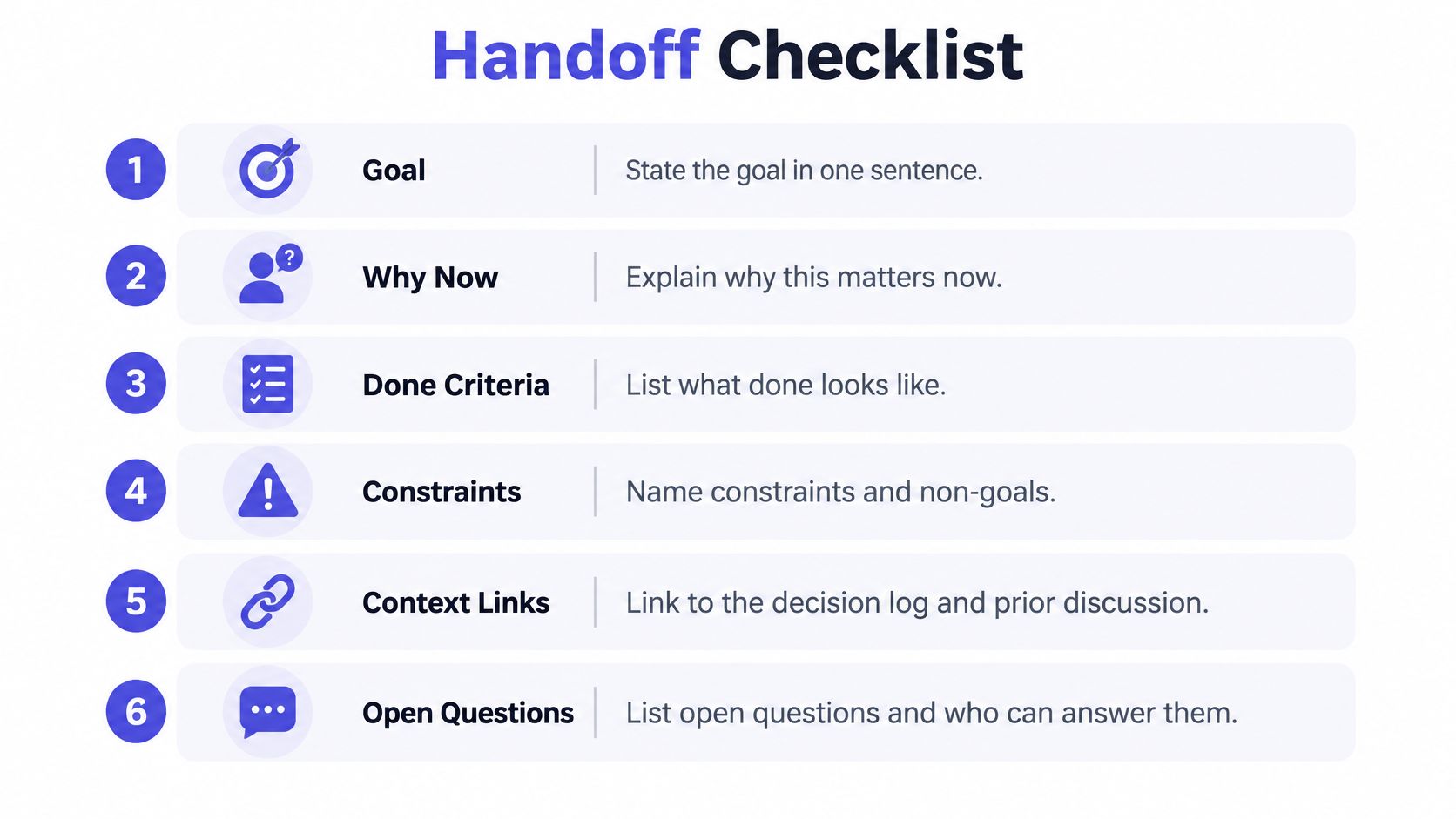
- Goal and urgency: State the customer outcome and why the team is addressing it now.
- Decisions and rationale: Link the relevant choices, including rejected options that might otherwise resurface.
- Acceptance examples: Show inputs, expected behaviour, and failure handling.
- Constraints and non-goals: Identify performance, design, compliance, and compatibility boundaries.
- Open questions: Name their owners and distinguish blockers from questions that can wait.
- Validation evidence: Specify what reviewers need, such as a working flow, test results, or accessibility checks.
Our Feature Kickoff guidance recommends circulating the brief or one-pager at least 48 hours before the meeting. That gives receivers time to inspect dependencies and prepare questions rather than discover the entire problem live.
Apply the same standard to AI tasks
Faster code production isn't proof of faster delivery: Allstacks' recap of DORA-reported findings describes 2025 gains of 21% in tasks completed per developer and 98% in pull requests merged per developer, while organizational throughput stayed flat and delivery stability declined.
Those findings don't establish that missing context caused the outcome. They do make individual activity an insufficient success measure.
Before assigning implementation to an AI assistant, attach worked examples, constraints, and design rationale. Check the generated output against the acceptance examples before requesting human review, including behaviour the task explicitly excludes.
The handoff test isn't whether the document looks complete. It's whether the receiver can begin useful work without asking the sender to reconstruct the reasoning.
Feedback Loops That Catch Errors Early
A historical IBM Systems Journal study reported 38% fewer errors per thousand lines of code in an inspection sample than in a comparable walkthrough sample, and found that error-rework costs in a traditional process could become 10 to 100 times higher when corrections were deferred to the latter half of the schedule. Treat those figures as historical evidence about detection timing, not expected savings for your team.
The practical choice is which review can detect a specific mistake while the affected work is still small.
| Feedback loop | Cadence | What it catches |
|---|---|---|
| Daily stand-up check | Daily | Blocked work and misread tasks |
| Design review before build | Before each feature | Wrong assumptions and missing constraints |
| Weekly prototype test | Weekly | Usability problems and unclear flows |
| Per-change code review | Every change | Defects while the change is still small |
| Per-merge integration test | Every merge | Errors between components and interfaces |
| Per-release retro | Every release | Recurring causes of rework across the cycle |
Choose the earliest useful check
Start with recent reopened work and identify where someone detected the problem. Then ask which earlier artifact would have made it detectable: a customer example, clickable prototype, code diff, or integrated build.
Don't add every meeting in the table. A stand-up can't validate usability, and a retrospective can't prevent a defect in a release that's already shipped. Add a loop only when you can name the recurring problem it should catch.
Say customers repeatedly misunderstand a confirmation flow after implementation. Testing the clickable prototype before engineering begins lets the designer change the sequence without asking developers to rebuild it. That's a targeted intervention, not a blanket instruction to review everything more often.
Reviewers also need shared ownership of the outcome. The 99tests guide to ending the QA versus dev divide is a useful resource when testers and developers treat defect discovery as a handoff dispute rather than a joint investigation.
Placement rule: If someone finds a defect later than the earliest check that could reasonably detect it, change the check's timing or coverage.
Measuring Rework Without Counting Good Iteration as Failure
A headline rework rate can punish the behaviour a startup needs. Rejecting a prototype after customer feedback isn't equivalent to repairing production because engineers never received a required permission rule. Count them identically and teams have an incentive to avoid experiments or hide corrections.
DORA's 2026 measurement guidance defines deployment rework rate as the ratio of unplanned deployments caused by production incidents and recommends exposing it to application teams alongside delivery-performance measures, as described in its Quick Check updates. That is a deployment-specific measure, not a label for every changed ticket.
Classify the trigger before counting
Use a small set of operational categories:
- Production incident: Unplanned correction needed to restore or protect live service.
- Misunderstood requirement: Implementation differs from the intended behaviour because the team lacked shared understanding.
- Integration failure: Components fail to work together as expected.
- Usability problem: Users can't understand or complete the intended task.
- Deliberate learning: An intentional experiment produces evidence that changes the product direction.
Track frequency and recovery effort for each category. A frequent correction that takes little effort and an infrequent rebuild that consumes the team deserve different responses. Keep the original trigger attached even when the eventual fix crosses several components.
Don't automatically classify every usability change as waste. If the team deliberately tested an uncertain interaction with a cheap prototype, the changed design is a learning outcome; if someone skipped an agreed validation step, investigate the missing check.
In a short weekly review, ask what signal could have prevented each avoidable correction and whether the team could reasonably have obtained it. Compare your own trend alongside delivery speed and stability rather than chasing a universal healthy rate.
If misunderstood requirements dominate, strengthen examples before implementation. If deliberate learning dominates, examine whether experiments are appropriately cheap before trying to reduce their number.
Run Your First Rework Audit This Week
Pull a manageable batch of recently reopened or redone work items from your tracker. Include quiet rebuilds hidden inside new tickets, not just items carrying a bug label.
For each item, record:
- Trigger: Which category best explains why the team repeated the work?
- Missing signal: What information or evidence would've changed the original action?
- Earliest useful check: Where could someone reasonably have detected the issue?
- Recovery effort: What did the correction require across design, implementation, testing, and release?
Tally the causes and choose the most frequent preventable one. Apply the matching fix from the diagnostic table for a short trial, with a review date agreed before you start.
A shared record makes this audit easier because you can inspect what people knew at the time. Stoa, built by SpecStory, Inc., captures decisions and open questions in live meetings and keeps the resulting context as plain Markdown files readable in any editor, reducing the need to reconstruct the discussion afterward.
Compare the subsequent rework count with your baseline, checking workload and trigger mix before crediting the change. Keep the fix if avoidable rework falls without slowing useful delivery; otherwise, revise the intervention.
SpecStory, Inc. offers tools that preserve product discussions and implementation context so your team can trace corrections back to the decisions behind them. Visit SpecStory, Inc. to explore how capturing decisions and unresolved questions during the work can support your first rework audit.
Older
10 Collaborative Planning Tools for Small Product Teams
Newer
Product Requirements Management: A Practical Guide
Newsletter
Get new posts in your inbox
Bring your team together to build better products. Fresh takes on remote collaboration and AI-driven development.