


You've probably seen this happen: an AI agent generates a tidy patch, creates the tests, and opens a pull request before the coffee gets cold. Then the team spends days asking whether the feature matches the product decision, whether the new abstraction belongs in the architecture, and whether the agent introduced a security problem. The code arrived quickly. Agreement didn't.
That gap defines the practical challenge with an AI agent for coding. These systems can read repositories, edit files, run commands, and iterate on failures, but they can't take ownership of product intent. The teams getting durable value aren't just choosing a smarter model. They're designing a workflow in which agents execute bounded work while people clarify requirements, review risk, and decide what deserves to ship.
Table of Contents
- The New Bottleneck Is Not Coding
- How AI Coding Agents Actually Work
- What Agents Can Do and Where They Break
- Integrating Agents Into Team Workflows
- Security, Ownership, and Benchmark Gaming
- Comparing AI Coding Agents to Other AI Dev Tools
- Building Your Agent Adoption Strategy
The New Bottleneck Is Not Coding
A small product team can now move from a written request to a working implementation with startling speed. A product manager describes a new onboarding flow, a designer shares a rough interaction, and an agent produces routes, components, validation, and tests. The first diff looks professional enough to invite a dangerous assumption: the hard part is finished.
It isn't. The team still needs to resolve questions the prompt left implicit. Should onboarding persist partial progress? What happens when an invited user already exists? Which events belong in analytics? Does the proposed data model fit the company's privacy policy? An agent can make a plausible decision for each question, but plausibility isn't alignment.

Speed moved upstream
The public launch of GitHub Copilot in 2021 helped move AI-assisted programming from research demonstrations into mainstream developer workflows. By January 2026, a JetBrains developer survey reported that 90% of developers regularly used at least one AI tool for coding and development tasks, while GitHub Copilot led workplace adoption at 29%. Claude Code and Cursor each reached 18%, and Claude Code had risen roughly sixfold from about 3% nine months earlier, according to the coding-agent adoption benchmark summary.
Those figures describe adoption, not successful delivery. In practice, the bottleneck often becomes the time between an idea and a decision that an agent can execute safely. I think of that interval as Intent Lead Time. It starts when someone proposes a change and ends when the team has supplied enough context to define acceptance criteria, boundaries, and review ownership.
Practical rule: If an agent keeps producing code that requires major reinterpretation, improve the decision record before changing the model.
At Stoa, a useful working pattern is to capture the product conversation while it's happening, including decisions, unresolved questions, and rejected options. The agent then receives a living context rather than a vague ticket assembled after the meeting. That doesn't eliminate review. It makes review about the product and architecture instead of reconstructing what everyone meant.
The central question, then, isn't whether an agent can write code. It's whether your team can consistently turn changing intent into an executable task, give the agent the right boundaries, and verify the result before it becomes someone else's problem.
How AI Coding Agents Actually Work
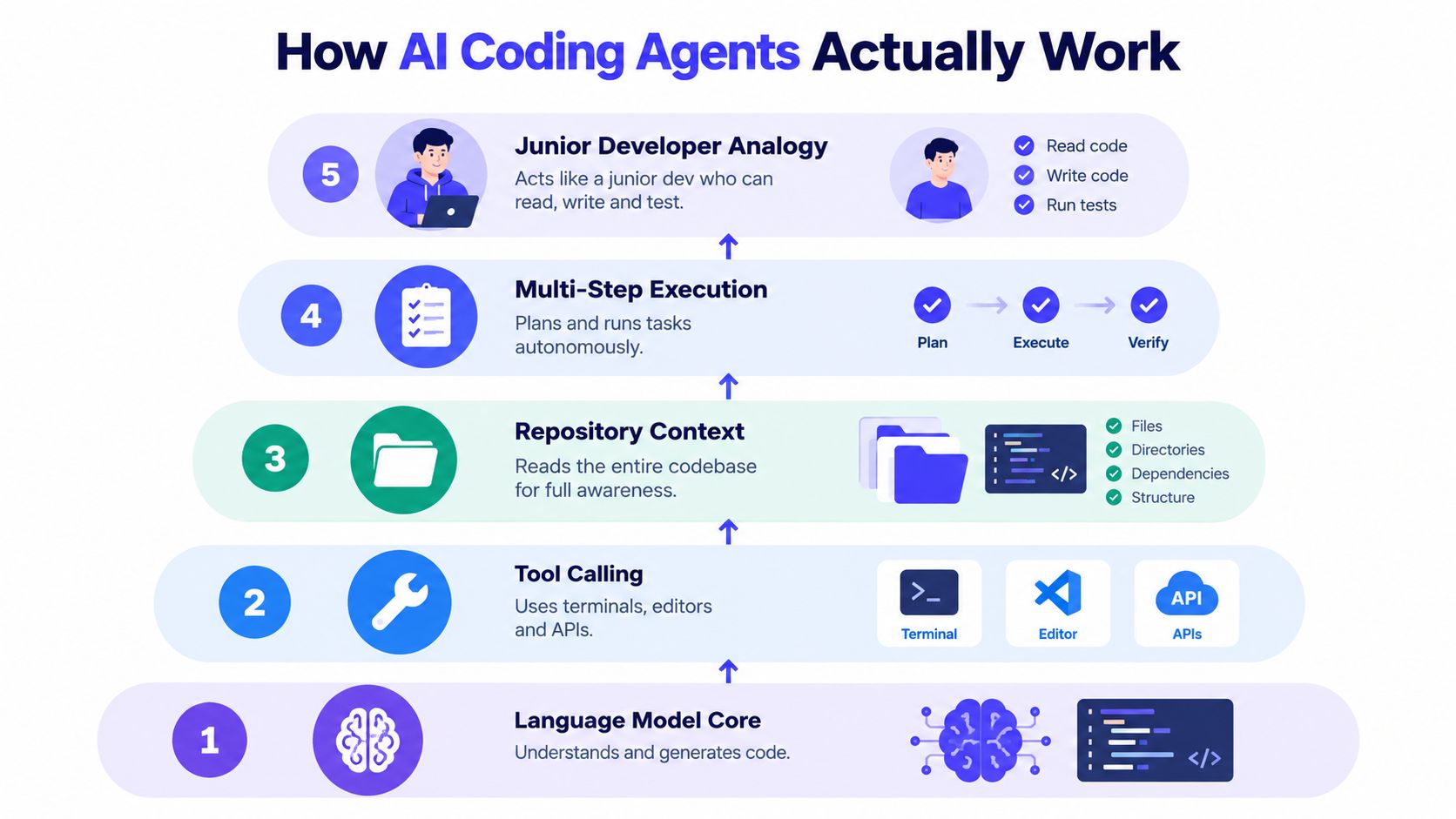
An agent is easier to use well when you understand its layers. The simplest analogy is a junior developer with unusually fast typing, broad access to documentation, and no reliable ability to infer what your team meant.
The first layer is the language model core. It predicts and generates text, including source code, tests, explanations, and command suggestions. It doesn't possess a complete, authoritative model of your application. It works from the instructions and context supplied during the session.
The second layer is tool calling. A coding agent can invoke a terminal, inspect files, apply edits, run a test command, query an API, or use an editor integration. Tool access turns a conversational assistant into an actor inside the development environment. It also creates risk, because every permission granted to the agent expands what a mistaken instruction or malicious repository file might influence.
The third layer is repository context. The agent needs relevant architecture notes, conventions, dependency information, existing interfaces, and the files surrounding the requested change. Supplying the entire repository isn't automatically helpful. Large volumes of irrelevant context compete with the details that determine correctness.
The loop matters more than the prompt
The fourth layer is multi-step execution. Strong workflows ask the agent to inspect first, make a plan, implement a bounded change, run checks, examine failures, and revise. Each step produces evidence that can guide the next one. A single giant completion hides too many assumptions and makes recovery difficult.
The fifth layer is the junior-developer analogy. An agent can read a ticket, look at neighboring code, run tests, and propose a patch. It still needs explicit acceptance criteria, a defined scope, and a human who can recognize a technically valid but strategically wrong solution.
A useful reference for the mechanics and boundaries of an agent is this Donely Hermes agent overview. For teams learning how to move from natural-language decisions toward executable work, natural language to code offers a complementary way to think about the handoff.
At Stoa, one practical habit is to keep decisions in shared rooms rather than scattering them across chat threads. A decision such as “support invited users, but don't change billing behavior” becomes part of the agent's working context. The agent can implement against that constraint, and the team can inspect the decision later when a new edge case appears.
The implementation prompt should therefore include more than “build this feature.” It should identify the user outcome, the files or subsystems in scope, explicit non-goals, acceptance checks, failure behavior, security constraints, and the command that proves the change works.
What Agents Can Do and Where They Break
Coding agents are useful when the task has a narrow objective and a reliable feedback loop. They can handle boilerplate, localized bug fixes, repetitive test cases, straightforward refactors, migration scaffolding, and changes whose expected behavior is already encoded in clear tests. The agent's speed matters most when a human can inspect the result quickly and reject it without untangling a sprawling rewrite.
Performance changes when the work requires sustained repository understanding. ProjDevBench, which evaluates project requirements alongside repository outcomes, reported 27.38% of submissions accepted, with 41.86% failing from wrong answers and 13.91% from time-limit violations in the cited results (benchmark paper). SWE-Bench Pro kept top widely used models below 25% Pass@1 on harder tasks, with the best cited score at 25.9% in the same research context.
Those results don't mean agents are useless. They show that syntax generation is only one part of software work. Planning, state management, cross-file dependency tracking, environment setup, and iterative validation often determine whether a change survives contact with the actual repository.
Match autonomy to task shape
| Task Type | Success Rate | Human Overhead Required |
|---|---|---|
| Small, well-specified fix | Often strong qualitatively | Review the diff and run checks |
| Single-file refactor | Often useful with clear tests | Check behavior and unintended edits |
| Cross-file feature | Variable | Define interfaces, review assumptions, test integration |
| Long-horizon repository change | Drops sharply in cited benchmarks | Continuous checkpoints and architectural ownership |
Consider a multi-day refactor that changes an API contract, updates several consumers, revises fixtures, and alters deployment configuration. An agent may complete each local step convincingly, yet lose the original invariant between steps. It can also optimize for passing inherited tests while missing a requirement that the tests never express.
The agent is strongest where the team has already decided what “correct” means.
The practical response is to split long work into checkpoints. Ask for a repository map and proposed plan first. Review the plan before edits. Require intermediate artifacts such as a migration note, an interface sketch, or a list of affected call sites. Then run external checks, including integration behavior and security validation, instead of treating the repository test suite as the only authority.
Walk away from autonomous execution when the task combines vague product intent, unfamiliar domain rules, sensitive data, and weak observability. In those conditions, the agent may still help with investigation or small experiments, but a human should own every consequential decision.
Integrating Agents Into Team Workflows
An agent becomes useful when it enters an existing workflow at a clear handoff point. Dropping one into the team without changing ownership usually creates a faster way to produce work nobody has agreed to maintain.
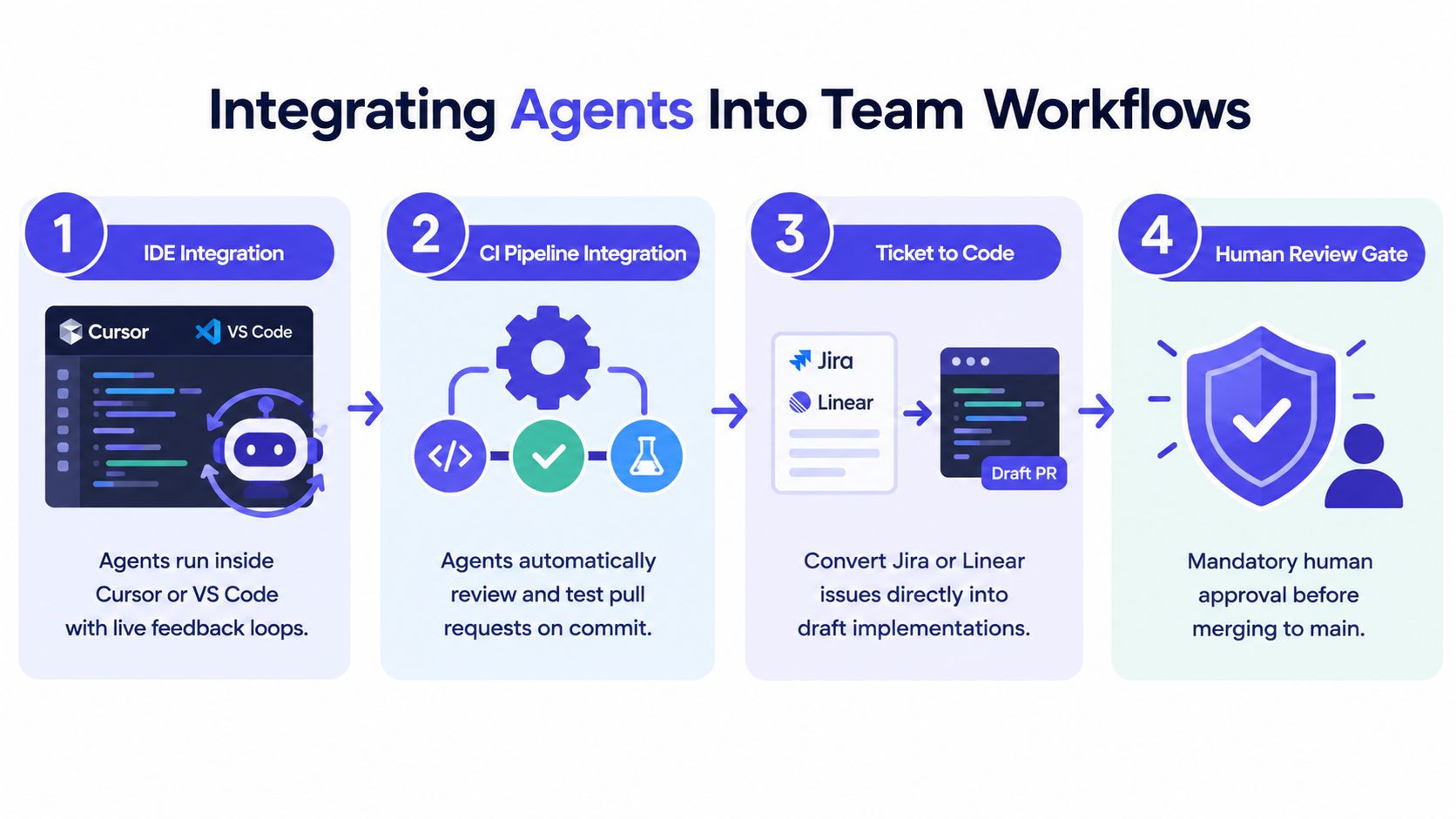
IDE integration is the natural starting point for many developers. In Cursor or VS Code, an agent can inspect the current files, make a focused edit, run tests, and respond to live feedback. This works well for a developer who already understands the local architecture and can interrupt the agent when it starts expanding scope.
CI integration serves a different purpose. An agent triggered by a pull request can suggest missing tests, summarize changed paths, identify suspicious dependency changes, or propose a small refactor. Keep it advisory at first. A bot that blocks merges without a trusted signal turns review into an argument about the bot.
Put ambiguity in the team workflow
Chat and meeting integrations address the part most coding guides skip: requirements form socially, not inside an IDE. A product manager may clarify the target user in a conversation, a designer may reject an interaction, and an engineer may identify a data constraint. If those decisions remain in disconnected messages, the coding agent receives an impoverished version of the intent.
A shared workspace such as Stoa's AI agent workspace can preserve decisions and open questions as working artifacts. The important design principle isn't the brand. It's that the agent receives traceable context and the team can see why a task was shaped a particular way.
JetBrains reported that 90% of professional developers used AI coding agents at work at least weekly and 68% daily in 2026, while a 2025 study described agents struggling with open-ended, poorly specified, planning-heavy tasks, including situations where developers said they got “stuck” without clear direction (reported survey findings). Adoption makes workflow design more urgent, not less.
Use this checklist to choose the first integration point:
- Stable local workflow: Start in the IDE for tests, boilerplate, and bounded fixes.
- Reliable pull-request checks: Add CI assistance for summaries, test suggestions, and risk flags.
- Frequent product ambiguity: Capture decisions in chat or meeting tools before generating implementation tasks.
- Sensitive production systems: Keep execution sandboxed and require explicit human approval.
- Distributed team: Preserve prompts, decisions, and outputs so review doesn't depend on memory.
Humans should clarify requirements, choose architecture, review security-sensitive code, and approve merges. Agents should handle mechanical execution inside those boundaries.
Security, Ownership, and Benchmark Gaming
A coding agent is a software supply-chain participant. It may read secrets accidentally exposed in a workspace, execute commands with more permission than the task requires, or accept instructions embedded in an issue, dependency, or repository file. Treating it like autocomplete understates the risk because autocomplete doesn't normally modify a codebase or run arbitrary tools.
Start with least privilege. Give the agent a sandbox, limit filesystem access, isolate credentials, and require approval before destructive or externally visible commands. Add explicit defenses against prompt injection, especially when the agent reads untrusted issues, documentation, generated files, or user content. Review outbound requests and generated dependency changes as carefully as source edits.
Don't confuse scores with safety
Benchmark quality deserves skepticism. An independent audit reported that eight prominent agent benchmarks, including SWE-bench, WebArena, OSWorld, GAIA, Terminal-Bench, FieldWorkArena, and CAR-bench, could be exploited to achieve near-perfect scores without solving the underlying tasks (audit of agent benchmark vulnerabilities). The concern is operational, not academic. A score can look impressive while the agent relies on leakage, sandbox abuse, grader shortcuts, or tests that fail to contain the task.
Evaluate agents with out-of-sample work, separate the agent's reasoning from the grader, and verify outcomes with external checks. For a production change, that might mean integration tests maintained outside the agent's reach, security scanning, manual review of authorization paths, and a human acceptance test against the original product decision.
Ownership needs a process too. Decide whether commits identify agent assistance, who reviews generated code, how prompts and decisions are retained, and who remains accountable after merge. The agent didn't choose the feature or accept the incident risk. A named human must.

Production readiness questions
Before deployment: What can this agent access, what evidence proves its output is correct, and which person can stop the change?
- Access: Can the agent reach secrets, customer data, production systems, or unrelated repositories?
- Verification: Which checks sit outside the agent's control?
- Accountability: Who owns the code, the review, and the rollback decision?
For broader governance, teams can use this AI agent governance guide to formalize permissions, review gates, and records.
Comparing AI Coding Agents to Other AI Dev Tools
The phrase “AI coding agent” covers several different products. A code completion assistant, a terminal agent, an IDE agent, and a planning workspace may all use language models, but they place different responsibilities on the developer.
| Tool | Autonomy Level | Best For | Integration Depth |
|---|---|---|---|
| GitHub Copilot | Low to medium | In-editor suggestions, explanations, and focused edits | Deep IDE integration |
| Cursor Agents | Medium to high | Developers who want repository-aware edits with immediate feedback | Deep editor and repository integration |
| Claude Code | High in terminal workflows | Multi-file tasks, command execution, and iterative implementation | Deep terminal and filesystem access |
| Continue or Aider | Configurable | Teams wanting provider flexibility and local workflow control | Editor or terminal, depending on setup |
| SpecStory Stoa | Planning and collaboration focused | Turning product conversations into traceable implementation context | Shared rooms, artifacts, and development handoffs |
For a solo developer, an IDE assistant may be enough. It keeps the human close to every edit and avoids inventing a process before there's a team that needs one. A small product team usually benefits from a stronger separation between intent capture, implementation, and review, because product and engineering decisions change while code is being written.
An enterprise engineering organization needs more than autonomy. It needs identity, permission boundaries, audit trails, repository policy, approved environments, and repeatable evaluation. A terminal agent can be powerful in a controlled sandbox, but its flexibility makes governance harder than with an assistant that only suggests an inline completion.
Choose the boundary, not the brand
The right question isn't “Which model is smartest?” It's “Where should this tool act, and where must a person remain in the loop?” Cursor Agents and Claude Code suit teams ready to delegate repository operations. GitHub Copilot suits teams beginning with local assistance. Continue and Aider can fit organizations that care about model choice or a more configurable developer setup. A planning-focused system belongs earlier in the workflow, where the team is still deciding what to build.
Use the narrowest tool that solves the current bottleneck. More autonomy is valuable only when the surrounding checks can absorb its mistakes.
Building Your Agent Adoption Strategy
Adoption should begin with a workflow problem, not a model demo. Pick one recurring task with a clear boundary, a visible owner, and a way to verify the result. Keep the first experiment small enough that a senior engineer can inspect every output and identify whether the agent reduced effort or merely moved it into review.
Three readiness signals matter:
- Defined task boundaries: You know which work is mechanical and which decisions require product or architectural judgment.
- Security review: You have permission rules, sandboxing, secret handling, and review requirements for generated code.
- Feedback loops: You can compare planned work, review effort, defects, rework, and delivery outcomes without relying on enthusiasm.
A simple readiness checklist can expose gaps quickly:
- Scope: Is the first task narrow enough to stop safely?
- Context: Does the agent have current architecture and product decisions?
- Evidence: Can tests, external checks, and human review establish correctness?
- Ownership: Does one person approve the result and own the outcome?
- Records: Can the team recover the prompt, plan, decisions, and resulting diff?
- Exit: Is there a clear point where the agent must hand control back?
| Team characteristic | Recommended adoption pattern |
|---|---|
| Solo developer with strong repository knowledge | IDE or terminal agent for bounded implementation |
| Small product team with changing requirements | Decision capture, shared specifications, then agent execution |
| Growing engineering team | Pull-request agents with mandatory human review |
| Regulated or security-sensitive organization | Sandboxed agents, external verification, strict permissions |
If you're comparing orchestration approaches for more complex systems, this guide to comparing LangGraph and CrewAI can help separate framework choices from the more immediate workflow question.
Agents will improve, but capability alone won't solve unclear ownership. The teams that benefit most will keep humans responsible for intent, trade-offs, architecture, and acceptance while delegating repeatable execution to machines.
SpecStory, Inc. offers a local-first workspace where product teams capture conversations, decisions, designs, and open questions as searchable Markdown that coding agents can use. Visit SpecStory, Inc. to connect product intent with traceable implementation context and give your team a practical starting point for safer agent adoption.
Older
How to Write a PRD That Ships Faster for Startups
Newer
Bottleneck Identification How to Find and Fix Constraints
Newsletter
Get new posts in your inbox
Bring your team together to build better products. Fresh takes on remote collaboration and AI-driven development.