


The most popular advice about web page specs is also the least useful: start with a Figma link, add a few user stories, and let engineering “fill in the details.” That approach documents appearance, but it leaves behavior, performance, accessibility, and failure states open to interpretation.
A page spec that ships is a living technical contract. It tells product, design, engineering, QA, content, and SEO what the page must do, what it must not do, and how the team will prove that it works. The visual layout still matters, but it's only one part of the agreement.
Table of Contents
- Why Most Web Page Specs Fail Before Coding Starts
- Drafting Goals and Acceptance Criteria
- Setting Realistic Performance Budgets
- Defining Interaction-Level Accessibility
- The Engineering Handoff Protocol
- Maintaining the Spec as a Living Document
Why Most Web Page Specs Fail Before Coding Starts
A Figma file can show the intended composition of a page. It usually can't answer what happens when a form submission fails, a user increases text size, a network connection slows down, or an API returns no results. Those omissions don't disappear when development begins. They become decisions made under pressure, often by different people and at different times.
That creates decision lag. A developer searches Slack for the rationale behind a component. A designer updates a frame without recording which behavior changed. QA tests the happy path because nobody defined the expected empty state. Product then discovers that the implementation follows the pixels but not the original user job.
The problem isn't that teams write too little documentation. They often write plenty. The problem is that the important context sits in meeting transcripts, comments, private messages, and memory instead of in a form that someone can execute, test, or challenge.
Practical rule: If an engineer has to ask what “done” means after opening the spec, the spec isn't finished.
Replace the design handoff with an agreement
A useful web page spec begins by defining the page's boundaries. State the primary user job, the business outcome it supports, the content and components included in the release, and the items explicitly out of scope. “Build a pricing page” isn't a scope. “Help a qualified visitor compare plans and begin the appropriate signup path” is closer, because it identifies the decision the page must support.
Then document the contract around that job:
- Inputs: What information does the user provide, and what data does the page receive?
- States: What does the page show before loading, during loading, after success, after failure, and when no content exists?
- Interactions: Which controls change the interface, submit data, open overlays, or move to another location?
- Constraints: Which performance, accessibility, browser, content, and SEO requirements are release gates?
- Ownership: Who approves copy, visual decisions, technical exceptions, and accessibility fixes?
The W3C's HTML publication history illustrates why this level of traceability matters. HTML advanced through a Candidate Recommendation Snapshot on June 18, 2020, a Proposed Recommendation on December 22, 2020, and a final Recommendation on January 28, 2021, as recorded in the HTML standards publication history. The lesson for product teams isn't to memorize those milestones. It's to treat technical assumptions as versioned decisions rather than permanent truths.
A visual reference can still help. A design specification showcase gallery is useful for comparing how teams present layouts, states, and implementation details. Use examples like that to improve the document's clarity, not to substitute for acceptance criteria.
Write for the first code commit
The best test is simple. Give the spec to an engineer who wasn't in the planning meetings and ask them to identify the first implementation steps, unresolved questions, and release checks. If they can start without reconstructing the team's history, the document has done its job.
That standard changes the author's responsibility. You're not recording what the team discussed. You're making the team's decisions available at the moment they matter, with enough precision that design intent survives contact with code.
Drafting Goals and Acceptance Criteria
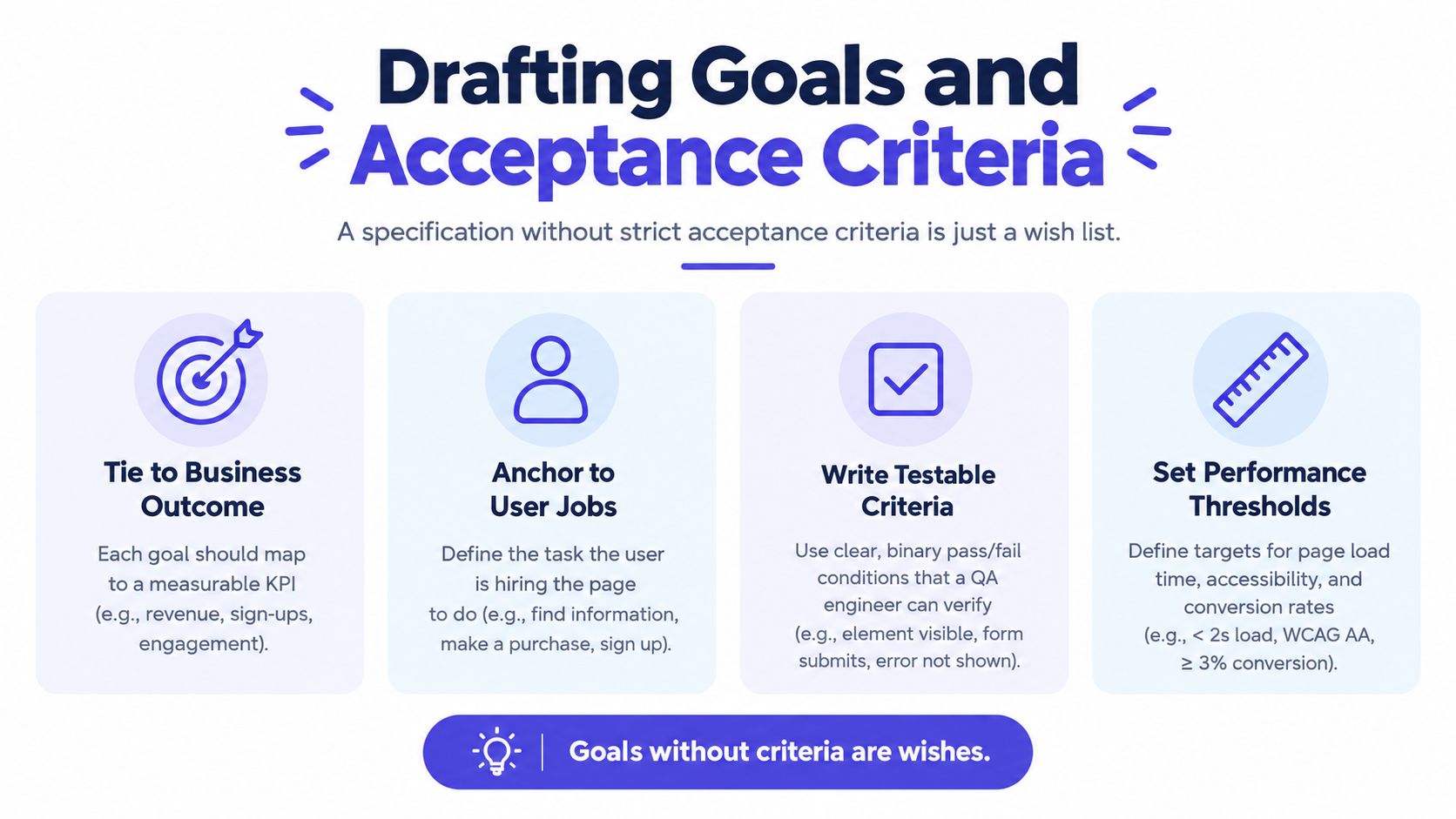
A web page spec earns its place when it can be executed and tested, not when it presents a polished collection of screens. Goals explain why the page exists. Acceptance criteria turn that intent into an executable contract, including the behavior, failure handling, performance expectations, and interaction details that design files often leave open.
Start with the user's job and connect it to a business outcome. “Add a polished account panel” describes an appearance, not a result. A stronger goal states that an authenticated user can review account details and find the next relevant action without leaving the page. It identifies the user, task, and intended outcome while leaving room for engineering to choose an appropriate implementation.
Turn intent into observable behavior
Write criteria that QA can verify without interpreting design intent. “The form should be easy to use” cannot pass or fail consistently. “When a required field is submitted empty, the page keeps entered values, identifies the field, displays an understandable error, and associates that error with the input” gives design, engineering, and QA the same target.
A useful criterion records five details:
- Context: Which state or user action starts the behavior?
- Action: What does the user or system do?
- Visible result: What changes on screen?
- System result: What data, navigation, or request changes?
- Failure behavior: What happens if the operation cannot complete?
For an expandable FAQ, specify that the closed item exposes its question, keyboard users can activate it, the expanded answer appears in reading order, and opening one item does not close another unless that behavior is intentional. For a search field, define the response to an empty query, no matches, a slow response, a failed request, and repeated submission. Include interaction-level accessibility requirements in the same contract, such as focus behavior, error association, keyboard access, and status announcements.
Teams can use this definition of acceptance criteria to establish shared terminology. Keep each criterion narrow enough to pass or fail independently. If one sentence covers several unrelated behaviors, split it before implementation begins.
Record states before approval
Missing states create more implementation friction than missing colors. Add a state matrix while the component is still being reviewed, and require a decision for each row:
| State | Required decision |
|---|---|
| Initial | What appears before data or interaction exists? |
| Loading | Which region changes, and can the user still act? |
| Success | What confirms completion, and where does the user go next? |
| Empty | What appears when valid data contains no items? |
| Error | What can the user do next, and what information is preserved? |
| Partial | What happens when some content loads and some fails? |
| Responsive | Which content reflows, collapses, or changes priority? |
Use direct language for edge cases. “Handle errors gracefully” starts another discussion. “If the payment request times out, keep the form values, prevent duplicate submission while the request is pending, show an inline recovery message, and expose a retry action” gives engineering and QA a concrete contract.
Traceability keeps that contract reliable as requirements change. A practical explanation of how AuricIDE handles traceability shows how teams can connect requirements with decisions, implementation work, and verification evidence. That connection helps reveal when a changed headline, API field, interaction rule, or acceptance test invalidates downstream work.
Finish by recording explicit non-goals. If the first release excludes saved searches, bulk actions, or personalized recommendations, state that in the spec. Scope boundaries keep plausible enhancements from silently becoming part of the current contract. They also give reviewers a clear basis for rejecting work that does not support the agreed page goal.
Setting Realistic Performance Budgets
Responsive breakpoints describe where a layout changes. They don't describe whether the page remains usable while it changes. A page can match every approved viewport and still delay its main content with a large hero video, block interaction behind a JavaScript bundle, or shift controls as fonts and images arrive.
Set performance limits while design decisions are still flexible. The page spec should connect each expensive visual choice to a measurable cost and a fallback. A hero video might require a poster image and a static mobile treatment. A custom font might load after the primary content, with a compatible fallback that avoids layout movement. An animated component might respect reduced-motion preferences and avoid delaying the first meaningful interaction.
The Core Web Vitals benchmark data gives teams a concrete basis for these limits. A rigorous specification should evaluate Largest Contentful Paint, Interaction to Next Paint, and Cumulative Layout Shift at the 75th percentile of real-user visits over a rolling 28-day period, then reproduce failures in a throttled mobile lab profile. The recommended good limits are LCP at or below 2.5 seconds, INP at or below 200 milliseconds, and CLS at or below 0.1. An origin passes only when at least 75% of visits meet all three thresholds.
In 2025 CrUX-derived benchmarks, only about 48% of mobile origins and 56% of desktop origins passed all three metrics, while only about 62% of mobile origins achieved good LCP, as reported in the same benchmark source. These figures make the trade-off clear. “We'll optimize it later” means accepting the production behavior that many teams already fail to control.
Core Web Vitals Performance Budgets
| Metric | Target Limit | Design Constraint |
|---|---|---|
| Largest Contentful Paint | ≤ 2.5 seconds | Keep the primary content discoverable early. Optimize hero media, server response, image sizing, and font loading. |
| Interaction to Next Paint | ≤ 200 milliseconds | Limit main-thread JavaScript and avoid expensive event handlers, animations, and layout recalculation. |
| Cumulative Layout Shift | ≤ 0.1 | Reserve space for images, embeds, and fonts. Don't insert late content above what the user is reading. |
The table provides release targets, not a complete performance plan. Add budgets for HTML, JavaScript, images, fonts, and third-party scripts at the template level. A product page with interactive configuration needs a different budget from an editorial page, but both need a clear ceiling and an owner.
Test the experience users actually receive
Field data tells you how the page behaves across devices, connections, locations, and real journeys. Lab tests help reproduce a failure consistently. Use both. A Lighthouse score alone can't reveal whether a slow-tail group regularly misses the field threshold, and an average can hide that distribution.
Instrument the page by URL template and device class. When a metric fails, identify the limiting stage instead of assigning “performance” as a general engineering task. LCP problems may involve server response, resource discovery, image selection, or render-blocking work. INP problems may come from event handling or main-thread execution. CLS problems often trace back to missing dimensions or late-loading content.
A useful spec makes a trade-off visible before launch: “The autoplay hero video is removed from the mobile experience because the page must preserve the LCP budget.” That's better product work than shipping the video and asking engineers to recover the lost time after the design has become politically untouchable.
Defining Interaction-Level Accessibility
A page can match its design perfectly and still fail the task it was built to support. Semantic HTML and color contrast matter, but accessibility is proven through operation: whether people can understand the structure, control the interface, recover from errors, and complete the primary job with the tools and settings they use.
WCAG 1.0 established accessibility as a formal web requirement in 1999, with 14 guidelines and 65 checkpoints assigned Priority 1, 2, or 3, according to the historical accessibility overview from Be Accessible. The same source describes a United Nations-commissioned survey reported in 2006 that assessed 100 home pages across 20 countries. Only three pages satisfied all Priority 1 checkpoints, while 93% lacked adequate text descriptions for graphical content.
Those findings point to a specification problem that still appears in product work. Teams often approve a rendered page because it resembles the design. Users encounter something different: missing structure, unclear control states, broken keyboard paths, and interface changes that discard meaning when visual presentation changes.
Write an executable interaction contract
Start with the task and its failure states. For a modal, “use an accessible dialog” is not an acceptance criterion. Specify that focus moves into the dialog, stays contained while it is open, returns to the triggering control after closure, and exposes the dialog's name and purpose. Define the announcement for both successful and failed save operations.
Attach the conditions to each component or journey:
- Keyboard completion: A keyboard-only user completes the primary task without hidden controls or a keyboard trap.
- Focus behavior: Focus remains visible, follows a logical order, and is preserved when the interface updates.
- Accessible names: Buttons, links, fields, and custom controls expose their purpose, role, and current state.
- Zoom and reflow: Content remains usable at 200% zoom, without losing information or the ability to operate the page.
- Content alternatives: Meaningful images receive accurate alternatives, while decorative images stay out of the assistive technology output.
- Motion and media: Users can reduce motion, and important audio or video includes suitable text alternatives.
- Dynamic updates: Status messages, validation errors, and changed results are announced without requiring users to search the page.
These criteria turn accessibility from a broad quality statement into something developers can implement and testers can verify. A line such as “the site will meet WCAG” leaves too many decisions unresolved.
Test complete journeys, not isolated controls
Automation belongs in CI, but it cannot establish that a person can finish a task. Automated tools detect only roughly 30–40% of accessibility issues, as summarized in WCAG 2.2 testing guidance. Scan every relevant route, then manually test semantic structure, keyboard behavior, focus order, zoom, screen-reader output, and representative journeys.
Test the states that disappear from static designs: an empty form, an invalid submission, a loading result, a failed request, a populated table, and a dialog reopened after an error. Check whether focus remains useful and whether the status change reaches the person who needs it.
Assign ownership after release. Designers must preserve accessible states as components change. Content teams need checks for replacement images, headings, links, and embedded media. Engineers need regression coverage for fixed defects. Product must decide whether an exception blocks release or receives a documented remediation plan.
An independent 2025 scan reported detectable WCAG failures on 95.9% of the top one million homepages, while another large scan found approximately 297 accessibility issues per page, according to the same testing guidance. Those figures do not establish whether a particular page is usable, but they show why an automated green score cannot define accessibility. A reliable web page spec names the user task, the interaction states, the expected announcements, and the test that proves completion.
The Engineering Handoff Protocol
A file transfer is not an engineering handoff. If the team delivers exports, component names, and a meeting invite without the reasoning behind them, developers spend the first implementation cycle reconstructing decisions instead of building the page.
Treat the handoff as an executable contract. The package should give a human developer or AI coding agent enough context to implement, test, and challenge the page without reopening the entire planning history.
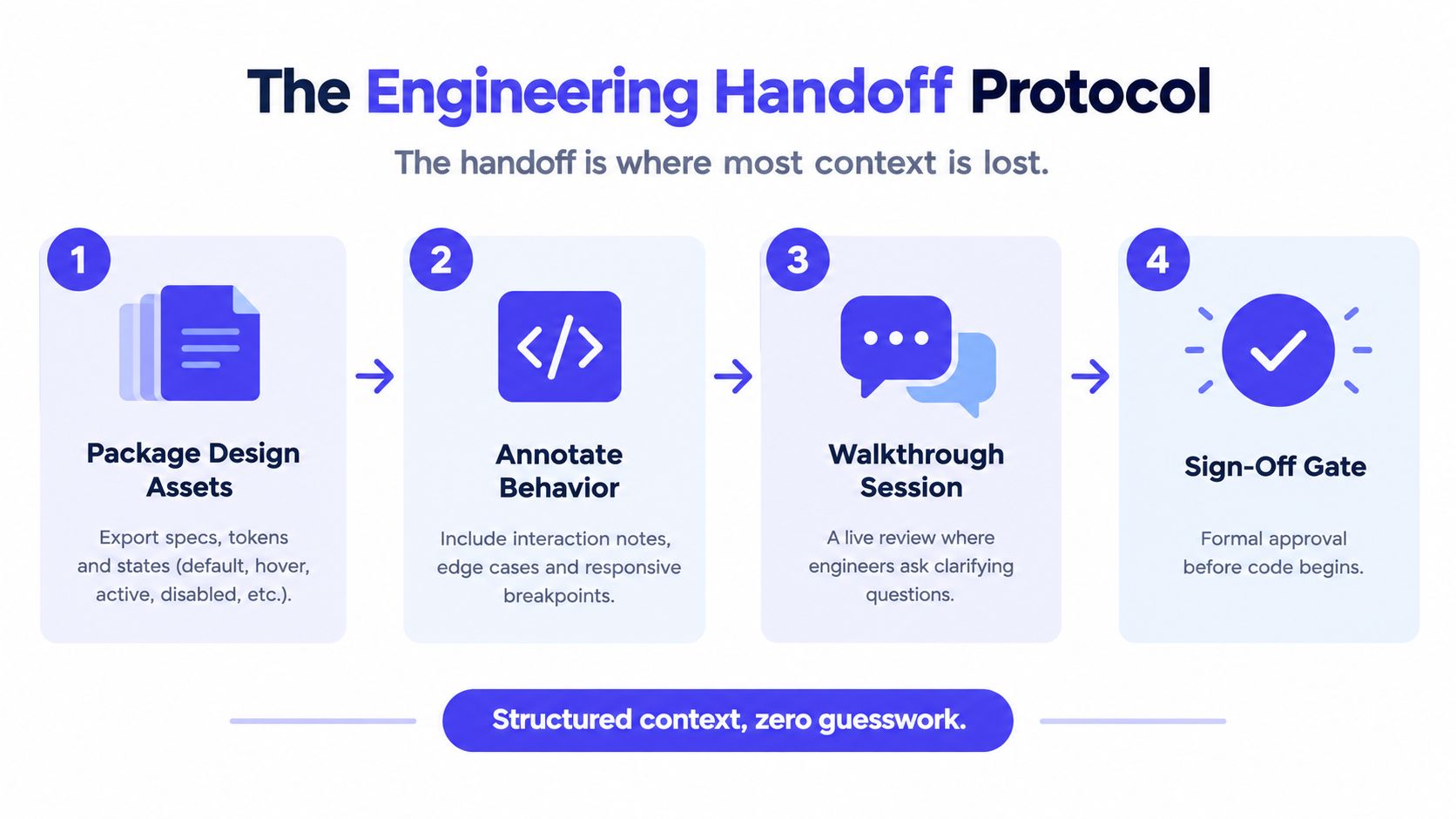
Start with a clear source-of-truth package. Link the canonical design frames, then identify design tokens, component references, content rules, responsive variants, and approved assets. Mark exploratory details so they are not mistaken for requirements. Include the page's performance budget and interaction criteria alongside the visual material, rather than leaving those constraints in a separate conversation.
The package must answer six implementation questions:
- A scope statement: What ships now, and what remains outside the release.
- A route and data map: Which page, endpoint, content source, or fixture supplies each region.
- A component inventory: Which existing components can be reused and which require new work.
- A state matrix: Which visible and interactive states need implementation and testing, including loading, errors, validation, and responsive changes.
- A release checklist: Which performance, accessibility, browser, content, analytics, SEO, and QA gates must pass.
- A decision log: Why material trade-offs were made and who approved them.
Then annotate behavior at the component level. Record triggers, transitions, validation rules, loading treatment, error recovery, keyboard operation, focus expectations, and changes across breakpoints. Tie each item to an acceptance criterion or test. A missing state should be marked as an open question with an owner and a resolution date. Otherwise, the developer has to decide whether the omission is intentional, and that guess can become production behavior.
A short walkthrough should test the contract, not showcase polished design. Product confirms the user job and scope. Design explains hierarchy and responsive intent. Engineering tests feasibility, data assumptions, implementation cost, and performance impact. QA checks whether each criterion can be verified. Record unresolved questions in the document during or immediately after the session.
Teams can review this design-to-development handoff guide for broader process detail. The practical standard is simple: nobody should infer whether an absent state is deliberately excluded.
Infrastructure belongs in the discussion when it changes rendering, caching, or crawlable content. Teams reviewing technical SEO can consult guidance to boost local rankings by UpTime Web Hosting, while keeping the spec tied to the concrete constraints of the page.
Sign-off has four explicit owners. Product confirms scope, design confirms intent, engineering confirms a viable implementation path, and QA confirms testability. If one answer is “not yet,” coding can begin only with a recorded exception, owner, and follow-up action.
Maintaining the Spec as a Living Document
A spec changes as soon as engineers discover an API limitation, a designer finds a better responsive treatment, or QA exposes an unlisted state. Pretending otherwise creates two competing truths: the original document and the code that really exists.
Treat the document as the source of intent, while the repository remains the source of implementation. When the implementation diverges, record whether the difference is an approved change, a temporary workaround, or technical debt. Don't edit the original requirement behind the scenes until nobody can see what changed.
A practical living document workflow keeps four areas visible:
- Decided: Approved behavior and rationale.
- Open: Questions with an owner and a next action.
- Deferred: Valid work intentionally excluded from the current release.
- Known debt: Shortcuts that need follow-up, with the condition that would trigger it.
Use change control without creating bureaucracy
Suppose a landing page begins with a static product image. During implementation, marketing requests a hero video. The team can accept the request, but the spec should show the effect: a new asset dependency, a mobile fallback, a performance review, and updated acceptance criteria for reduced motion and loading behavior.
If the video can't meet the existing budget, product chooses among explicit options. Keep the static image, use video only after the primary content is available, or move the request to a later release. The decision belongs in the document, so the next person doesn't reopen the same debate from scratch.
A similar process handles content changes. If marketing replaces an image, the content owner verifies its alternative text. If a heading changes, QA checks hierarchy and navigation. If a component is reused on another route, the new context gets its own acceptance review rather than inheriting assumptions that may no longer apply.
Close the loop after release
Post-launch review should compare the shipped behavior with the contract. Which criteria passed in production? Which exceptions remained? Did field performance reveal a problem that the lab missed? Did support tickets expose an interaction state the team never specified?
Keep the answers attached to the page or template. Over time, these notes become practical guidance for future specs. They show which components repeatedly create ambiguity, which third-party dependencies consume budget, and which content workflows introduce accessibility regressions.
A well-maintained spec can prevent scope creep without slowing delivery. A team might agree to build a searchable resource page with loading, empty, error, and keyboard criteria already defined. During implementation, QA finds that the API's partial-response state wasn't documented. The team adds that state, assigns the follow-up, and continues without reopening the entire product decision. The first commit remains aligned with the user job because the document absorbs new knowledge instead of hiding it.
SpecStory, Inc. offers a collaborative workspace where product conversations become traceable specifications, decisions, open questions, and code-oriented artifacts that can follow the team into tools such as Cursor and Figma. If your web page specs keep losing context between meetings and implementation, visit SpecStory, Inc. to see how a living plan can connect agreement to the first commit.
Newsletter
Get new posts in your inbox
Bring your team together to build better products. Fresh takes on remote collaboration and AI-driven development.