


Your team probably doesn't feel slow while people are talking. It feels slow the next morning, when everyone leaves a productive meeting with different interpretations of what was decided, where the spec lives, and who's supposed to turn intent into the first working branch.
That's the trap with workflow streamlining. Many teams treat it as a task automation problem. They look for ways to auto-assign tickets, route forms, summarize notes, and push status updates between apps. Those can help. But in seed-stage product work, the bigger drag usually shows up earlier. It sits between a verbal decision and the first commit.
I've seen the same pattern in product trios, founder-led teams, and engineering groups trying to move faster with lean headcount. A feature is discussed in Zoom or Meet. Designs live in Figma. edge cases sit in Slack. the latest scope change is buried in a thread. By the time an engineer starts implementation, they're reconstructing intent from fragments instead of building. That's not a coding bottleneck. It's a context bottleneck.
Table of Contents
- Why Workflow Streamlining Breaks Before Code Starts
- How to Audit Your Current Workflow and Find Bottlenecks
- Designing a Repeatable Meeting to Ship Process
- Automating Handoffs Without Adding More Overhead
- Choosing Tools and Making Context Follow Your Team
- Your Streamlined Workflow in Action and What to Measure Next
Why Workflow Streamlining Breaks Before Code Starts
A lot of teams think they need better execution. What they need is less decision residue.
You can spot it fast. A PM says a feature is ready. A designer thinks one flow is still open. The engineer starts a branch, then pauses because there are three conflicting versions of the empty state. Nobody is blocked by code. They're blocked by unresolved intent.
The lag between agreement and action
For product teams, workflow streamlining should be measured by decision-to-commit velocity. That means asking a blunt question: once the team agrees on what to do, how long does it take before someone can start real implementation without chasing context?
That lag is usually hidden inside ordinary work:
- Meeting notes that don't survive contact with execution
- Slack archaeology to recover decisions
- Specs that explain outputs but not trade-offs
- Ownership that sounds assigned but isn't operational
- Designs linked in one place, open questions in another
This is why “productive” teams still feel like they're spinning. In Lucid's 2025 survey of 2,100+ knowledge workers, the main blockers were tool overload, fragmented processes, and lack of shared visibility, which points to coordination drag rather than simple lack of automation, as summarized in this workflow automation report overview.
Teams rarely stall because nobody worked hard. They stall because the working context fractured before implementation began.
There's another clue in the meeting layer. Neutral industry summaries report that 71% of meetings are viewed as unproductive, and 65% of senior managers say meetings prevent completion of their own work, which matches what product teams feel when calendar time replaces shipping time, according to this review of meeting waste statistics.
What a streamlined workflow actually feels like
A workflow that doesn't feel busy. It feels boring in a good way.
After a planning call, the engineer shouldn't need to ask:
- where the latest decision lives
- which mockup is current
- what's still open
- who signs off on trade-offs
- whether the scope changed in chat
They should be able to move from conversation to branch with minimal translation. That's the practical bar.
If you're trying to tighten that gap, it helps to look at workflow changes through an engineering lens, not a generic productivity lens. This productivity playbook for DevOps leaders is useful because it treats throughput as a systems issue, not a motivation issue. The same logic applies here.
A lot of the lost time also comes from constant attention resets. When decisions are scattered, people keep hopping between chat, docs, task boards, and design files just to rebuild enough certainty to continue. That's why context switching is so expensive in product work. The cost isn't only interruption. It's reloading intent.
How to Audit Your Current Workflow and Find Bottlenecks
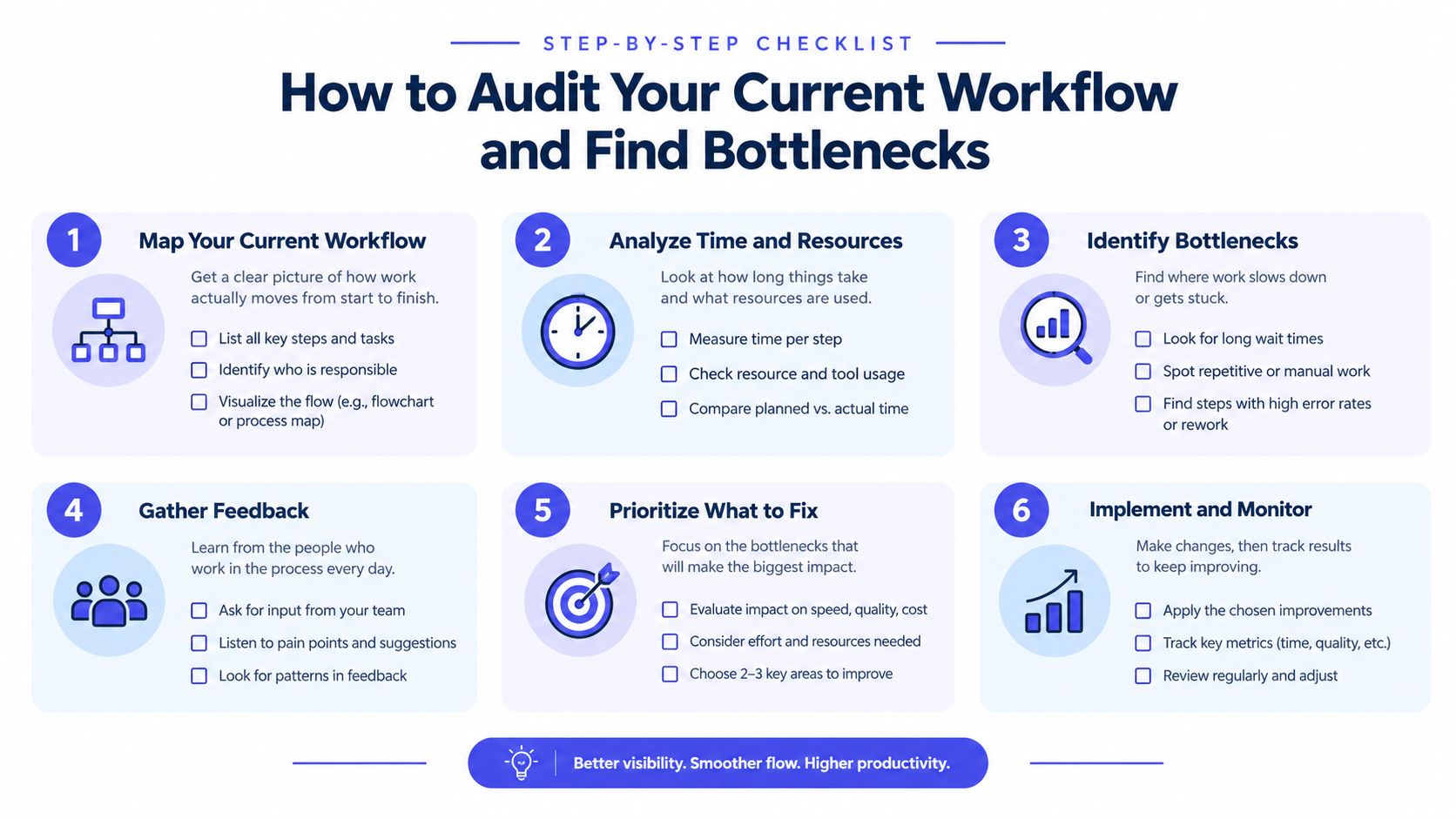
Don't start by buying another tool. Start by tracing one recent feature that looked normal on the surface and felt messy underneath.
Use a feature that crossed product, design, and engineering. Not a tiny bug fix, and not a months-long initiative. You want something representative enough to expose handoffs.
Trace one feature from idea to first commit
Run a lightweight audit in one afternoon. Pull calendar invites, the PRD or brief, Slack threads, task history, and the first commit or branch creation. Capture four timestamps:
-
Intent formed
When someone first proposed the work seriously enough that it entered team discussion. -
Decision made
When the team agreed to proceed with a defined direction. -
Work became executable
When an engineer had enough context to start without another clarification loop. -
First commit landed
When implementation started.
That gap between the second and third timestamp is where many teams discover their real slowdown. It's Intent Lead Time. If that interval is long, your workflow isn't blocked by coding speed. It's blocked by translation.
Score the handoffs, not just the tasks
Most audits fail because they only count tasks. Count handoffs instead.
For each handoff, note:
-
Where it happened
Meeting, Slack thread, ticket comment, PRD edit, Figma comment, voice note. -
What changed hands
Decision, requirement, approval, design state, dependency, unanswered question. -
Whether context survived
Did the receiver get enough information to act without backtracking? -
What had to be rediscovered
Scope, rationale, owner, edge case, status, latest version.
A simple way to score handoff quality is green, yellow, red.
- Green means the next person could act immediately.
- Yellow means they could act, but had to verify something first.
- Red means work stalled until someone reconstructed missing context.
This is also where cross-tool visibility problems become obvious. A lot of “workflow streamlining” projects focus on replacing manual effort, but many teams are suffering from scattered state. If you want a useful companion framework, this guide on bottleneck identification is a solid reference for separating true capacity limits from process confusion.
Use a compact KPI set
Keep the baseline small. You need enough signal to improve, not a dashboard graveyard.
Track:
- Cycle time for the feature slice you audited
- Decision latency between discussion and clear commitment
- Handoff quality across the path from meeting to implementation
- Reopen loops where people had to revisit already-discussed questions
Research on workflow streamlining consistently points to reclaimed time from repetitive work. One summary reports 94% of workers spend at least two hours each day on repetitive tasks and estimates repetitive work can consume about 25% of the work week, with productivity gains often landing in the 25% to 30% range after implementation and cycle times often falling by 30% to 70% in automated processes, based on this roundup of workflow efficiency statistics. The key point for product teams is that those gains only matter if you're fixing the right bottleneck.
Here's a walkthrough worth skimming before you map fixes. It stays grounded in practical process cleanup, not abstract optimization.
If you want an outside perspective on simplification patterns before automating anything, this write-up on how to optimize workflows with MakeAutomation is useful because it frames streamlining as reducing friction between steps, not merely adding automations.
Designing a Repeatable Meeting to Ship Process
If the audit shows that work gets fuzzy after meetings, don't solve it with better note-taking. Solve it with a better output format.
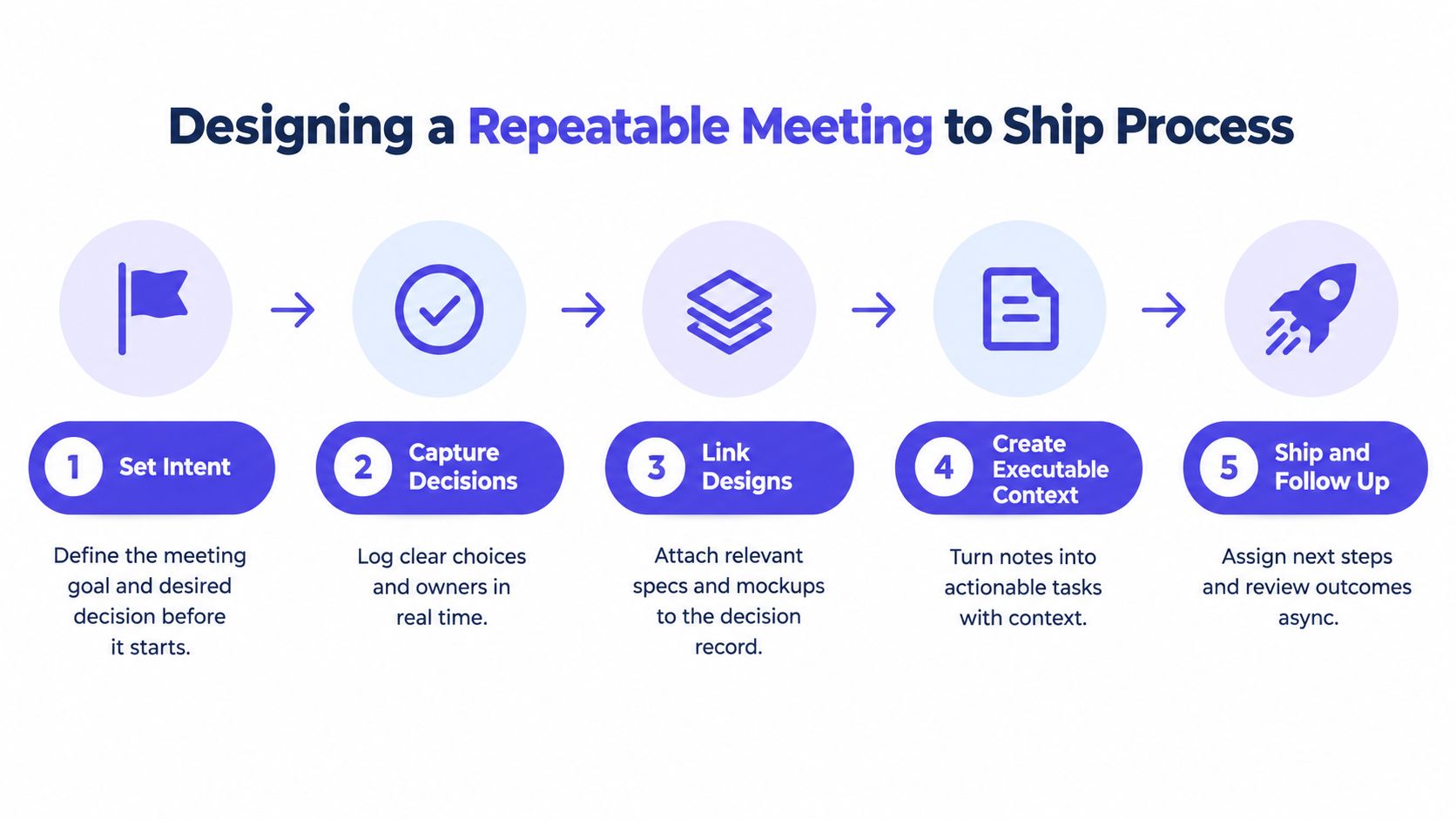
A useful meeting-to-ship process turns live conversation into executable context before anyone leaves the room. That means the team captures decisions, scope edges, owners, and unresolved questions while they're still fresh, not later when someone is rewriting memory into a doc.
Structure the meeting around intent
Most recurring product meetings fail because they mix exploration, decision-making, and status review into one blob. Split those modes.
A shipping-oriented working session needs five things:
- a clear decision the group is trying to make
- the relevant design or product artifact open during discussion
- explicit trade-offs captured live
- owners attached to next actions
- unresolved questions parked somewhere visible
The goal isn't more ceremony. It's less aftercare.
Capture decisions in a way engineering can use
A lot of teams leave meetings with “good notes” that are useless to the person implementing. Notes often describe what people said. Engineers need to know what survived the discussion.
Use a lightweight record with these fields:
- Decision
- Why this path won
- What's in scope now
- What's explicitly out
- Owner
- Open questions
- Linked designs or docs
- Definition of ready
That last one matters. “Ready” shouldn't mean people are tired of discussing it. It should mean the engineer can start without another sync to recover intent.
Practical rule: If implementation still depends on someone remembering what the room meant, the workflow is not streamlined yet.
A consistent planning habit gives teams an advantage. A method like rapid planning works because it compresses planning into a structure the team can execute against, instead of generating another planning artifact that goes stale.
Make unresolved questions resurface at the right time
Trying to answer everything live is a mistake. It slows the meeting and muddies ownership. Good workflow streamlining doesn't eliminate open questions. It makes them traceable and timed.
Here's the pattern that works in small product teams:
- Resolve now for decisions that block implementation start
- Defer with owner for issues that can be answered asynchronously
- Escalate fast for cross-functional questions with real product risk
- Ignore for now when the uncertainty doesn't affect the current slice
What doesn't work is vague parking lots. If a question matters, attach a name, a trigger, and a re-entry point. “We'll revisit later” is often where throughput goes to die.
A working example
Say a founder, designer, and engineer are reviewing onboarding changes. During the session, they decide to simplify the first-run experience, postpone role-based branching, and ship only one success path. The designer links the active Figma frame. The PM writes the exact acceptance conditions. The engineer flags one API dependency and one analytics event still open.
That's enough to start, if the output survives the meeting. It isn't enough if the decisions are scattered across a doc, a whiteboard screenshot, and a Slack recap.
The strongest meeting-to-ship process produces a living plan. It doesn't force the team to duplicate everything into a second system before work can begin.
Automating Handoffs Without Adding More Overhead
Automation is useful. Extra orchestration isn't always useful.
A lot of workflow streamlining efforts fail because teams automate a messy handoff instead of fixing why the handoff is messy. If ownership is unclear, adding triggers and bots just makes ambiguity move faster.
Start with the handoffs that are deterministic
Automate the steps that follow clear rules and stable inputs. Simplify the ones that depend on judgment, interpretation, or changing context.
The benchmark case for automation is repetitive operational work. A widely cited summary says automation can save the average company about $46,000 per year, and McKinsey has estimated that 60% of employees could save 30% of their time with workflow automation. The same summary also notes 32% of companies reported fewer human errors after adoption, which is why automation can improve both efficiency and accuracy when applied to the right tasks, as compiled in these workflow automation statistics.
That doesn't mean every handoff should be automated. It means you should be selective.
Automate or Simplify Decision Matrix
| Handoff Type | Automate When | Simplify Instead |
|---|---|---|
| Ticket creation from approved request | Inputs are structured and required fields are stable | Approval criteria keep changing |
| Status sync between tools | The state model is consistent across both systems | Teams use status labels inconsistently |
| Design review routing | Review stages and owners are predictable | Decisions still happen informally in chat |
| QA handoff | Entry criteria are explicit and repeatable | Test scope changes case by case |
| Customer feedback triage | Tags and categories are well-defined | Feedback requires product judgment before routing |
| PRD to engineering task generation | Output format is standardized and reviewed | The spec still leaves major implementation gaps |
Measure reliability, not just speed
If you do automate a handoff, baseline it first. Measure the current execution time, failure rate, and the kinds of exceptions humans handle manually.
One arXiv study on n8n reported manual execution averaging 185.35 seconds versus 1.23 seconds when automated, a roughly 151× reduction, with observed error rate dropping from 5% in manual runs to 0% across 25 automated executions, in this n8n workflow automation study. That result is a strong reminder to compare identical runs under the same conditions. It's also a reminder not to overgeneralize from a small sample.
Fast automation that breaks on edge cases is just deferred manual work.
A good implementation review asks:
- What happens when fields are missing?
- What happens when the linked artifact changed format?
- Who notices failures?
- Can the team recover without silent data loss?
Where overhead sneaks in
The common failure mode is adding a workflow layer that requires its own maintenance, vocabulary, permissions, and monitoring. Teams then spend time tending the automation system instead of reducing coordination drag.
One practical filter helps. If the handoff exists because information is hard to see, fix visibility first. If the handoff exists because people keep doing the same deterministic step, automate it.
For teams evaluating tooling options in that middle ground, this overview of no-code tools includes a useful angle on a privacy-first automation platform. That matters when streamlining touches internal product context and customer data.
Choosing Tools and Making Context Follow Your Team
Tool choice matters less than teams think. Tool boundaries matter more.
When workflow streamlining works, context moves with the work. A decision made in a meeting should still be visible when someone is editing a PRD, refining a Figma flow, or opening a code assistant later that day. If context has to be manually recopied at each stage, the stack is fighting the team.
Pick tools that preserve traceability

The best stack for a small product team usually isn't the one with the most features. It's the one with the fewest translation steps between conversation and execution.
When evaluating tools, check for:
-
Decision traceability
Can you tell which discussion produced the current plan? -
Artifact continuity
Do meeting outputs connect cleanly to specs, mockups, tasks, and code? -
Local workflow fit
Can engineers stay in their editor, terminal, or existing review flow? -
Async survivability
Can someone who missed the meeting recover quickly without asking for a recap? -
Low adoption burden
Does the tool demand a new operating system for the team, or just remove friction from the current one?
A workflow tool earns its place when it reduces reconstruction work. If it creates another place to check, it probably isn't streamlining anything.
Avoid seat-heavy coordination tax
Small teams often overbuy software because they want certainty. They end up with a notes tool, a whiteboard tool, a PM tool, an automation tool, and two AI layers trying to summarize all of it. The result is more abstraction and less clarity.
In practice, lean teams tend to adopt better when the stack:
- keeps files portable
- works with existing tools like Cursor and Figma
- doesn't require everyone to live in one web app all day
- makes guest collaboration easy
- prices usage in a way that matches actual work patterns
That's one reason local-first and file-based workflows are attractive in product and engineering environments. They let context travel without turning the tool into a gatekeeper.
One practical stack pattern
A workable pattern looks like this: live discussion happens in a shared workspace, the outputs become Markdown or linked artifacts, designs stay attached to the decisions that shaped them, and implementation context follows engineers into their editor instead of stopping at the meeting layer.
One option in that category is Stoa by SpecStory, Inc. It's a multiplayer workspace for product teams that captures intent, decisions, designs, and open questions during live collaboration, drafts Markdown PRDs, supports shared sandboxes for code, and syncs context into tools like Cursor and Figma through local-first files and CLI. That's useful when the problem isn't missing another meeting summary. It's keeping executable context intact across tools.
The exact toolset matters less than the operating principle. Pick systems that make context portable, visible, and hard to lose.
Your Streamlined Workflow in Action and What to Measure Next
Workflow streamlining sticks when teams treat it as an operating habit, not a cleanup sprint.
The useful shift is simple. Stop asking, “What can we automate?” first. Ask, “Where does intent become fuzzy before implementation begins?” That question usually exposes the delays that feel like engineering slowness but are really decision lag, weak handoffs, and broken visibility.
A 30-day reset that actually works
In the first week, audit one recently shipped feature and map the gap between decision and executable work. Don't debate your whole operating system. Just inspect one path closely enough to see where context fell apart.
In the second week, standardize one meeting type that regularly feeds engineering work. Capture decisions live, define ready clearly, and make unresolved questions visible with owners attached.
In the third week, pick one high-friction handoff and decide whether it needs automation or simplification. Validate it across enough runs to catch exceptions, not just happy-path speed.
What to keep measuring
Use a short loop:
- Decision latency so you can see whether agreements are becoming executable
- Handoff quality so you know where context still degrades
- Cycle time so improvements show up in real delivery
- Rework caused by missing context so the team can distinguish coding defects from process defects
The deeper lesson from operational benchmarking is that teams don't judge success only by isolated time savings. In a 2025 report based on 816 accounting firms, workflow inefficiencies remained a top challenge, 53.8% spent over 5 hours per week scheduling and assigning work before automation, and 75.8% reduced that to 5 hours or less after automation. But the report also found that firms judged success by whether systems and processes ran smoothly, not just by time saved, according to these findings on workflow pain points and practice.
That's the right bar for product teams too. Smoother execution beats isolated efficiency wins. Remove the meeting, tool, or automation when it no longer improves throughput.
If your team keeps losing momentum between discussion and implementation, SpecStory, Inc. builds for that exact gap. Their product, Stoa, helps product teams turn live conversations into executable context that follows the work into specs, design, and code instead of getting lost in recap docs and chat threads. Visit SpecStory, Inc. to see how that workflow looks in practice.
Newsletter
Get new posts in your inbox
Bring your team together to build better products. Fresh takes on remote collaboration and AI-driven development.