


Your project got approved on a Tuesday. By Friday the plan lives in three places: a slide with six boxes and no dates, a thread where someone asked who owns billing and nobody answered, and a doc called "onboarding v3" that hasn't been opened since kickoff. Three weeks later the work is late, and no one can point to the decision that slipped.
That gap between approval and execution is where most launches die. Not from bad engineering, but from a plan that was never a control document: no baseline, no named owner, no gate that has to open before the next phase starts. What follows is the template I'd hand a five to fifteen person team, field by field, with the parts generic templates leave out, including how to validate work an agent wrote and what to do when the numbers disagree with the plan.
Table of Contents
- Copy This Implementation Plan Template and Its Core Fields
- How to Fill In Each Section in Five Steps
- Assign Owners and Decision Rights That Hold Up
- Tailor the Stage Gates to Your Team Size
- Add an AI Validation Layer for Agent-Written Work
- Track Progress and Revise When Metrics Disagree
- Confirm Owners and Gates Before Kickoff
Copy This Implementation Plan Template and Its Core Fields
A Library of Congress implementation plan template treats deployment as a managed lifecycle. It requires a system overview, the major implementation tasks, supporting resources such as hardware, software, facilities, materials and personnel, site-specific requirements, and a chronological activity schedule with start and end dates. The system is installed, transitioned into operation, and checked before anyone calls it live.
A product team can run the same idea with six fields. The table below is the template. Each row is a field, what belongs in it, and a realistic entry from a 2026 SaaS onboarding launch, with dates relative to kickoff week rather than fixed calendar days.
| Field | What to write | Example entry |
|---|---|---|
| Objective and scope | The outcome, in-scope items and out-of-scope items | Cut trial-to-paid drop-off by 10% in one quarter; billing redesign excluded |
| Baseline and target | The measured current state and the target with a date | Setup takes 3 days today; target is same-day setup by end of quarter |
| Workstreams | Each track of work with its milestone dates | Onboarding flow (week 2), billing sync (week 4), support docs (week 5) |
| Owners and resources | One named owner per workstream, plus people, budget and tools | Priya owns billing sync; two engineers; Stripe sandbox access |
| Dependencies and risks | Blockers with probability, impact, owner, trigger and mitigation | Legal review of data terms; trigger if not signed by week 3 |
| Launch criteria | The evidence required before rollout | 95% of test accounts finish setup without support contact |
I keep the document short enough that a lead still reads it after the first week. Once it grows past that, people cite the file without opening it, and an unread plan is worse than none because it gives false confidence. Named owners and launch criteria make the table a control document: a gate has to open before the next phase starts, and a later AI check can test whether agent-written work still matches those criteria.
When the deploy step is the risky part, the production deployment plan template covers release sequencing, rollback and environment checks that this table only summarizes.
Copy the table into a document now and fill in two rows: objective and baseline. Those two decide every other field, because a target without a measured starting point is an opinion later.
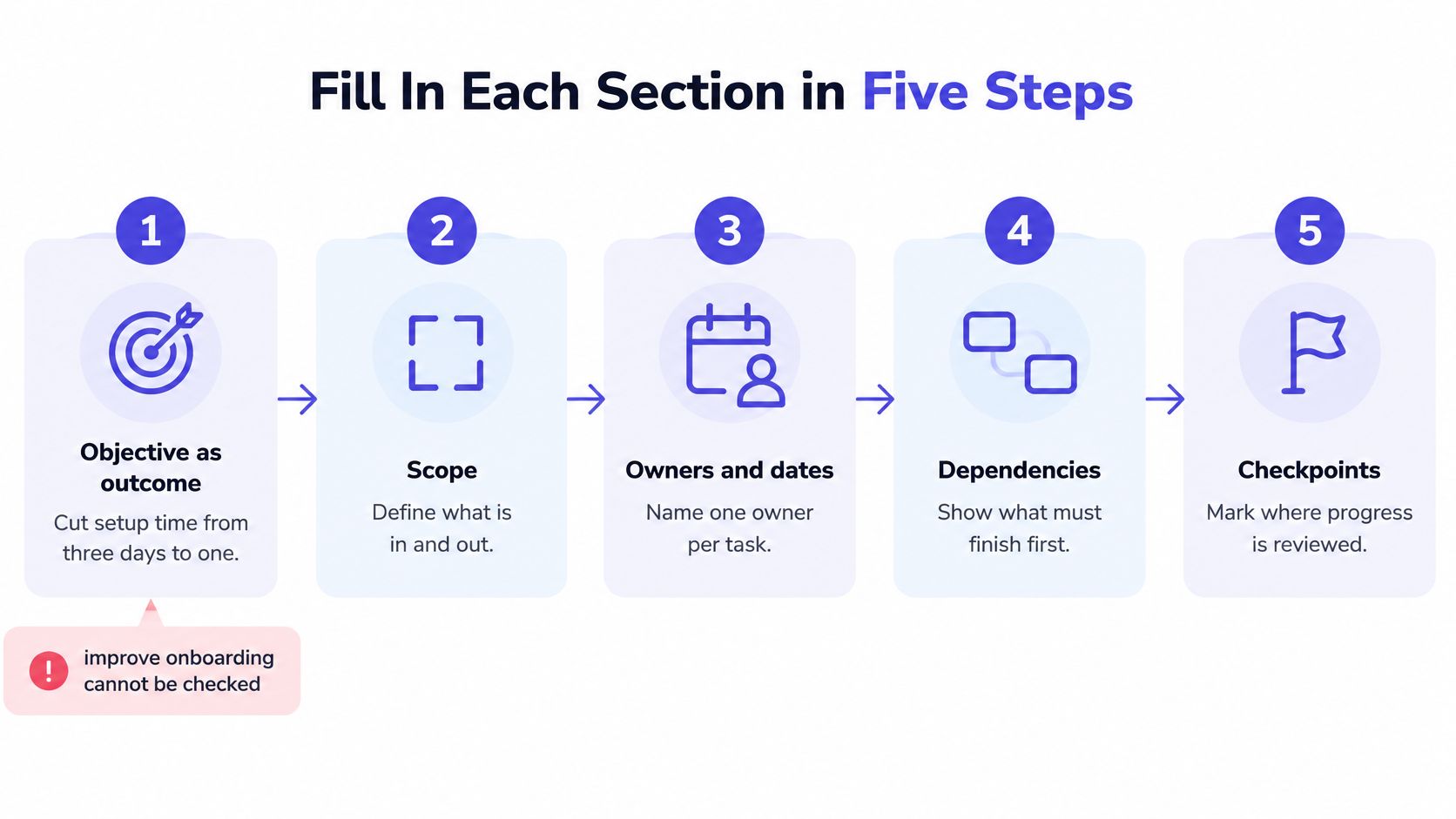
How to Fill In Each Section in Five Steps
You can finish a first draft in one sitting. The order matters, because each step constrains the next.
- Write the objective as an outcome. "Improve onboarding" cannot be checked. "Cut setup time from three days to one" can. If you can't name the number and the date, you don't have an objective yet.
- Record the baseline with a measured value. Pull it from your analytics or your support tickets, not from memory, and write the target date beside it.
- Split the work into three to five workstreams. Give each one milestone dates, and cut anything that doesn't move the objective. A sixth workstream is usually scope creep wearing a lanyard.
- Convert each risk into an if-then rule. Not "legal review might slip", but the specific format below.
- Attach resources and acceptance criteria. Then mark which items are still open, with an owner and a date on each.
The if-then rule is the one line worth memorizing. Implementation-intention research supports it: a meta-analysis of 94 independent studies found a medium-to-large improvement in goal attainment, with an effect size of d = 0.65.
Copy this pattern: If [observable condition] occurs by [date], then [owner] executes [action] using [resource], and success is verified by [metric].
The common slips are predictable. A launch gets described as a noun ("integration launch") with no testable finish. A risk gets listed without a trigger date, so nobody knows when to act. A workstream gets resources but no acceptance criteria, so "done" becomes whoever complains last. A finished plan looks like this: every workstream has a dated milestone, one name, a trigger and a pass or fail test you could hand to a stranger.
Assign Owners and Decision Rights That Hold Up
Ownership is where plans fail, and the cost is measurable. The PMI 2018 Pulse of the Profession found organizations wasted an average of 9.9% of every dollar on poor project performance, about $2 trillion a year worldwide, and that roughly 52% of projects experienced scope creep. Scope creep is rarely a rogue engineer. It's an unowned boundary.
The rule I'd enforce in one line: one named person per workstream, and the person who does the work is not the person who approves it. A team name owns nothing on a Thursday afternoon.
On a three-person startup that looks like this. The product manager owns scope and writes the out-of-scope list. The lead engineer owns the build and the launch criteria evidence. The founder approves the rollout and can say no. Nobody approves their own work, and nobody signs off on a gate they didn't attend.
Keep a decision log with four columns: decision, owner, date, reason. Later reviewers can then see why a choice was made and whether the assumption behind it still holds. decision rights that make delegation stick earn their keep, because a decision without a named decider gets re-litigated in every meeting.
Open questions follow the same discipline. Every question gets an owner and a deadline before the planning meeting ends. Anything missing either stays flagged as a risk in the plan rather than drifting in a chat thread, which is also the rule in our own Feature Kickoff template. Alignment work like this pairs well with a structured approach to stakeholder alignment, because the people who must agree are the ones who need to see the log.
Run this check in five minutes: list every workstream, confirm a human name sits beside it, then confirm every open question has both an owner and a date. Anything that fails, fix before kickoff.
Tailor the Stage Gates to Your Team Size
Here's the trade-off nobody names. A template built for a 50-person company will bury a team of five in paperwork, but deleting every gate removes the checkpoints that stop a bad launch. The answer is fewer documents and the same gates.
Five gates do the work. Each needs an approver and a written standard for what counts as enough evidence.
| Gate | Who approves | Sufficient evidence |
|---|---|---|
| Agreement on outcomes | Product lead and engineering lead | Signed objective, baseline and target metrics |
| Dependency readiness | Engineering lead | Every blocker has an owner and date; access and sandboxes confirmed |
| Pilot evidence | Product manager | Pilot cohort meets the threshold for two consecutive weeks |
| Rollout decision | Founder or executive sponsor | Launch criteria met and rollback path tested |
| Post-implementation review | Plan owner with the team | Results compared to target at 30 days; lessons logged |

To shrink the template, delete sections for work you don't do (procurement, facilities, formal training programs), and merge the owner and approver roles while the team is under five people. Keep the gates. Short documents with real gates beat long documents with none.
The risk register stays inside the plan, never in a separate spreadsheet nobody opens. Each risk carries probability, impact, owner, trigger, mitigation, contingency and review date. That structure pays: the PMI Project Success report reported an NPSS of 41 for projects with risk monitoring against 14 without it, and 41 versus 20 for projects that defined success criteria upfront.
Overplanning has its own cost. The same report found only 22% of transformation leaders would spend more time planning in retrospect, while 49% would spend more time communicating the change story. Keep gate meetings to 30 minutes and point them at evidence.
For the mechanics of proving a system is ready before you open a gate, deployment readiness covers the checks that belong in the pilot evidence pack.
Add an AI Validation Layer for Agent-Written Work
An agent commits a billing webhook change at 4:10 p.m. The plan still says "owner: engineering," and nobody can name who signs the merge. Generic templates record the task and skip the control.
Google's 2025 DORA research, which surveyed nearly 5,000 technology professionals globally, found 90% use AI at work while 30% report little or no trust in AI-generated code. Adoption is running ahead of confidence. Many developers remain skeptical of AI-generated code, and faster generation without a named check only moves the cost into review and rework.
Put the validation layer in the plan itself, next to the change record, with a named owner and a gate that can block the merge. Paste this checklist:
- Source of the change: which agent, which prompt, which commit.
- Reviewer ownership: a named engineer who owns the affected system, never the person who prompted it.
- Automated tests: the specific suite that must pass, not "tests exist".
- Security and privacy checks: what data the change touches and whether it leaves the boundary.
- Human approval gate: merge blocked until a person signs, with the name recorded.
- Rollback criteria: written before the change ships, with the trigger and the time to revert.
- Problem evidence: proof the change solves the user problem, not just that it compiles.
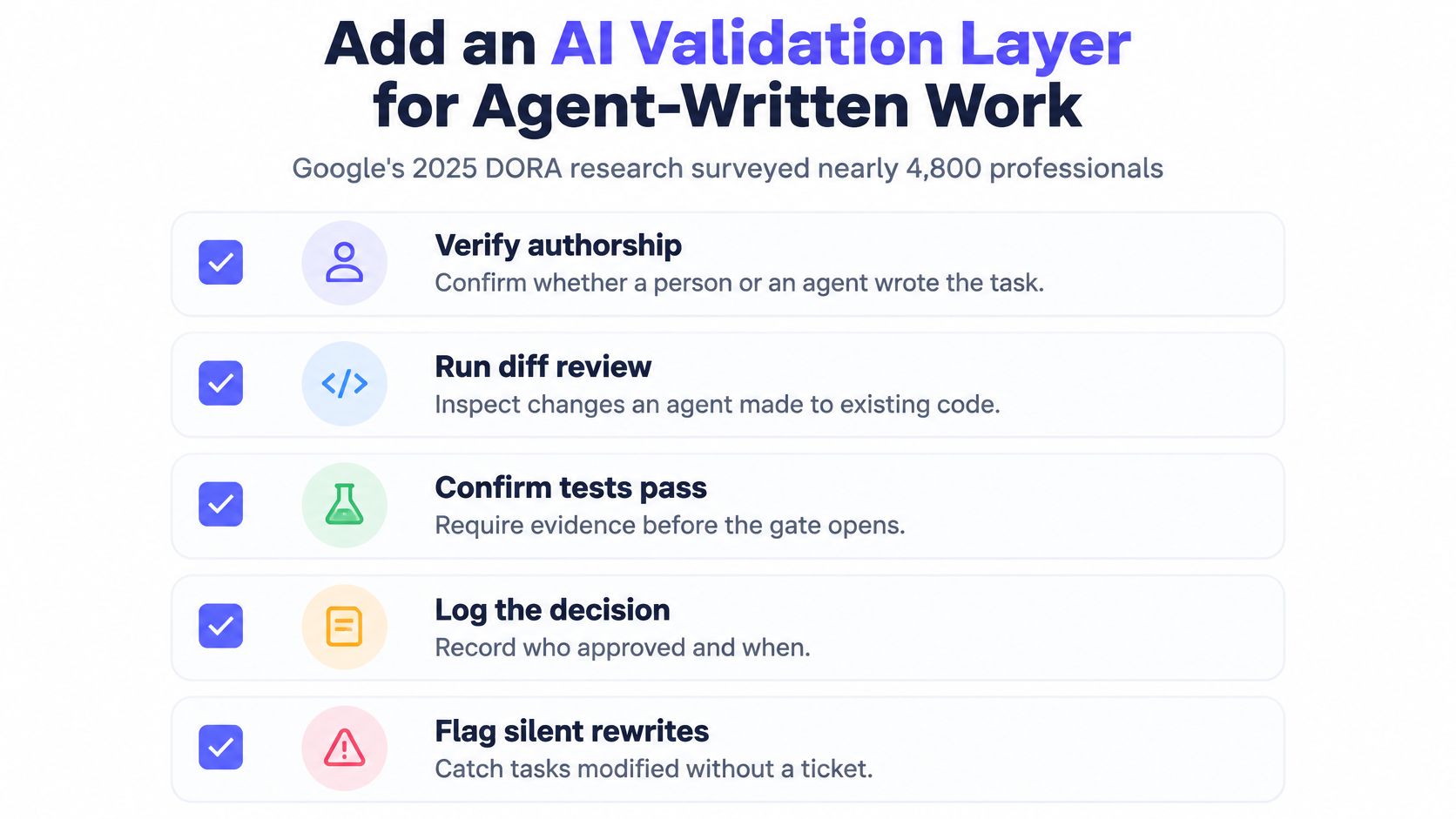
On that billing webhook, the reviewer is the engineer who owns billing. The approval gate blocks merge until the test suite passes and a sandbox refund completes end to end. Rollback is a feature flag switched off within 15 minutes. If data handling changed, an AI code security audit is the right escalation before release rather than after an incident.
I would keep this gate on a three-person team. Speed without a named reviewer and a written rollback becomes rework nobody budgeted. A practical guide to how to test AI-generated code covers the test design side of that gate.
Track Progress and Revise When Metrics Disagree
Activation is flat, every task is closed, and the status board is still green. That is the failure a plan has to catch: shipped work with no movement in the number the work was supposed to change.
Teams now ship faster than they can measure. What usually breaks is the metric itself. Nobody can say whether the change moved the outcome, so the board stays green while the result does not. Put four measure types in the review section so status cannot outrun the data.
| Measure type | Examples | How the review uses it |
|---|---|---|
| Baseline | Measured value before work starts | Denominator for every target in the plan |
| Leading indicator | Decision latency; age of unresolved questions | Weekly 30-minute check to catch slippage early |
| Delivery | Lead time; rework rate | Weekly trend; two weeks of rising rework triggers a revision |
| Outcome | Activation or retention | Monthly review against threshold; a miss for a full cycle triggers a decision |
Run a 30-minute weekly check on leading indicators and a monthly review of outcomes. Timebox both. If a major question stays open, book a follow-up instead of stretching the meeting. The same limit belongs on kickoff: the Feature Kickoff template recommends 60–90 minutes, with a follow-up scheduled when major questions remain unresolved.
I treat a green board against a flat outcome as a failed review. The review records one of three decisions, and each one names an owner and a trigger before the meeting ends:
- Stop the workstream when the outcome is unreachable, for example activation below threshold for a full cycle. The workstream owner writes the stop, and the approver signs it.
- Revise the plan when delivery is fine but friction is rising, such as two consecutive weeks of climbing rework. The owner updates the milestone date in that same review.
- Roll back the release when launch criteria stop being true in production, not when someone feels uneasy. The named approver owns the rollback call.
Map every requirement to an objective, a deliverable, a leading indicator, a lagging outcome, a data source, a frequency, a threshold, a corrective action, and the person who executes it. A missed number then has a named response, not a debate about whether the board looks fine.
Confirm Owners and Gates Before Kickoff
Skip the second template. Run five checks before your first meeting, and fix failures beforehand rather than during it.
- Every workstream has a named owner and a dated milestone.
- The baseline and target are measured numbers, not adjectives.
- Each gate has an approver and written evidence that clears it.
- Each AI-generated change has a reviewer and rollback criteria.
- The first review date sits in the calendar.
A plan that passes is ready for kickoff. One that fails is still a draft, and starting the meeting anyway is how a draft becomes a launch nobody can audit. Circulate the brief ahead of time so owners arrive with answers, and ask each owner to bring the single open question blocking their workstream. Our Feature Kickoff template carries an Open Questions section and an Action Items section for exactly this reason, and it can be opened in Stoa or downloaded for your next project.
Do one thing today: copy the table from the first section into a document and fill in the objective and the baseline for your first workstream. Everything else in the plan exists to make those two lines true.
If you want that plan to be a living artifact instead of a document you rewrite after every call, SpecStory, Inc. builds Stoa: a shared workspace where decisions, open questions and action items get captured as the conversation happens, so the plan is written while you're still talking. Agents can draft the Markdown plan, run code in a shared sandbox and keep every output traceable to the moment the team agreed to it. Visit SpecStory, Inc. to open the Feature Kickoff template, invite your team and walk into kickoff with a plan that already has owners, dates and gates in it.
Older
Code Blocks Markdown: Syntax, Language Tags and Fixes
Newer
10 Collaborative Planning Tools for Small Product Teams
Newsletter
Get new posts in your inbox
Bring your team together to build better products. Fresh takes on remote collaboration and AI-driven development.