


You shipped on Friday, felt good about it on Monday, and by Wednesday you're rebuilding the same feature because two people meant different things by the same sentence. That's the normal week for a lot of small product teams. Nobody skipped the meeting. Nobody ignored the customer. The team just never pinned down, in writing, what was confirmed, what was assumed, and who still owed an answer.
A Product Requirements Document Generator won't fix that on its own. Used well, though, it turns a messy conversation into a draft you can argue with before code exists, and that timing is where the money is.
Table of Contents
- What a PRD Generator Does and Why Early Requirements Matter
- Seven Steps From Meeting to Approved Spec
- Features That Separate Useful Generators From Simple Templates
- Pitfalls That Make Generated PRDs Untrustworthy
- Prompts and Templates to Start This Week
- Run One Past Feature Through the Process Before You Commit
What a PRD Generator Does and Why Early Requirements Matter
Say a five-person team ships an export feature, then spends three weeks on rework because "users can export data" meant a CSV file to the engineer and a formatted PDF report to the person who sold it. The feature worked. It just wasn't the feature anyone had agreed to build, because that agreement never made it past the call.
A product requirements document generator is software that drafts a product requirements document from raw inputs such as a feature brief, meeting notes, a transcript, support tickets, and customer quotes. Think of it as a drafting assistant for an architect. It produces the first set of drawings fast, but a responsible person still checks every line before anyone builds.

What a complete draft holds
A usable PRD isn't long prose. It's a set of distinct parts that a reviewer can check one by one:
- Problem and target users: Who hurts, and what job are they trying to get done.
- Goals and non-goals: What success looks like, and what you're deliberately not building.
- Requirements and acceptance criteria: The behavior you want, plus the test that proves it shipped.
- Open questions and a decision log: What's unresolved, who owns it, and what's already settled.
If your inputs include calls in more than one language, clean text matters before generation starts. A tool that helps you transcribe French speech into text is useful for the same reason a dated English transcript is, because the generator can only work from evidence you can read and cite later.
Why drafting early is the economic argument
The formatting isn't the point. The point is when you catch a mistake. NASA's analysis, cited in the IBM Rational whitepaper on requirements management ROI, sets the cost of correcting a requirements error during the requirements phase at 1 unit, and that same defect gets sharply more expensive in every later phase.
Relative cost of fixing one requirements error by phase
| Phase where the defect is found | Relative correction cost (units) |
|---|---|
| Requirements | 1 |
| Design | 3-8 |
| Build or manufacturing | 7-16 |
| Integration and testing | 21-78 |
| Operations | 29 to more than 1,500 |
That table is the whole case for drafting before the kickoff ends instead of after the sprint starts. For a small team the payoff is concrete. A first draft exists while people can still correct it, so they stop re-arguing settled decisions. A new hire reads the decision log instead of interrupting three colleagues. Handoff to an engineer or a coding agent starts from confirmed text instead of memory.
Run this check this week. List your last three rework items and mark which ones trace back to an assumption nobody wrote down.
I'd bet at least one does. That's the failure a generator should help you prevent, not by writing prettier documents, but by surfacing the unstated assumption while fixing it still costs 1 unit.
Seven Steps From Meeting to Approved Spec
A kickoff can end with a fluent draft and still leave the team arguing the same decision two sprints later. Generation is one part of a pipeline. Extraction, evidence, checks, and approval each do different work. Skip one of them and a polished draft turns into rework, because nobody can show where a requirement came from, who disagreed, or who confirmed the change.
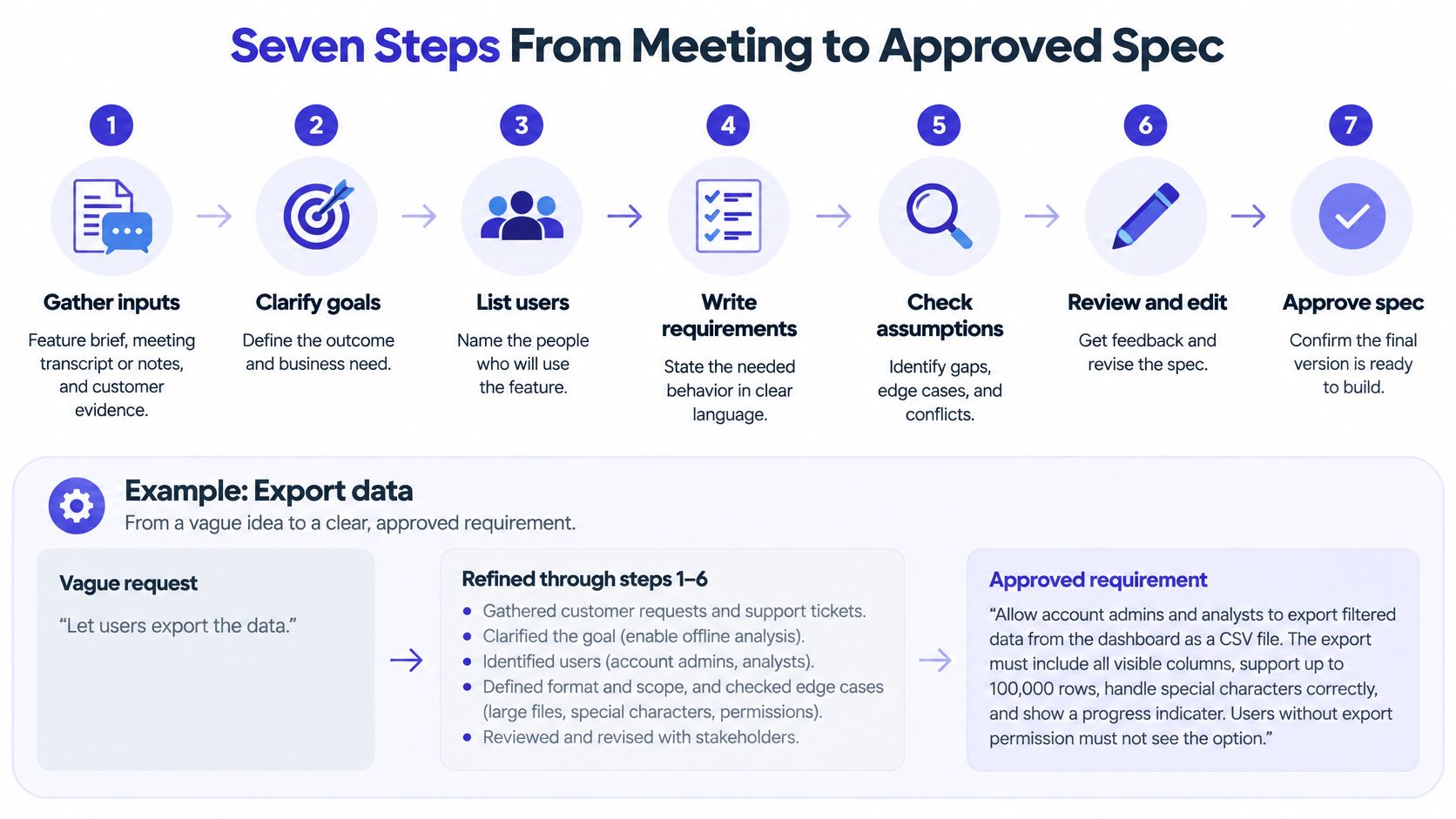
The seven steps
-
Gather inputs before you generate anything. Pull together the feature brief, the meeting transcript or notes, and customer evidence such as quotes, tickets, or recordings. Keep dates and speaker names on each item. A requirement you cannot date or attribute is a requirement you cannot defend when someone challenges it three weeks later. The generator should not have to guess whose opinion it is summarizing.
-
Extract atomic candidate requirements. Split compound statements into one behavior each, so "users can export and share reports" becomes two items. The split feels pedantic until you test the combined version and half of it passes while the other half fails. Atomic items also let a reviewer approve one behavior and reject another without rewriting a paragraph.
-
Attach evidence to every item. Each candidate requirement gets a source: a transcript segment, a customer quote, a support ticket, or a repository constraint that forces the behavior. No evidence means the item is an inference. Label it that way. Do not blend it in with something a customer said.
-
Draft the sections in a fixed order. Problem, target users, goals, non-goals, requirements with stable IDs, acceptance criteria, and open questions. Consistency matters more than the exact sequence. Reviewers learn where to look, and a missing non-goals section shows up in review instead of during implementation.
-
Run quality checks before anyone approves. Look for ambiguous words like "fast" or "simple," statements that carry several behaviors, missing actors, missing conditions, and outcomes nobody could test. Fluent text does not guarantee any of that. A 2026 empirical study of AI-generated requirements generated 900 candidate requirements from 150 feature requests across five open-source repositories and evaluated them against ISO/IEC/IEEE 29148-oriented attributes including unambiguity, verifiability, and singularity. Copy that discipline in your own checks.
-
Route the draft to a named reviewer. That person marks each requirement confirmed, assumed, or rejected, and their name sits next to the decision. "The team reviewed it" leaves no one to ask when a requirement turns out wrong, and no record of the evidence they saw. One named reviewer per requirement area beats a room full of vague agreement. Status changes only after that person confirms them.
-
Export and link to where work happens. Export the approved document as Markdown and link each requirement ID to its issue in your tracker. If the link only lives inside the generator's editor, the first scope change strands engineers between two versions of the truth. The requirements gathering process guide covers how the inputs feed this kind of pipeline.
Practical rule: Separate extraction from validation. Let the model propose candidates freely, then make a second, stricter pass try to break each one.
That separation is what turns a draft into a specification you can audit later. Each requirement should carry structured fields, not just a sentence: actor, trigger, behavior, constraints, measurable result, priority, confidence, and the evidence span it came from. A reviewer can then scan for the gaps prose hides, such as a behavior with no actor or a result with no number.
The walkthrough below shows the same meeting-to-spec flow in motion, including how a live draft changes while people talk.
One worked example with a bulk CSV import
Say a five-person seed-stage team is planning a bulk CSV import because onboarding customers keep emailing spreadsheets to support. The Feature Kickoff template recommends circulating the feature brief or one-pager at least 48 hours before the meeting, so the product lead sends a one-page brief on Monday for a Wednesday kickoff. By the time the call starts, nobody is hearing the problem for the first time, and the generator has the brief plus three support tickets as input.
During the call, a tool such as Stoa drafts a Markdown PRD live and keeps the context as plain files, so the team watches the PRD draft take shape during the call instead of waiting for someone to write up notes afterward. "Users can import contacts" gets split into separate items for uploading a file, mapping columns, previewing validation errors, and confirming the import. One support ticket mentions duplicate email addresses. That quote attaches directly to the requirement about duplicate handling, so the engineer can see why the rule exists.
Two conflicts surface. Sales wants invalid rows skipped so imports never fail in a demo. The engineer wants the whole file rejected so customers fix their data once. A summary tool would keep whichever version was said last. Both readings stay visible as alternatives. The product lead, named as the decider, resolves it after the call by choosing row-level errors with a downloadable error report. The rejected option stays in the decision log with the reason, so nobody reopens it in the next sprint planning session.
The Feature Kickoff template also recommends that every open question has an owner and a deadline before the kickoff meeting ends. Before anyone leaves, the designer owns the question of whether column mapping needs a preview step, due Friday, and the engineer owns the file size limit, due Thursday. Those items sit in the document as open questions, not as quiet assumptions baked into requirements.
Handing off to engineers and coding agents
Handoff works when approved requirements are split into small, independently verifiable slices, each with its own acceptance test, edge cases, and constraints. That shape helps a human engineer. It matters more if a coding agent picks up part of the work. In the Stack Overflow 2025 developer survey, 84% of surveyed developers now use or plan to use AI tools, while 52% either do not use agents or use only simpler AI tools. You are designing for a mixed workflow, not full autonomy.
Agents handle well-defined, repetitive, or scaffolding work best, and their fit drops as complexity rises. Keep business logic with a person. I would give an agent the CSV parser slice with its Given/When/Then scenarios and keep the duplicate-resolution policy with a reviewer. Assistants often miss constraints that live only in a long narrative, so each slice has to carry its own dependencies and unresolved decisions.
A draft you can trust a month later is easy to recognize. Every requirement has an ID, a source, an owner, and a testable criterion. Dissent stays visible until a named person closes it. Every assumption is labeled. Every open question has a name and a date. If the draft cannot pass that description, it is not an approved spec yet, whatever the formatting looks like.
Features That Separate Useful Generators From Simple Templates
Most generators can fill in headings. The difference shows up a month later, when scope changes and you need to know what a requirement was based on, who approved it, and what else breaks if you touch it. Use the checklist below to compare tools on that basis, and score each row against a real feature rather than a demo.
PRD generator features to test before you buy or adopt
| Feature | What good looks like | Red flag |
|---|---|---|
| Source capture | Ingests transcripts, notes and briefs with timestamps and speakers | Accepts only a blank prompt |
| Requirement IDs and links | Stable IDs with derived_from, implemented_by and verified_by links | Prose with no IDs or references |
| Acceptance criteria | Given/When/Then scenarios or measurable thresholds for each requirement | Adjectives such as fast or intuitive |
| Open question tracking | Each question has an owner, a deadline and a status | Questions buried in a footnote |
| Assumption labels | Assumptions are marked separately from confirmed requirements | Every sentence carries the same certainty |
| Version history | Shows what changed between PRD versions and why | Regenerates the whole document each time |
| Human approval | Requirements become approved only after a named reviewer signs off | Publishes automatically |
| Export and sync | Plain Markdown plus links to the issue tracker or repository | Locked in a proprietary editor |
Traceability is the feature that pays for itself
Of everything in that table, traceability does the most work over time. A generator should preserve provenance for every requirement, covering the source conversation or request, the stakeholder, the decision status, the acceptance criteria, the linked design artifact, the implementation task, the test, and any unresolved assumption. That's not bookkeeping for its own sake. It's how an engineer tells an approved requirement apart from an AI inference, and how you run impact analysis when a customer asks for a change mid-build.
There's evidence behind treating this as an engineering control rather than a formatting preference. In an empirical study of traceability in open-source projects, researchers examined 24 medium-to-large open-source projects and found that greater traceability completeness significantly reduced the expected defect rate for three requirements-to-implementation activities. The mechanism is plain. When a requirement changes and its links are explicit, the affected designs, code, and tests surface early instead of showing up as late defects.
A coverage number you can compute today
You don't need special tooling to measure this. Take your last PRD and count what percentage of requirements have all four of these present:
- An identified source: A quote, ticket, or transcript segment you can open.
- An owner: A named person accountable for the requirement being right.
- An acceptance test: A scenario or threshold that can pass or fail.
- An implementation link: The issue or pull request where the work lives.
That percentage is your traceability coverage, and it's a far better quality signal than page count. A short PRD at full coverage beats a thorough narrative where half the statements float free of any source. When you're comparing tools, the broader product specification software comparison is worth reading alongside your own scoring, but run the coverage count on your own documents first.
If you only test two things during a trial, I'd test export and provenance. Export decides whether your requirements survive leaving the tool. Provenance decides whether anyone trusts them while they're still in it. A generator that fails either test is a template with a chat box attached, and you can get that for free.
Pitfalls That Make Generated PRDs Untrustworthy
A polished PRD can be less trustworthy than a messy one. Mess at least looks unfinished, so people ask questions. Polish hides uncertainty behind confident sentences, and the team stops asking until the uncertainty resurfaces as a defect.
Six pitfalls and the fix for each
- Treating fluent prose as validated requirements: Run the ambiguity and testability checks before anyone approves, because a sentence that reads well can still be impossible to test.
- Silent interpretation of a disputed point: When stakeholders disagree, keep both readings visible in the draft instead of letting the generator pick the one it heard most recently.
- Regenerating the whole document after every change: Each full rewrite erases earlier decisions, so keep a dated decision log that regeneration isn't allowed to overwrite.
- Open questions with no owner or deadline: An unassigned question doesn't stay open politely, it comes back as a crisis during implementation, so attach a name and a date to every one.
- Dissent erased in the summary: A generator that averages opinions ends up reflecting the loudest voice, so record who disagreed and why, right next to the decision that went the other way.
- Over-long PRDs that bury what matters: Length is not rigor, and the three requirements that carry the risk shouldn't sit on page nine behind boilerplate nobody reads.
These aren't hypothetical worries about a new tool category. In the Stack Overflow 2025 survey results on AI, only 17% of respondents said AI tools or agents improved team collaboration, the lowest-rated impact, while 87% expressed accuracy concerns and 81% expressed security or privacy concerns. Teams are adopting these tools without trusting them, and a generator that converts ambiguous discussion into false certainty earns that distrust.
Writing better scenarios helps at the edges, and the acceptance criteria definition and examples give you a solid format to copy. But format alone doesn't fix provenance. If a developer can't verify whether a requirement came from user evidence or from the model's inference, well-formed criteria just make the guess look rigorous.
Living documentation is only an improvement if it doesn't silently rewrite its own history.
The pattern I'd adopt instead is an auditable decision ledger with human-confirmed status changes. Requirements move from proposed to confirmed to approved only when a person makes that call, assumptions carry expiration dates so they get revisited, and every version shows what changed and who changed it. The document can still update. It just can't update itself into a different past.
Prompts and Templates to Start This Week
You don't need a new platform to test this approach. You need one prompt that forces structure and honesty, one template skeleton, and the discipline to keep both under version control. Start with the prompt below and paste your brief, notes, or transcript underneath it.
The starter prompt
You are drafting a product requirements document from the notes below. Output these sections in order: problem, target users, goals, non-goals, requirements, acceptance criteria, open questions, decision log. Give each requirement a stable ID and a source reference. Mark each statement as confirmed or assumed. Flag ambiguous words, statements with several behaviors and outcomes without a test. Do not choose between conflicting statements; list both.
That last sentence does the heaviest lifting. Without it, most models will resolve a disagreement by picking the version that appeared last or sounded most confident, and your reviewers will never know a conflict existed. The instruction to mark statements as confirmed or assumed matters for the same reason. It forces the model to admit which parts of the draft came from your evidence and which parts it filled in from pattern matching.
The template skeleton
Keep the skeleton short enough that a reviewer reads it top to bottom in the order decisions were made:
- Header: Feature name, owner, status, and date, so nobody mistakes a draft for an approved spec.
- Problem: Two sentences maximum, naming who hurts and what it costs them today.
- Target user: The specific person and the job they're hiring this feature to do.
- Success metrics: Each metric with a baseline and a target, never a bare aspiration like "improve engagement."
- Non-goals: The adjacent work you're explicitly refusing, which is where scope arguments go to die early.
- Requirement list: Each item with an ID, statement, source, and status on one line.
- Acceptance criteria: Given/When/Then scenarios tied to requirement IDs, so a tester can work without interviewing the author.
- Open questions: Each with an owner and a deadline, treated as blockers rather than decoration.
- Decision log: Date, decision, and decider, including options that were rejected and why.
Two variants worth keeping
For a bug-fix spec, shorten the prompt. Ask for the observed behavior, the expected behavior, reproduction steps from the ticket, the affected requirement ID if one exists, and one acceptance scenario that proves the fix. Skip goals and personas entirely. A bug fix that needs a target user section is usually a feature wearing a disguise.
For a new product area, go longer. Add sections for customer evidence with direct quotes, constraints from the existing system, dependencies on other teams, and risks with the assumption that creates each one. Also ask the model to list what evidence is missing before the requirements can be confirmed, because a new area is exactly where confident invention does the most damage.
Store the prompt and the template in version control beside the code. That way a change to the template gets reviewed like any other file, the whole team generates from the same version, and six months from now you can see exactly which template produced a given PRD. I'd rather debug a template in a pull request than discover three teammates have been using three different prompts with three different ideas of what "confirmed" means.
Run One Past Feature Through the Process Before You Commit
Don't evaluate a generator on a feature you haven't built yet, because you have nothing to check the output against. A past feature gives you ground truth. Here's the test I'd run before adopting any tool or template across a team.
- Pick a feature that caused you issues. Choose something shipped in the last quarter that led to visible rework, and gather whatever brief, notes, or tickets surrounded it at the time.
- Rebuild its PRD from those inputs. Run the prompt and template, then compare the draft line by line with what the team decided and built. Write down what the generator missed and, just as carefully, what it invented.
- Score the draft against the checklist. Every requirement should have an ID and a source, every open question an owner and a deadline, and every acceptance criterion a matching test or review decision.
A tool such as Stoa makes this comparison easier to run live, since Stoa drafts a Markdown PRD live during the meeting and its AI extracts decisions, drafts specs, generates user stories, and flags open questions from the conversation. Stoa also stores session output as files, including decisions.md, prd.md, context.md and meeting-notes.md, so you can check the record against the draft after the call instead of trusting your memory of it.
Then apply the decision rule plainly. If the draft passes the checklist on your next live feature, extend the process to the whole team. If it fails, fix the template and the checks first, because automating a weak process just produces untrustworthy documents faster.
If your team is tired of re-arguing decisions that never made it out of the meeting, try drafting your next PRD live with SpecStory, Inc., where Stoa turns the conversation itself into traceable Markdown requirements, decisions, and open questions before the call ends. Run one feature through it, score the output against the checklist above, and keep it only if every requirement still has a source, an owner, and a test when you're done.
Older
Encryption at Rest: What It Protects and How to Set It Up
Newer
AI Agent Context Management: Practices and Pitfalls
Newsletter
Get new posts in your inbox
Bring your team together to build better products. Fresh takes on remote collaboration and AI-driven development.